Search...Search plugins and themes...
⌘K
Sign in
  • Get started
  • Download
  • Pricing
  • Enterprise
  • Account
  • Obsidian
  • Overview
  • Sync
  • Publish
  • Canvas
  • Mobile
  • Web Clipper
  • CLI
  • Learn
  • Help
  • Developers
  • Changelog
  • About
  • Roadmap
  • Blog
  • Resources
  • System status
  • License overview
  • Terms of service
  • Privacy policy
  • Security
  • Community
  • Plugins
  • Themes
  • Discord
  • Forum / 中文论坛
  • Merch store
  • Brand guidelines
Follow us
DiscordTwitterBlueskyThreadsMastodonYouTubeGitHub
© 2026 Obsidian

Musical Text

tynanpurdytynanpurdy904 downloads

Highlight sentences with color based on their length as you write.

Add to Obsidian
  • Overview
  • Scorecard
  • Updates3

When we write, we often forget text has rhythm. Poetry and music incorporate rhythm inherently as they are performed aloud. Written prose has this same property, but we writers often overlook it. Musical Text visualizes the variety in your sentence length to reveal the rhythm of your prose. Sentences are color coded based on their word count, making it simple to assess the rhythm of whole pages at once.
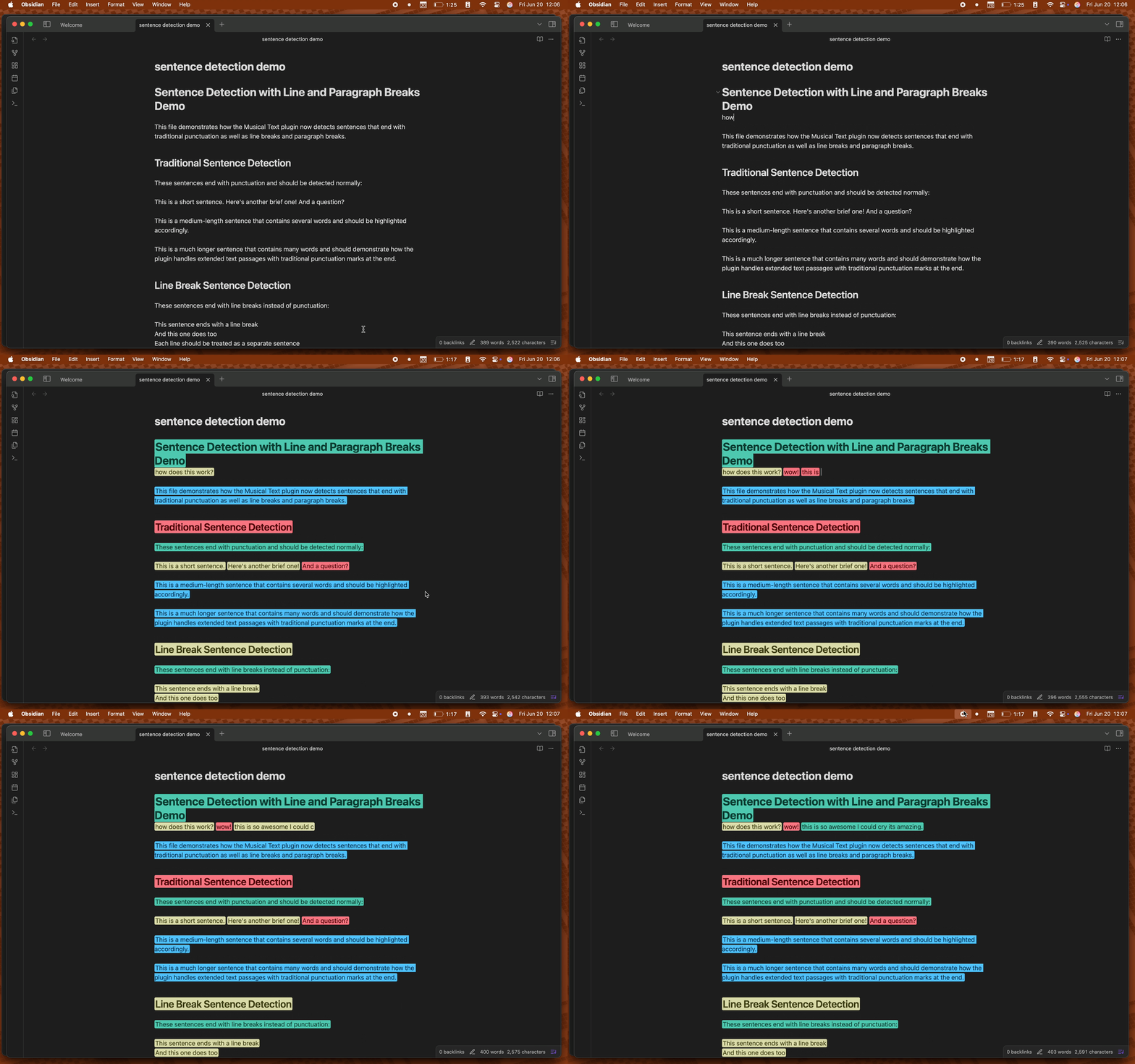
Demo of Musical Text plugin

Features

  • Real-time sentence marking as you type
  • Three visual marking styles:
    • Highlighting
    • Text color
    • Color underlining
  • Automatic contrasting text colors that maintain hue for optimal readability (highlighting mode)
  • Toggle highlighting on/off per editor with status bar button, ribbon, or command
  • Customizable sentence length thresholds
  • Customizable highlight colors

How to Use

  1. Install the plugin from Obsidian's Community Plugins
  2. Enable the plugin in Settings → Community Plugins
  3. Start writing! Sentences will be automatically highlighted based on their length
  4. Toggle highlighting using:
    • The status bar button (sheet music icon)
    • The ribbon button (same icon)
    • The command palette (Cmd/Ctrl + P → "Toggle musical text highlighting")
  5. Start writing! Sentences will be automatically highlighted based on their length

Settings

You can customize the plugin in Settings → Musical Text:

  • Choose a marking style between highlighting, underlining, and text color

  • Hide status bar button

  • Hide ribbon button

  • Sentence Length Thresholds

    • Short: 1 to (medium-1) words via slider (default: 5)
    • Medium: (short+1) to (long-1) words via slider (default: 7)
    • Long: Minimum of (medium+1) words via text input (default: 9)
  • Colors

    • Select a premade palette from several popular code themes
    • Customize colors for each sentence length category

Markdown Support

The plugin intelligently handles markdown syntax:

  • Unordered lists: - item, * item, + item
  • Ordered lists: 1. item, 2. item, 10. item
  • Checkboxes: - [ ] task, - [x] done, - [X] complete
  • Nested lists: Properly handles indented list structures
  • List markers excluded: Only the actual content text is highlighted, not the markers

About

Read about the development process in my blog post.

Support

  • Report issues on GitHub
  • Follow development updates on Bluesky or my blog

License

MIT License - do whatever you want with it

65%
HealthGood
ReviewCaution
About
Visualize the rhythm of your prose by color-coding sentences by word count to reveal short/medium/long patterns across pages. Highlight sentences in real time with three marking styles — highlight, text color, or underline — and automatic contrasting colors for readability.
Writing
Details
Current version
0.2.2
Last updated
11 months ago
Created
Last year
Updates
3 releases
Downloads
904
Compatible with
Obsidian 0.15.0+
Platforms
Desktop, Mobile
License
MIT
Report bugRequest featureReport plugin
Sponsor
Buy Me a Coffee
Author
tynanpurdytynanpurdy
tynanpurdy.com
GitHubtynanpurdy
  1. Community
  2. Plugins
  3. Writing
  4. Musical Text

Related plugins

Longform

Helps you write and edit novels, screenplays, and other long projects.

Text Generator

Generate text content using GPT-3 (OpenAI).

Smart Composer

AI chat with note context, smart writing assistance, and one-click edits for your vault.

LanguageTool Integration

advanced spell/grammar checks with the help of language-tool.

LanguageTool

Unofficial integration of the LanguageTool spell and grammar checker.

Local GPT

Local Ollama and OpenAI-like GPT's assistance for maximum privacy and offline access.

Calendarium

Craft mind-bending fantasy and sci-fi calendars.

Novel word count

Display a word count, page count, creation date, or other statistics for each file, folder and vault in the File Explorer pane.

Keep the Rhythm

Turns out watching your word count go up is all the motivation you need.

Better Word Count

Count the words of selected text in the editor.