Mood Journal
 nyonyataro110 downloads
Quickly log mood, activities, and notes to daily notes.
- Overview
- Scorecard
- Updates10
Mood Journal records a required five-level mood, optional activities, and an optional Markdown note in your normal Obsidian daily note. It is designed for desktop and mobile and stores everything locally.
Screenshots
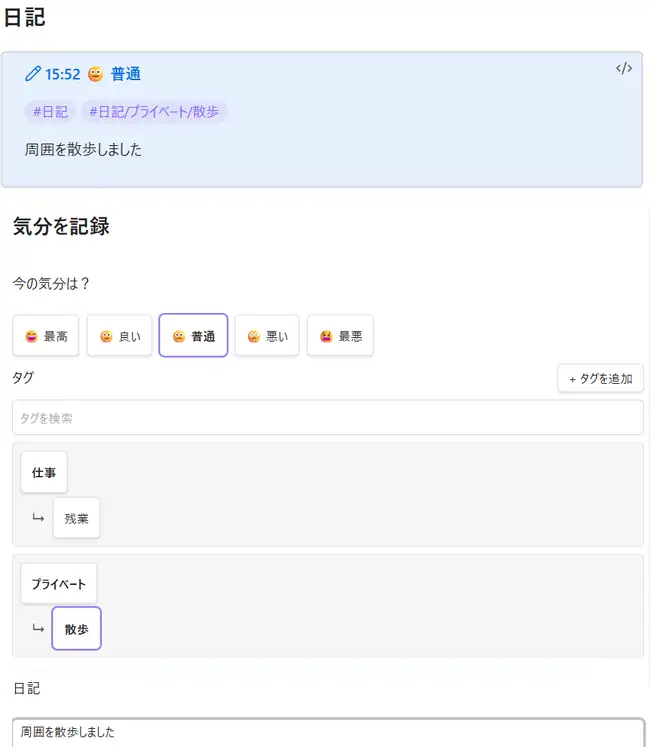
The Japanese interface above shows selecting a required mood and a nested activity, then the saved callout with both #日記 and #日記/プライベート/散歩.
Setup and use
On first launch, choose a language and Daily notes mode. Use the smile ribbon icon or the Open journal entry command, choose a mood, optionally add activities or a note, and save. Entries without a selected mood cannot be saved. Use Ctrl/Cmd+Enter to save on desktop. You can choose a past or future date and time.
The plugin follows Obsidian Daily notes settings or uses its manual folder/date-format/template settings. It renders only core {{title}}, {{date}}, and {{time}} template variables; it does not execute Templater.
Mood dashboard
Open Mood dashboard from the ribbon or command palette to view a read-only summary of valid Mood Journal logs across the whole Vault. The dashboard supports 30-day, 90-day, and all-time ranges, daily average mood, record counts, score distribution, and a daily list with links back to source notes. Missing days remain gaps rather than being treated as a score of zero. Existing Markdown is never rewritten, and the dashboard scans on demand without a persistent cache.
Saved Markdown
English entries use an English heading and always include the journal root tag:
## Journal

> [!mood-log] 23:10 🙂 Good
> #journal #journal/Personal/Walk
> <!-- mood-log-id: 2026-07-20T23:10:00.000+09:00 -->
> <!-- mood-score: 4 -->
>
> A short note.
Japanese entries use ## 日記, the root tag #日記, and localized nested activity tags. Activities use up to two levels, such as #journal/Parent, #journal/Parent/Child, #日記/親, or #日記/親/子. An entry without an activity uses only #journal or #日記. When activities are selected, the root tag is retained and the nested activity tags are added on the same quoted line. Multiple selected activities are stored as separate nested tags.
Changing the display language affects only entries saved after the change. Existing Markdown is not migrated or rewritten, including legacy #activity/... tags. Japanese and English journal sections can coexist in the same daily note, and each language is ordered independently within its own section.
The tags are normal Obsidian nested tags. Mood Journal does not add or modify Properties/frontmatter, and it does not add activity-specific HTML comments. The existing mood-log-id and mood-score comments remain part of the log format. Mood labels and activities are stored in the plugin's data.json; journal entries remain Markdown. Broken manually edited logs are not repaired automatically.
Privacy
Mood Journal makes no network requests during plugin operation and has no telemetry or analytics. External pages open only when you explicitly follow a link. The plugin does not open saved notes automatically.
Manual installation
Copy main.js, manifest.json, and styles.css into <vault>/.obsidian/plugins/mood-journal/, then enable the plugin. This path is documentation only; the plugin does not hard-code it.
Development
npm ci
npm run check
Run npm run dev for watch mode. Releases are prepared by the tag-triggered draft workflow; create no release before device QA. Screenshots/GIFs should be added before public release.
The repository includes a manual test plan for desktop, Android, iOS, sync, localization, and destructive-safety checks. See the release checklist before creating a beta or Community release.
Support
Report reproducible issues with Obsidian version, platform, and safe steps to reproduce. Do not include private journal content.
Use the bug report template and include a redacted Markdown sample only when it is needed to reproduce the issue.
If Mood Journal makes your daily reflection a little easier, you can optionally support its development with a coffee ☕️ Mood Journal remains completely free, and donations are handled by Buy Me a Coffee without unlocking additional features.