MediaLog
 DrSigmaLi307 downloads
Track movies, TV shows, games, and books in a unified Obsidian card wall.
- Overview
- Scorecard
- Updates6
A personal media library for Obsidian, covering movies, TV shows, anime, games, and books.
English | 简体中文
MediaLog brings different kinds of media records into one card wall while keeping your data in your own Obsidian vault as plain Markdown or JSON files.
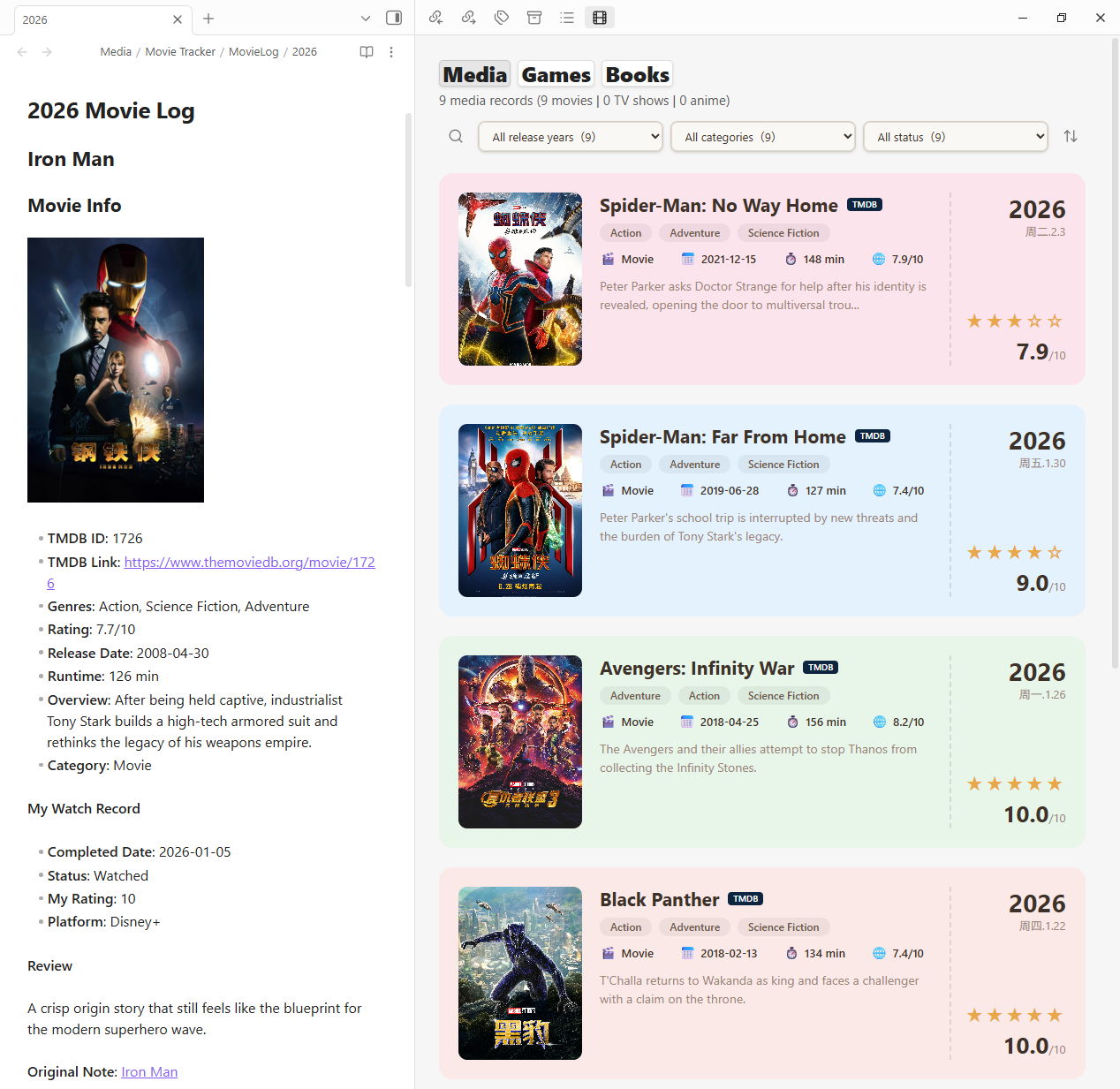
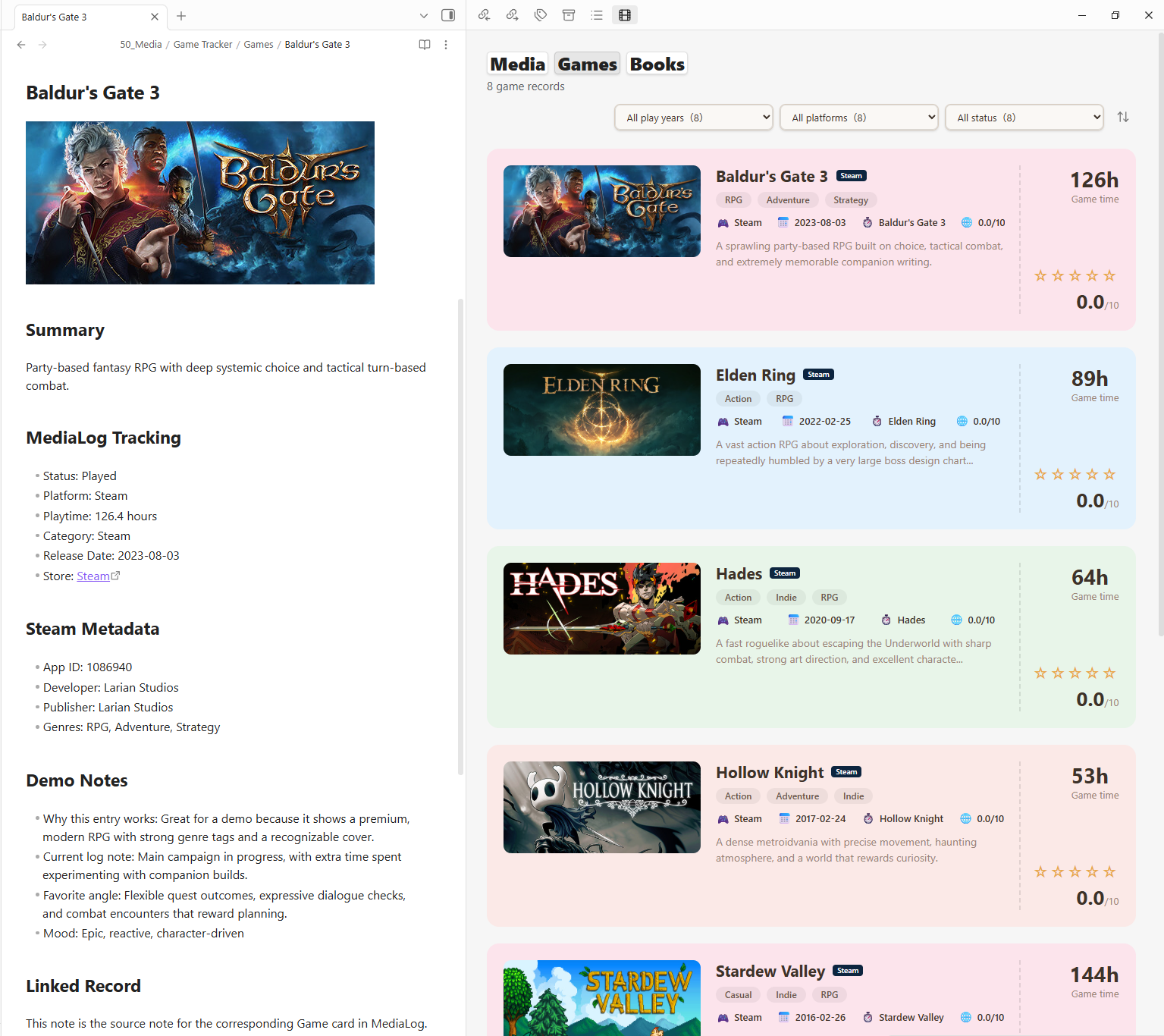
Overview
MediaLog is designed for users who want to keep long-term personal records of what they watch, play, and read inside Obsidian.
It is not a cloud service and does not maintain an external database. Your records stay in your vault, and MediaLog reads them from configurable local paths.
MediaLog is currently a beta fork of MovieLog. Movie and TV workflows remain compatible with MovieLog-style year files, while games and books are displayed from structured JSON data sources.
Features
- Unified card wall with top-level tabs for Media, Games, and Books
- Movie and TV record creation through TMDB
- Search and add movies directly from the card wall
- Click movie, TV, or anime cards to update status, date, rating, platform, and review
- Game library display from
gamelog.json, including playtime fields - Book library display from
booklog.json, compatible with Open Library / Google Books style metadata - Mode-aware filters for year, category/platform/type, status, and sorting
- Obsidian-style icon sort menu
- Local and remote cover image support
- Responsive layout for poster covers and Steam-style wide game images
- Interface language setting with Obsidian auto-detection and multiple UI languages
Current Beta Scope
- Movies, TV shows, and anime are read from one MovieLog-compatible folder.
- Games and books are read from JSON files, currently intended for import or sync scripts.
- Separate onboarding sources for Movies, TV Shows, Anime, and custom categories are planned but not fully implemented yet.
Default Data Paths
Media/
├─ Movie Tracker/
│  └─ MovieLog/
│     ├─ 2024.md
│     ├─ 2025.md
│     └─ 2026.md
├─ Game Tracker/
│  └─ GameLog/
│     └─ gamelog.json
└─ Book Tracker/
   └─ BookLog/
      └─ booklog.json
Default paths:
- Movies and TV shows:
Media/Movie Tracker/MovieLog - Games:
Media/Game Tracker/GameLog/gamelog.json - Books:
Media/Book Tracker/BookLog/booklog.json
All paths can be changed in the plugin settings.
Installation
Manual installation
Download the latest release files and copy them into:
{vault}/.obsidian/plugins/medialog/
Required files:
manifest.jsonmain.jsstyles.css
Then enable MediaLog in Obsidian's Community Plugins settings.
Community plugin directory
MediaLog has been submitted to the Obsidian Community directory. Once approved, it can be installed directly from Obsidian.
Usage
- Open the MediaLog card wall from the command palette.
- Configure the media, game, and book data paths in plugin settings.
- Add movie or TV records through TMDB search.
- In the Media tab, use the search action in the card wall to add a new movie.
- Click an existing movie, TV, or anime card to update status, watched date, rating, platform, and review.
Development
npm install
npm run build
Useful checks before release:
npm run lint
npm run build
Obsidian release assets:
main.jsmanifest.jsonstyles.css
The GitHub release tag must match the version field in manifest.json.
Privacy
MediaLog stores records in your Obsidian vault. It does not provide a cloud service, external account system, telemetry, or analytics.
MediaLog reads and writes only the media paths configured in plugin settings:
- Movie and TV year files in the configured media folder
- Game and book JSON files configured by the user
Network requests are limited to user-invoked metadata and image workflows:
- TMDB requests are made when the user searches for or creates movie / TV records.
- The TMDB API key is stored locally in Obsidian plugin data (
data.json) and is sent only to TMDB API endpoints. - Remote cover images are loaded from their configured image URLs.
- If local poster cache is enabled, posters are downloaded into the user's vault.
- Game and book data are read from local JSON files. Steam, Google Books, and Open Library URLs may appear as metadata or cover links, but MediaLog does not upload vault content to those services.
Do not commit personal plugin data, API keys, or generated .obsidian/plugins/medialog/data.json files to a public repository.
Attribution
MediaLog is based on MovieLog by tinazz / zzditto and keeps the original MIT license notice.
License
MIT.