Search...Search plugins and themes...
⌘K
Sign in
  • Get started
  • Download
  • Pricing
  • Enterprise
  • Account
  • Obsidian
  • Overview
  • Sync
  • Publish
  • Canvas
  • Mobile
  • Web Clipper
  • CLI
  • Learn
  • Help
  • Developers
  • Changelog
  • About
  • Roadmap
  • Blog
  • Resources
  • System status
  • License overview
  • Terms of service
  • Privacy policy
  • Security
  • Community
  • Plugins
  • Themes
  • Discord
  • Forum / 中文论坛
  • Merch store
  • Brand guidelines
Follow us
DiscordTwitterBlueskyThreadsMastodonYouTubeGitHub
© 2026 Obsidian

Markdown Chat Blocks

Czeglédy PéterCzeglédy Péter92 downloads

Chat style blocks for Markdown

Add to Obsidian
  • Overview
  • Scorecard
  • Updates7

Chat-style blocks for Obsidian. With this plugin, you can create simple chat-like blocks for any use case. It can be used to improve stories.

Features

  • Chat-style UI
  • Custome chat title
  • Dynamic profile picture
  • Left / right bubbles
  • An easy to use syntax
  • Automatic alternating alignment

Usage

The plugin has a very easy to learn syntax for the ideal user experience. By default, the bubbles are automatically alternated between the two sides. However, you can override this, by adding l: (for left side), or r: (for right side) in front of a line.

There are multiple parameters you can set for the chat block.

Name function Usage
Title Set the title (i.e. the contact's name) of the chat title = ""
Profile picture Set the profile picture of the contact pfp = ""

Example

```chat
title = "Ryan"

l: Hi!
l: What about the **school project**?
r: I'm still working on it. I finished most of the research yesterday.
l: That's good. Do you need any *help*?
r: Maybe with the presentation. I have no idea how to make it look **good**.
l: I can help you with that after school.
r: That would be great! Also, I found some `useful statistics` we could add.
l: Nice. Send them to me and I'll put them in the presentation.
r: Sure! I'll send everything tonight.
```
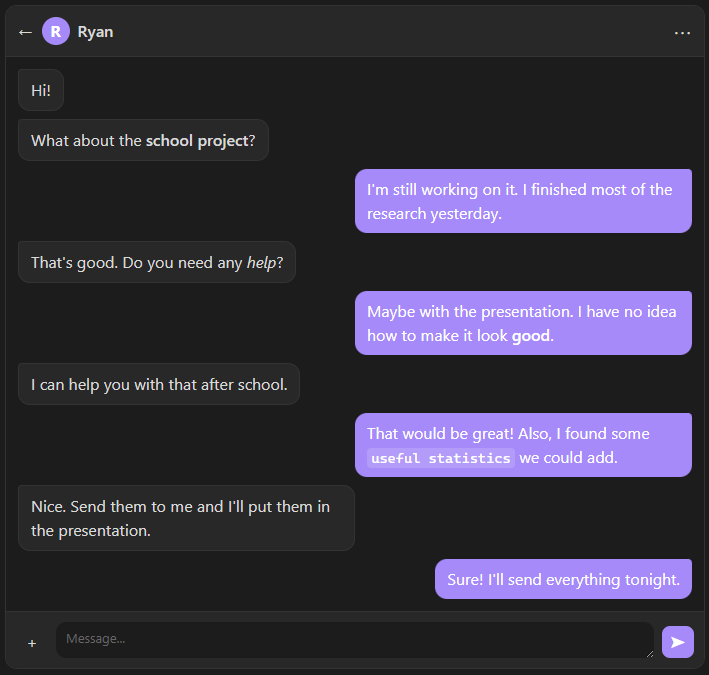
Demo image

Installation

Install from Obsidian Community Plugins.

Roadmap

  • More customization options
HealthExcellent
ReviewPassed
About
Create chat-style blocks in Markdown to craft dialog or story scenes with alternating left/right bubbles and optional custom titles. Display dynamic profile pictures and override alignment per line with l: and r: prefixes.
WritingFormatting
Details
Current version
1.1.2
Last updated
Last week
Created
4 months ago
Updates
7 releases
Downloads
92
Compatible with
Obsidian 1.13.7+
Platforms
Desktop, Mobile
License
MIT
Report bugRequest featureReport plugin
Author
Czeglédy PéterCzeglédy Péterpeterczegledy
GitHubpeterczegledy
czegledypeter
  1. Community
  2. Plugins
  3. Writing
  4. Markdown Chat Blocks

Related plugins

Fountain Editor

Fountain (screenplay) syntax highlighting in the editor.

Linter

Format and style your notes. Linter can be used to format YAML tags, aliases, arrays, and metadata; footnotes; headings; spacing; math blocks; regular Markdown contents like list, italics, and bold styles; and more with the use of custom rule options.

LanguageTool Integration

Advanced grammar and spell checking, powered by LanguageTool.

ChatGPT MD

A seamless integration of ChatGPT, OpenRouter.ai and local LLMs via Ollama into your notes.

Admonition

Admonition block-styled content.

Editing Toolbar

The Editing Toolbar is modified from cMenu, which provides more powerful customization settings and has many built-in editing commands to be a MS Word-like toolbar editing experience.

Longform

Helps you write and edit novels, screenplays, and other long projects.

Text Generator

Generate text content using GPT-3 (OpenAI).

Image Captions

Add captions to images with inline Markdown and link support. The caption format is compatible with the Commonmark spec and other Markdown applications.

Sort and Permute lines

Sort and Permute lines in whole file or selection.