Local Image Generator
 Johannes Kaindl260 downloads
Generate images right in your vault — built-in SD-Turbo on your GPU, or your local Draw Things / A1111 server. Private, on-device, no cloud.
- Overview
- Scorecard
- Updates20
Generate images inside Obsidian — on your own machine, with no cloud and no account. Four ways to do it, chosen in the settings:
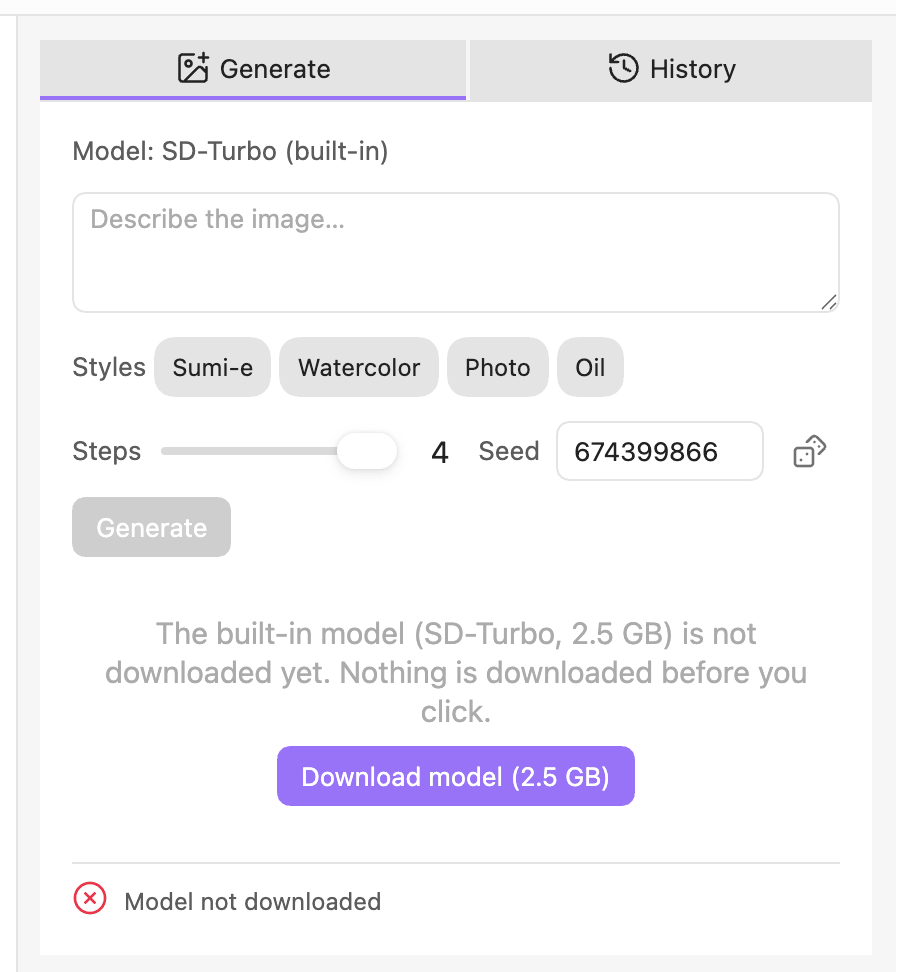
- Built-in (default): a model runs on your GPU inside Obsidian via WebGPU — pick one in the settings. SD-Turbo (≈ 2.6 GB, 512×512) is the default; SDXL-Turbo (≈ 7.1 GB, up to 1024×1024, sharper output) is an optional second model you switch to yourself. Nothing to install: click Download model, verified by checksum and stored outside your vault, then type a prompt and press Generate.
- Server: a local image server you run yourself — Draw Things, AUTOMATIC1111, Forge, or SD.Next over their shared A1111-compatible HTTP API — with whatever models it has loaded, and the full set of controls (negative prompt, guidance, sizes).
- ComfyUI: point it at your own running ComfyUI server and hand it a workflow you exported in the API format — the plugin patches your prompt, seed, steps and size into that workflow before every run and leaves everything else (sampler, scheduler, LoRAs, upscalers) exactly as you built it. No img2img, no progress bar (ComfyUI's own server refuses a WebSocket connection from inside Obsidian, so the status line counts seconds instead), no CFG slider — see the changelog for the full list of what this mode does not do.
- Image Playground (mobile): the only mode that works on your phone — everything else needs a desktop Obsidian with either a GPU or a reachable local server. Runs entirely on-device through Apple's Image Playground via a Shortcut you install once (see Setting up Image Playground below); the generated file is saved into your attachment folder like any other backend. Only stylized output — animation, illustration, sketch — never photorealistic images, and no negative prompt, no size control, no CFG, no starting image. Requires iOS/macOS 26+ and Apple Intelligence.
In every case, your prompts and images never leave your machine.
🇬🇧 English · 🇩🇪 Deutsch
Features
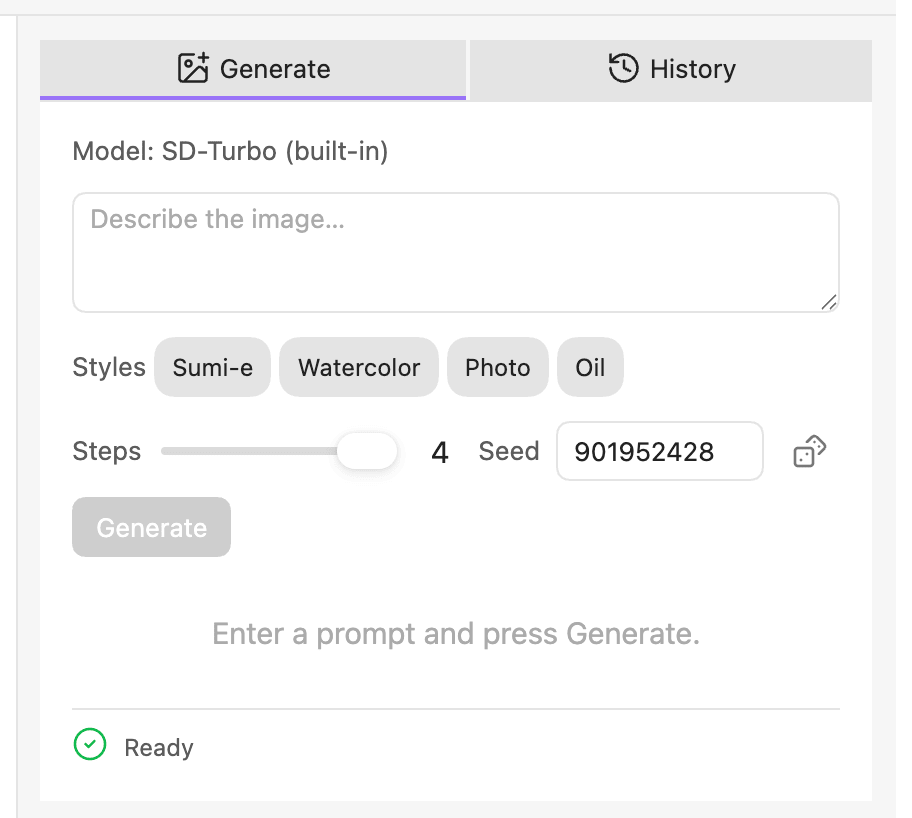
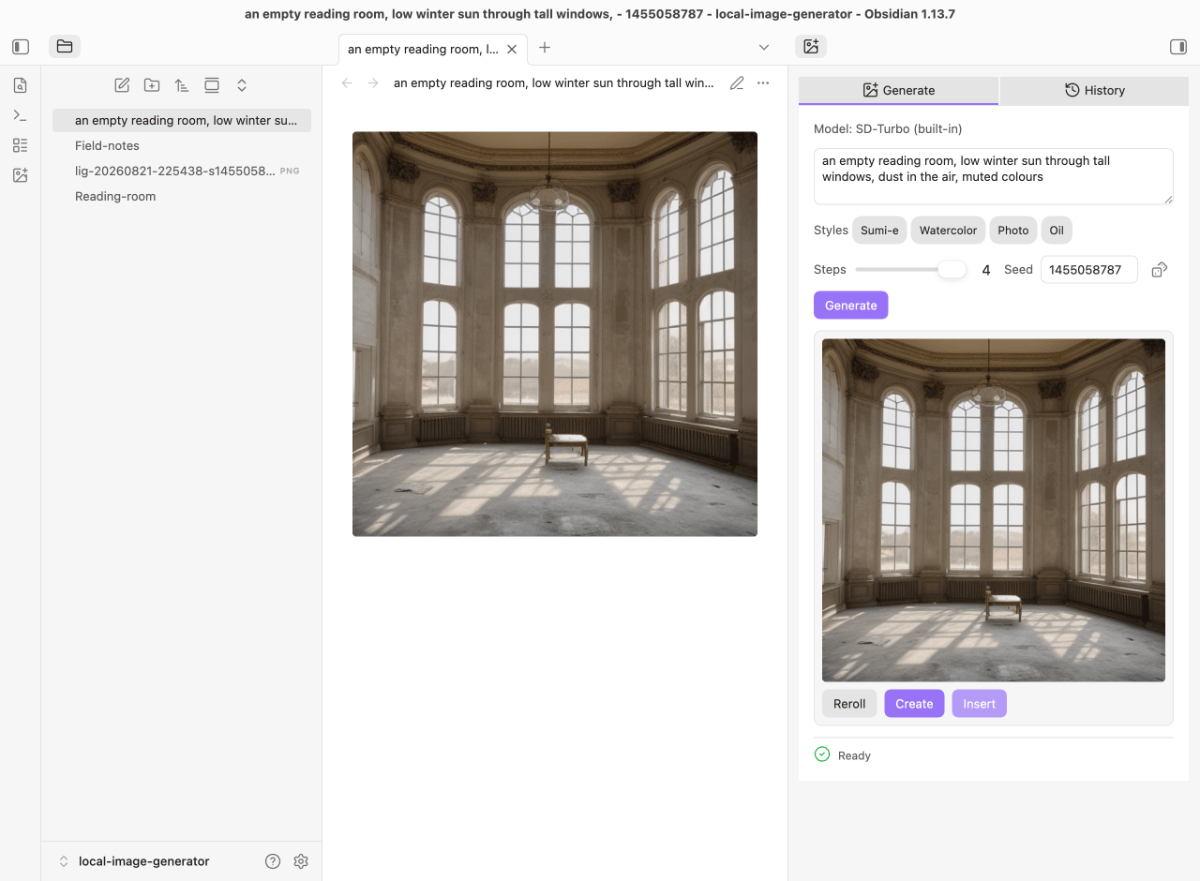
- Open the generator from the ribbon icon or the Open generator command.
- Type a prompt, optionally a negative prompt (what to avoid), pick a size from 10 curated aspect ratios (square, portrait, landscape, up to 2048), and adjust steps (1–50), CFG (guidance scale, 1–15) and seed to taste. Click a style chip (Sumi-e, Watercolor, Photo, Oil — edit or add your own in settings) to append its look to the prompt; click again to remove it.
- Generate uses the seed from the field (it never rerolls) and greys itself out once the current prompt/negative prompt/seed/steps/size/CFG exactly match your last result — regenerating without changing anything would just reproduce the same image. Reroll rolls a fresh seed and generates a new variation regardless; use the dice icon to reroll the seed by hand without generating.
- Start from an existing image (img2img, both engines): pick a reference image from your vault — or hit Save & use as reference on a result you just made — and set how far the model may move away from it. The strength slider is a continuous 0–1 range in both modes and only appears once a reference is actually set. Built-in mode center-crops the reference to the model's square input size (a 16:9 image gets cropped, not squished); server mode hands the file over unchanged and lets the server scale it. More steps also give the slider more room: the entry point is interpolated, but the meaning of a given denoising value shifts with the step count — a recipe saved at 4 steps will not look the same at 8. One honest caveat for the built-in SD-Turbo at low step counts: turning the slider up does not always move you further from the reference. Measured at 4 steps, 0.625 came out further from the original than 0.75. That is a property of the model, not a bug in the slider — SD-Turbo is distilled onto exactly four noise levels, and 0.625 is the one value of the three that lands between two of them, where the model is slightly out of its comfort zone. The effect shrinks as you raise the step count, and SDXL-Turbo does not show it. If a value looks wrong, try its neighbours rather than pushing further in the same direction.
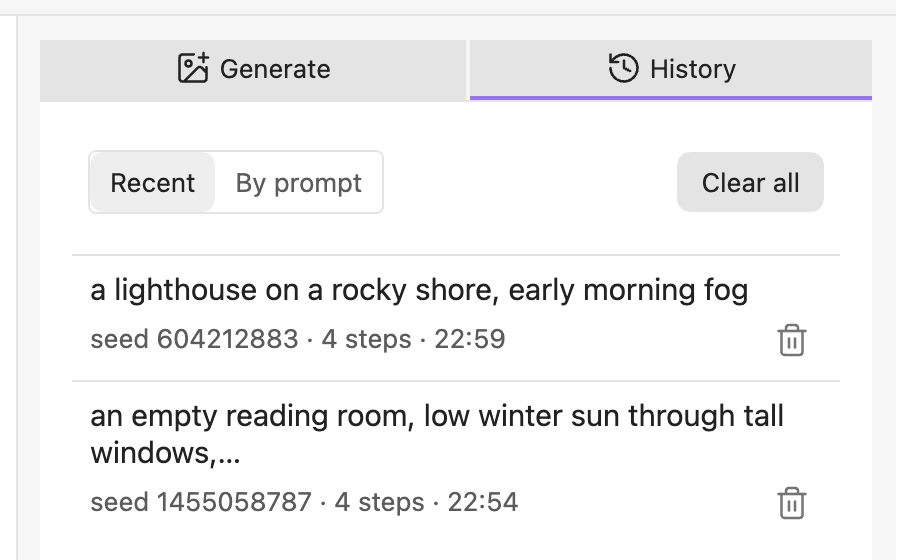
- Switch to the History tab to see your past generations as full recipes (prompt · negative prompt · seed · steps · size · CFG · time) — group them by prompt, click one to load its recipe back into Generate, delete single entries, or clear all.
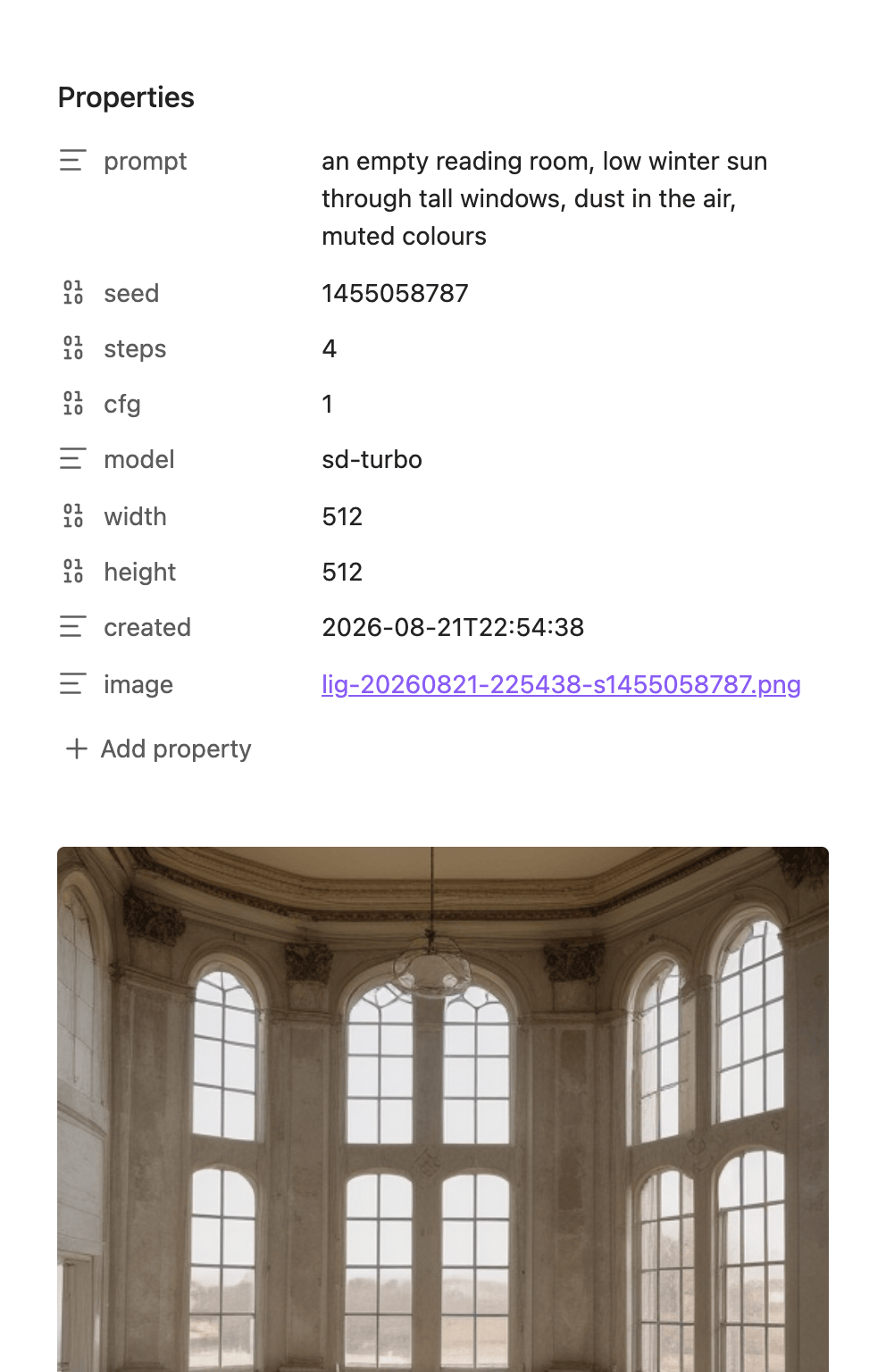
- Create saves the image as a new attachment. By default that's all it does (it also opens the image) — set the Create button dropdown in settings to Image + note to have it also create a note with the generation's prompt, seed, steps, size and date in its frontmatter and the image embedded, and open that note instead. Insert always just saves the image and embeds it at your cursor in the current note.
- Built-in engine: both catalog models are distilled — 1–8 steps, no guidance — so in this mode the panel shows only what a model honours: prompt, steps (1–8), seed and the style chips, plus a size picker once you have more than one size to choose from (SD-Turbo is fixed at 512×512; SDXL-Turbo also offers 1024×1024). Negative prompt and CFG stay server-only either way — no built-in model supports guidance.
- Server: which model actually runs is chosen in your server app (Draw Things, AUTOMATIC1111, etc.), not in this plugin — the plugin sends generic generation parameters and shows the server's active model name as a status hint.
The interface is available in English and German, switching automatically to match Obsidian's own language setting — no separate language option to set.

For plugin developers
This plugin exposes image generation to other Obsidian plugins. Read it defensively — it may be missing or disabled:
const api = (app as any).plugins?.plugins?.["local-image-generator"]?.api;
if (api?.apiVersion === 1) {
  const s = api.status();               // synchronous, no network
  if (s.ready) {
    const r = await api.generate({ prompt: "a quiet lake at dawn" });
    if (r.ok) {
      // r.image.base64 — PNG, no data: prefix
      // r.image.params — what was ACTUALLY computed, not what you asked for
      await api.save(r.image);          // optional: writes to the user's output folder
    }
  }
}
status().capabilities tells you what the active backend can honour. The built-in engine
is guidance-free and fixed at 512×512, so a CFG or size control in your UI would be a prop.
capabilities.initImage is true for the built-in engine and for a server, and false in
ComfyUI mode — ask the field rather than the mode.
r.image.params.cfg can be null: it means the plugin did not determine the value, which
happens in ComfyUI mode, where the user's workflow carries its own CFG. If you write the
params into a note, leave the field out in that case instead of substituting a number.
To generate from a reference image, pass it as base64 (no data: prefix) plus an optional
denoising between 0 and 1 (default 0.75 — higher means further from the original):
if (api.status().capabilities.initImage) {
  const r = await api.generate({ prompt: "the same lake, at dusk", initImage: pngBase64, denoising: 0.4 });
  // r.image.params.denoising tells you what was actually applied — null means it was
  // ignored (no reference image was sent).
}
The built-in engine only re-runs part of its fixed step schedule, but it interpolates the
entry point rather than snapping to it, so denoising is continuous there too — same as the
server backend. Either way, r.image.params.denoising is the value that governs; treat it
as the source of truth, not the number you passed in. More steps also give it more room to
matter: the same denoising value looks different at 4 steps than at 8.
The API never starts a download. If the model is missing you get
{ ok: false, reason: "model-not-downloaded" } — the user has to click that button
themselves.
status() can be stale — use recheck() when it matters. status() is synchronous and
makes no network call: in server mode it reports the last known reachability, checked on load,
after a failed run, on a mode switch, or when the user clicks Test connection. If the server
was down and has since come back up, status().ready stays false — and generate() keeps
refusing — until someone re-checks.
recheck() is that re-check: one network call, then the fresh status.
let s = api.status();                   // free, may be stale
if (!s.ready && s.reason === "unreachable") {
  s = await api.recheck();              // one network call, now current
}
if (s.ready) { /* … */ }
Call it when a stale unreachable would block you — not before every generation. In built-in
mode it is deliberately a no-op that returns the current status: there is no remote state that
could have changed behind the plugin's back, and a "re-check" that checks nothing would be a
prop. recheck() was added in 0.10.0; it is additive, so apiVersion stays 1 — guard for it
with typeof api.recheck === "function" if you support older installs.
generate()'s failure reason:
reason |
when |
|---|---|
busy |
a generation is already running (yours, another plugin's, or the panel's) |
not-configured |
server mode, no endpoint set in settings |
unreachable |
server mode, endpoint set but not responding — see the staleness note above |
model-not-downloaded |
built-in mode, the model isn't downloaded — this plugin never downloads on its own |
no-gpu |
built-in mode, the GPU doesn't meet the built-in engine's requirements |
failed |
the backend threw while generating; message carries its raw, untranslated text |
save(image, opts?) resolves to { ok: true, imagePath, notePath } — notePath is null
when no note was requested (opts.createNote === false, or it falls back to the user's own
setting) or when the note write itself failed after the image was already saved (the image
save still counts as success) — or to { ok: false, reason: "write-failed", message } if
writing the image failed (disk error, or the plugin was disabled between your generate()
and save() calls).
onProgress?(pct, phase) on the request lets you show a load phase instead of a hang: phase
is "loading-model" or "generating"; pct is 0–100, or null when the backend reports
no progress (Draw Things has no progress endpoint) — show an indeterminate spinner in that case.
Cancelling a run
Pass an AbortSignal and the run comes back as { ok: false, reason: "aborted" }:
const ctl = new AbortController();
const r = await api.generate({ prompt: "a lake at dusk", signal: ctl.signal });
What cancelling actually does depends on the mode. Built-in: a real stop — the diffusion
loop quits between two steps and the decoder never runs. Server and ComfyUI: only the waiting
ends; the server finishes the image, you just stop looking at it. Obsidian's requestUrl
knows neither abort nor timeout, so an HTTP call already in flight cannot be taken back.
For a batch this is still the useful half: the image in progress finishes remotely, the next
one never starts. Passing no signal changes nothing — apiVersion stays 1.
Installation
There are two ways to get the plugin.
Recommended — via AnySource Sideloader, which installs and updates plugins from any git forge. Subscribe to this catalog once:
https://git.jkaindl.de/jkaindl/obsidian-catalog/raw/branch/main/catalog.json
Local Image Generator then appears in the sideloader's plugin list and updates like any other
plugin — no manual copying, and every download is checksum-verified. To install just this one
plugin without the catalog, add its repository URL as a source instead:
https://github.com/johannes-kaindl/local-image-generator.
By hand, if you would rather not add another plugin:
- Download
main.js,manifest.jsonandstyles.cssfrom the latest release. - Copy them into
<vault>/.obsidian/plugins/local-image-generator/. - Obsidian → Settings → Community plugins → enable Local Image Generator.
Updates then have to be repeated by hand — the sideloader route exists to avoid exactly that.
Once installed:
- Built-in engine (default): open the generator and click Download model — or do it from Settings → Local Image Generator → Engine. The button names the size of the currently selected model (SD-Turbo, ≈ 2.6 GB, by default); pick SDXL-Turbo there first if you want the sharper, larger model instead. When the status says Ready, generate. That's the whole setup.
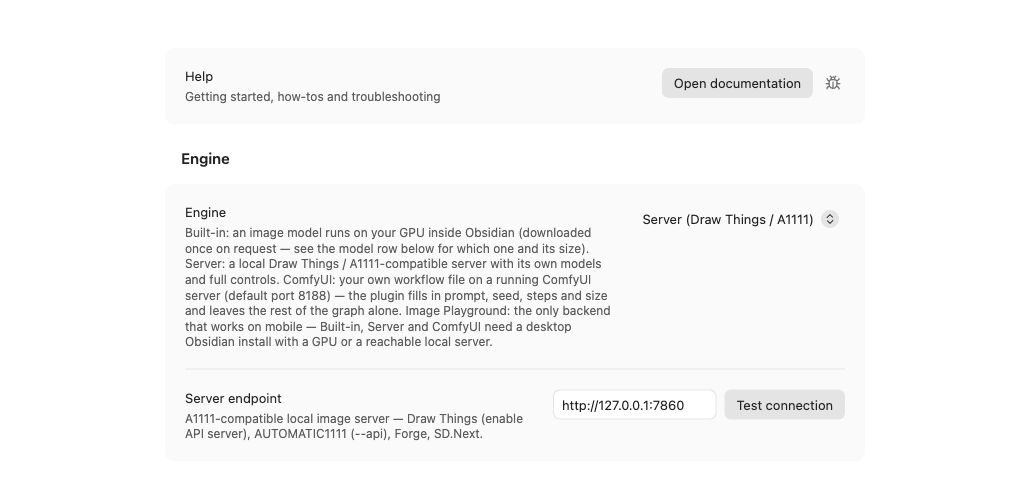
- Server instead? Switch Engine to Server (Draw Things / A1111), enter the server's URL in Server endpoint, and click Test connection.
Setting up a server (optional)
Pick one — this plugin talks to any of them the same way:
Draw Things (macOS, easiest to get started with — no command line):
- Install Draw Things from the Mac App Store.
- In Draw Things' own settings, enable its API Server. The default
address is
http://127.0.0.1:7860. - Use that address as this plugin's Server endpoint.
AUTOMATIC1111 (stable-diffusion-webui):
Launch it with the --api flag (e.g. add --api to COMMANDLINE_ARGS). It
serves the same API at http://127.0.0.1:7860 by default.
Forge (stable-diffusion-webui-forge):
Same A1111-compatible API — launch with --api, same default address.
SD.Next: Same A1111-compatible API family — check its docs for the equivalent launch flag if the API isn't enabled by default.
In all four cases, once the server is running with its API reachable, enter its URL in this plugin's settings and click Test connection. The status line and settings both show the server's active model name once connected.
Setting up Image Playground (mobile)
Requires iOS/macOS 26+ and Apple Intelligence. The plugin talks to Image Playground through a Shortcut you install once — there is no other way for a third-party app to reach it on iOS.
- Get the Shortcut named
Generate Image (Obsidian)— either import Johannes Kaindl's shared version (link and setup walkthrough: uplink.jkaindl.de/apple-shortcuts) or build your own: a Shortcut that takes the passed-in text as the prompt, runs an Image Playground action with it, and saves the result into your vault with a Save File action. - Switch Engine to Image Playground (Apple shortcut, mobile) in this plugin's settings.
- Enter the exact Shortcut name in Shortcut name — it defaults to
Generate Image (Obsidian), matching the shared Shortcut above; if you renamed yours, this field has to match exactly. - Generate as usual. Running it briefly switches you to the Shortcuts app and back — that hand-off is normal (enabling Reduce Motion in iOS Accessibility settings makes it noticeably shorter).
The central guide — the Shortcut's import questions, the full error table (guardrail refusals, a missing Shortcut, timeouts), and requirements in detail — lives at uplink.jkaindl.de/apple-shortcuts.
Usage
- Built-in engine: make sure the model is downloaded (the panel offers the button if it isn't). Server mode: make sure your image server (Draw Things, AUTOMATIC1111, Forge, or SD.Next) is running and its API is reachable — the panel tells you if it isn't.
- Open the generator (ribbon icon or the Open generator command).
- Type a prompt, adjust steps / seed (and, in server mode, negative prompt / size / CFG), and press Generate. The first image after an Obsidian start takes a few seconds longer with the built-in engine — the model is being loaded into the GPU; the status line counts along.
- Use Create to save the image as a new attachment and open it, or Insert to save it and embed it at your cursor. Set the Create button dropdown to Image + note in settings first if you also want a note with the generation's details in its frontmatter.
- Revisit past generations any time from the History tab.
Requirements
- Works on mobile through Image Playground only. Built-in, Server and ComfyUI all need a desktop Obsidian install — a GPU or a reachable local server. Image Playground needs iOS/macOS 26+ and Apple Intelligence; on a device or OS version without it, that mode simply is not usable — pick one of the other three on desktop instead.
- Built-in engine: a GPU that Obsidian's WebGPU can use with 16-bit
shaders (
shader-f16) — Apple Silicon Macs qualify, as do most current discrete GPUs. Disk and peak GPU memory depend on which model you pick: SD-Turbo needs ≈ 2.6 GB of disk and roughly 4 GB of free memory while an image is being made; SDXL-Turbo needs ≈ 7.1 GB of disk, and briefly needs about double that while its session is built for the first time (the weights sit in the JS heap and on the GPU until loading finishes) — roughly 13 GB peak. On Apple Silicon, where CPU and GPU share one pool, those 13 GB come out of the same memory; on a discrete GPU the JS half sits in host RAM instead. That can get tight on a 16 GB machine. The panel tells you if the GPU does not qualify at all; the server mode is the way out then. - Server mode: any A1111-compatible local image server, running and reachable — Draw Things, AUTOMATIC1111, Forge, or SD.Next. The server app owns the model, its hardware requirements and its own disk footprint.
Configuration
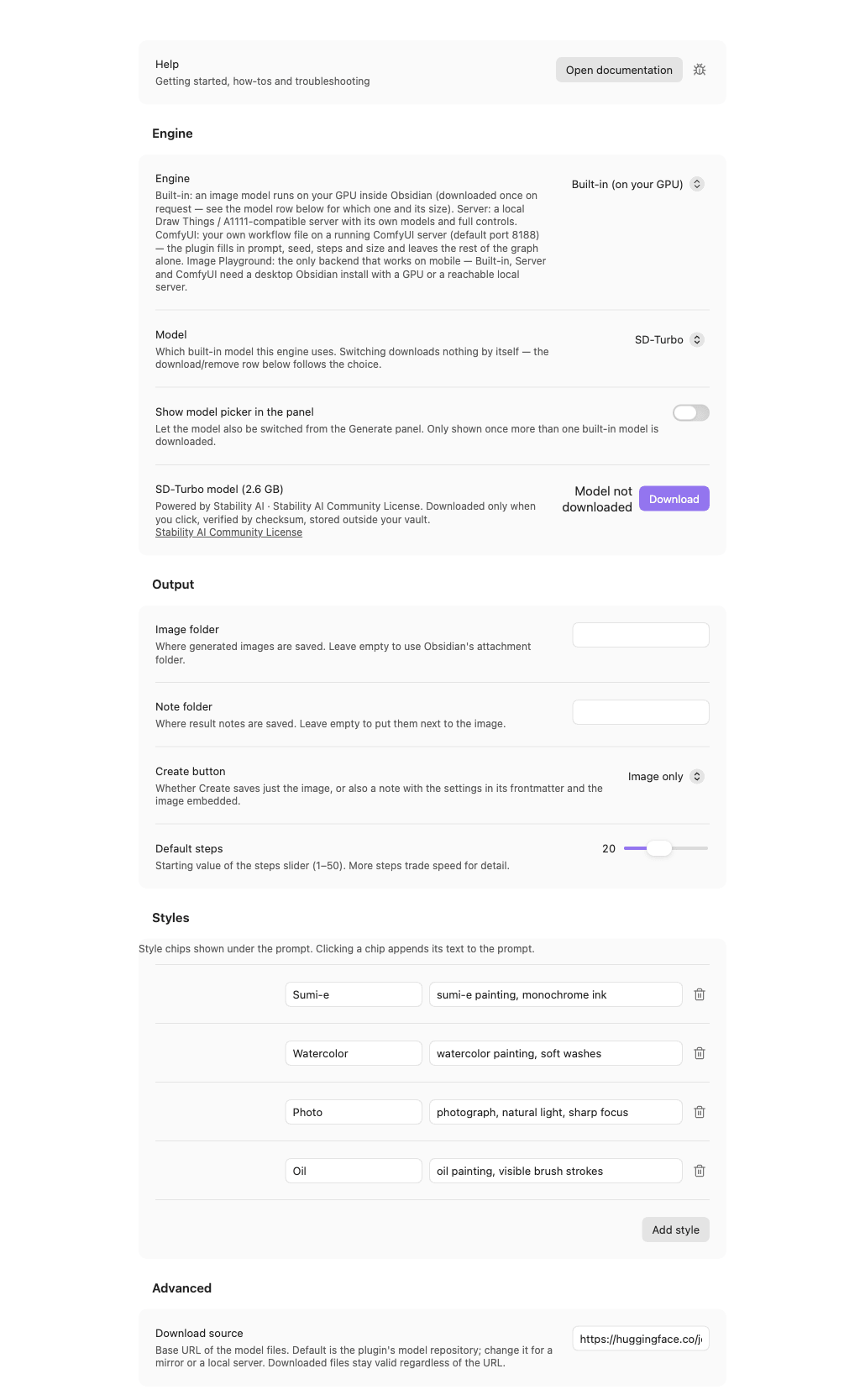
Settings → Local Image Generator:
- Engine — Built-in (on your GPU) or Server (Draw Things / A1111).
- Built-in shows a model dropdown (SD-Turbo / SDXL-Turbo) and, below it, that model's row: size, license, status, and Download / Cancel / Remove. Switching to a model other than SD-Turbo asks for confirmation before it downloads anything. Nothing is downloaded until you click Download.
- Server shows the Server endpoint — the URL of your local image
server (e.g.
http://127.0.0.1:7860), plus a Test connection button that checks reachability and reports the server's active model.
- Output — the image folder (leave empty to use Obsidian's attachment folder, with autocomplete for existing folders), the note folder used when Create makes a note (leave empty to put the note next to the image), the Create button dropdown (Image only or Image + note), and the starting value of the steps slider (1–50).
- Styles — the same style presets shown as chips under the prompt field. Edit a preset's label or prompt text, delete it, or add a new one.
- Advanced → Download source — the base URL the model files are fetched from. The default is this plugin's model repository on Hugging Face; point it at a mirror or a local server if you need to. Files already downloaded stay valid whatever the URL says.
- Delete old SD-Turbo weights (only shown if detected) — if you're upgrading from a pre-0.5 version of this plugin, which cached a different conversion of the model in the browser's Cache API, this row lets you delete those ~2.5 GB in one click. The 0.6 engine uses its own files and never reads the old ones.
How it works
The plugin owns the interface — prompt, presets, history, where files land — and one of two backends owns the generation:
Built-in engine. The selected catalog model (SD-Turbo, or SDXL-Turbo)
runs inside Obsidian through
onnxruntime-web on the WebGPU
backend. The model files are this plugin's own ONNX conversion of the
official stabilityai/sd-turbo/stabilityai/sdxl-turbo weights (fp16
weights, fp32 inputs/outputs), published in the plugin's model repository
together with the license and a notice; the conversion script is in
tools/convert/. On first use after Obsidian starts (or after switching
models), the model's sessions — three for SD-Turbo (text encoder, UNet, VAE
decoder), four for SDXL-Turbo (two text encoders, UNet, VAE decoder) — are
loaded into the GPU — the status line counts the seconds — then each image
takes one text-encoder pass, 1–8 UNet steps and a VAE decode. SDXL-Turbo's
UNet alone is ≈ 5 GB and exceeds the single-file limits both ONNX and the
browser's JS heap impose, so it is split into external-data buckets at
conversion time and reassembled by the engine at load. The pipeline (CLIP
tokenizer, Euler-ancestral scheduler, seeded noise) is pure TypeScript and
unit-tested against fake sessions.
Server. A generation is one POST /sdapi/v1/txt2img against the endpoint
you configured, carrying nothing but the generic parameters shown in the panel
(prompt, negative prompt, size, steps, CFG, seed). While it runs, the panel
polls GET /sdapi/v1/progress once a second for a percentage — a server that
does not offer that endpoint (Draw Things answers 404) simply shows an
elapsed-time counter instead, and the plugin stops asking after the first 404.
The connection test and the model name in the status line come from
GET /sdapi/v1/options. All three calls go through Obsidian's own
requestUrl, which is not subject to browser CORS rules, and carry a short
timeout of their own: requestUrl knows neither abort nor timeout, so without
one an unreachable server would hang the panel forever rather than report
that it is unreachable.
Either way, the image is written into your vault as an ordinary attachment. The recipe behind it (prompt, seed, steps, size, CFG, model, time) goes into the plugin's local data file, which is what the History tab reads — the image file itself carries no dependency on the plugin.
How network and storage are used
Out of the box the plugin downloads nothing. The built-in engine needs model files, and it fetches them once per model, only when you click Download (in the generator panel or in the settings) — you pick which of the two catalog models to download; nothing else is fetched automatically. Both come from this plugin's model repository on Hugging Face:
SD-Turbo (default, ≈ 2.6 GB total):
| File | Size | What it is | License |
|---|---|---|---|
sd-turbo/text_encoder/model.onnx |
≈ 681 MB | CLIP text encoder (fp16) | Stability AI Community License |
sd-turbo/unet/model.onnx |
≈ 1.7 GB | UNet (fp16) | Stability AI Community License |
sd-turbo/vae_decoder/model.onnx |
≈ 99 MB | VAE decoder (fp16) | Stability AI Community License |
sd-turbo/vae_encoder/model.onnx |
≈ 68 MB | VAE encoder (fp16) — for img2img | Stability AI Community License |
sd-turbo/tokenizer/vocab.json, merges.txt |
≈ 1.6 MB | CLIP BPE tokenizer data | (part of the model release) |
SDXL-Turbo (optional second model, ≈ 7.1 GB total):
| File | Size | What it is | License |
|---|---|---|---|
sdxl-turbo/text_encoder/model.onnx |
≈ 246 MB | CLIP-L text encoder (fp16) | Stability AI Community License |
sdxl-turbo/text_encoder_2/model.onnx |
≈ 1.4 GB | OpenCLIP bigG text encoder (fp16) | Stability AI Community License |
sdxl-turbo/unet/model.onnx + 13 external-data buckets |
≈ 5.1 GB | UNet (fp16, split across files — no single file exceeds 2 GB) | Stability AI Community License |
sdxl-turbo/vae_decoder/model.onnx |
≈ 198 MB | VAE decoder (fp32 — see note below) | Stability AI Community License |
sdxl-turbo/vae_encoder/model.onnx |
≈ 137 MB | VAE encoder (fp32 — same fp16 range issue as the decoder, measured) — for img2img | Stability AI Community License |
sdxl-turbo/tokenizer{,_2}/vocab.json, merges.txt |
≈ 3.2 MB | CLIP BPE tokenizer data, both encoders | (part of the model release) |
SDXL-Turbo's VAE decoder and VAE encoder both stay fp32 — both measured activations exceed fp16's range under the WebGPU execution provider (the encoder's peak sits around 300k–500k), and for the decoder that produced a silent, error-free pure-black image with no other symptom. Everything else in both models is fp16.
Shared by both models:
| File | Size | What it is | License |
|---|---|---|---|
runtime/ort-<version>/ort-wasm-simd-threaded.asyncify.wasm |
≈ 24 MB | ONNX Runtime Web (the same version the plugin is built against) | MIT |
Every file is checked against a SHA-256 pinned in the plugin before it is used; a mismatch is discarded and reported. Before downloading any model other than the default (currently just SDXL-Turbo) the plugin shows a confirmation dialog naming its size and the peak-memory note above — cancelling it downloads nothing. The files live in the browser's Cache API inside Obsidian's profile — outside your vault, so they are never synced — and Remove in the settings deletes them again. You can cancel a download at any time; finished files are kept.
The download source is the only network connection the built-in engine makes. In server mode, the only connection is to the server endpoint you configure, and only when you generate, test the connection, or the panel polls progress. No other network access, no telemetry.
- Prompts and generated images never leave your machine.
- Generated images are saved as normal attachments inside your vault, exactly like any image you'd add yourself. Generation history (prompts, seeds, settings) is stored in the plugin's own local data file, also on your machine.
- Upgrading from before 0.5? Those versions cached a different model conversion (~2.5 GB) in the Cache API. The 0.6 engine does not use it; the plugin shows a one-time notice if it finds it, and Settings → Delete old SD-Turbo weights removes it.
Privacy
- No telemetry. The plugin does not collect, transmit, or phone home any usage data, prompts, or images.
- No network access other than (a) the model download you start yourself, from the download source shown in the settings, and (b) in server mode, the local server endpoint you configure. Nothing is fetched without your click.
Model & licenses
- Plugin code: AGPL-3.0-or-later (see
LICENSE). - Built-in models: two catalog entries, both by Stability AI, both
redistributed as this plugin's own ONNX conversion (fp16 weights, fp32
inputs/outputs) under the
Stability AI Community License
— free for research, non-commercial and limited commercial use; read the
license before using generated images commercially. Powered by Stability
AI. Conversions are reproducible from the official weights with
tools/convert-model.sh <sd-turbo|sdxl-turbo>; no third-party conversion is involved.- SD-Turbo — the default.
- SDXL-Turbo — the optional second model, sharper output at up to 1024×1024, ≈ 7.0 GB.
- Server mode: the model is whatever your server app has loaded — its license applies to the images it makes. Check its model card before using generated images, especially for commercial purposes.
Roadmap
The two-backend design keeps both halves replaceable — img2img, the plugin API for other Obsidian plugins, and SDXL-Turbo as a second built-in model were all ideas once listed here and have since shipped. Further built-in catalog entries remain an option as the format proves itself.
Documentation
- Documentation index — all guides in one place.
- Getting started — from the install to your first image.
- Troubleshooting — the exact message, its cause and the fix.
License
AGPL-3.0-or-later — see LICENSE. Model licensing is a separate matter — see Model & licenses above.