
- Overview
- Scorecard
- Updates3
Link to a note by typing its name. No [[ needed.
Littera nexa — Latin for "the linked letter".
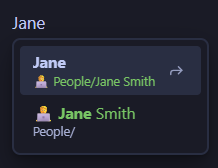
A convenience function that removes the need to type [[ before creating a wikilink. Common use
cases:
- Linking to the same notes frequently, e.g. notes from a People folder
- Auto-suggesting a link when you forgot to link
- Helping fast typers who mistype
[{Janeand don't get any suggestions from Obsidian
The suggestion list mimics Obsidian's behaviour as much as it can, with configurable elements under Settings → Littera Nexa.
Working with other plugins
Obsidian shows one suggestion menu at a time. Littera Nexa never replaces a menu you opened by typing a trigger, such as a date menu.
Tasks is different: on a task line its menu is open almost everywhere. By default Littera Nexa replaces it while a note matches what you type, and Tasks' menu comes back when nothing matches. Turn off Replace line-wide menus to stop that.
If you would rather not see the Tasks menu everywhere in the first place, raise Minimum match length for auto-suggest in the Tasks settings to 1 or more. Tasks then opens its menu only once you start typing one of its keywords.
Troubleshooting
If the list doesn't open, check these:
- The word starts with a lowercase letter, and Starts with a capital is on
- You have typed fewer characters than Minimum characters
- The note is outside the folders you selected, or inside one you excluded
- The cursor is in a section that is switched off, e.g. a code block
- The cursor is in the middle of a word
- The note is the one you are editing, which is never offered