Latex Render
 jvsteiner2k downloads
Render small latex snippets in your notes as SVG and PNG files.
- Overview
- Scorecard
- Updates3
NOTE: This project is a fork of an existing plugin repository: https://github.com/fenjalien/obsidian-latex-render which was never published on the community plugins page. I have made some changes to the plugin to make it more user friendly and added some features. I will submit it there, since the original author has not done so, and at the time of this writing has indicated that they have moved onto other projects. In case you are the original author and would like me to hand over maintenance, please let me know.
This plugin renders codeblocks with the label latex into an SVG and displays them inline in the note on preview. You are required to bring your own command that outputs a .svg file from a .tex file input, examples are given below.
Setup
- Install latex system
- Install this plugin
- Set the command in settings
Command Syntax
When these strings appear in your command, they will be replaced with their respective values. I would recommend wrapping them in quote marks "" in the event of spaces.
{file-path}: The absolute path to the file to be processed without the file extension. Most latex commands don't require the file extension, if one does you can just add it.
Example
latex -interaction=nonstopmode -halt-on-error -shell-escape "{file-path}" && dvisvgm "{file-path}"
This command uses latex to output a .dvi file and dvisvgm to convert the .dvi into an .svg. Both of these commands should be available from most tex systems.
The text in the output of the above command make look strange because by default dvisvgm uses <font> tags which are not supported by Obsidian. To fix this the --font-format option can be set. (See: https://dvisvgm.de/Manpage/)
latex -interaction=nonstopmode -halt-on-error -shell-escape "{file-path}" && dvisvgm --font-format=woff2,ah "{file-path}"
Some machines might have trouble finding the ghostscript dylib, in this case you can set the environment variable, for example:
export LIBGS=/opt/homebrew/lib/libgs.dylib && latex -interaction=nonstopmode -halt-on-error -shell-escape "{file-path}" && dvisvgm --no-fonts "{file-path}"
NOTE: depending on your installation, the PATH variable might not be set correctly, in which case you need to provide the full path to the latex and dvisvgm commands, ie. /Library/TeX/texbin/latex and /Library/TeX/texbin/dvisvgm on MacOS with MacTeX. You can find the path to the latex command by running which latex in the terminal.
Usage
The content inside of latex code blocks will be rendered using the given command. The document class standalone will be set for you using \documentclass{standalone}. You can load any packages you need with \usepackage{}.
The generated svg's <div> parent has the class block-language-latex, so it can be styled using CSS snippets. For example, if you are using dark mode you can set filter: invert(100%) to invert the colours for a quick hack for dark themed diagrams. You could also set background-color: white.
Caching
By default the plugin will keep generated .svg files in svg-cache so it won't have to re-render if nothing in the code block has changed, or you copy the code block to a different file, the plugin will simply reuse the .svg file. It'll keep track of which files use each .svg and when no files use a .svg the plugin removes it from the cache.
This should allow (hasn't been tested) latex code blocks to appear as .svg in notes when the vault is synced across different devices that may not have latex installed. Just don't edit the code block otherwise it won't be happy.
Examples
The svgs shown below have been generated in Obsidian with the setup in
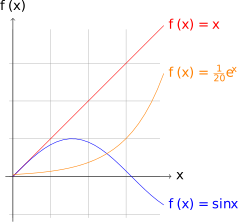
```latex
\usepackage{tikz}
\begin{document}
  \begin{tikzpicture}[domain=0:4]
    \draw[very thin,color=gray] (-0.1,-1.1) grid (3.9,3.9);
    \draw[->] (-0.2,0) -- (4.2,0) node[right] {$x$};
    \draw[->] (0,-1.2) -- (0,4.2) node[above] {$f(x)$};
    \draw[color=red]    plot (\x,\x)             node[right] {$f(x) =x$};
    \draw[color=blue]   plot (\x,{sin(\x r)})    node[right] {$f(x) = \sin x$};
    \draw[color=orange] plot (\x,{0.05*exp(\x)}) node[right] {$f(x) = \frac{1}{20} \mathrm e^x$};
  \end{tikzpicture}
\end{document}
```
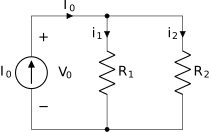
```latex
\usepackage{circuitikz}
\begin{document}
\begin{circuitikz}[american, voltage shift=0.5]
\draw (0,0)
to[isource, l=$I_0$, v=$V_0$] (0,3)
to[short, -*, i=$I_0$] (2,3)
to[R=$R_1$, i>_=$i_1$] (2,0) -- (0,0);
\draw (2,3) -- (4,3)
to[R=$R_2$, i>_=$i_2$]
(4,0) to[short, -*] (2,0);
\end{circuitikz}
\end{document}
```
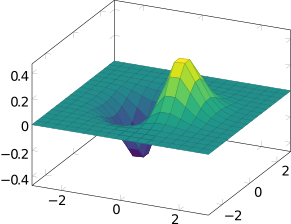
```latex
\usepackage{pgfplots}
\pgfplotsset{compat=1.16}
\begin{document}
\begin{tikzpicture}
\begin{axis}[colormap/viridis]
\addplot3[
    surf,
    samples=18,
    domain=-3:3
]
{exp(-x^2-y^2)*x};
\end{axis}
\end{tikzpicture}
\end{document}
```
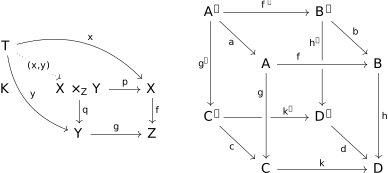
```latex
\usepackage{tikz-cd}
\begin{document}
\begin{tikzcd}
T
\arrow[drr, bend left, "x"]
\arrow[ddr, bend right, "y"]
\arrow[dr, dotted, "{(x,y)}" description] & & \\
K & X \times_Z Y \arrow[r, "p"] \arrow[d, "q"]
& X \arrow[d, "f"] \\
& Y \arrow[r, "g"]
& Z
\end{tikzcd}
\quad \quad
\begin{tikzcd}[row sep=2.5em]
A' \arrow[rr,"f'"] \arrow[dr,swap,"a"] \arrow[dd,swap,"g'"] &&
B' \arrow[dd,swap,"h'" near start] \arrow[dr,"b"] \\
& A \arrow[rr,crossing over,"f" near start] &&
B \arrow[dd,"h"] \\
C' \arrow[rr,"k'" near end] \arrow[dr,swap,"c"] && D' \arrow[dr,swap,"d"] \\
& C \arrow[rr,"k"] \arrow[uu,<-,crossing over,"g" near end]&& D
\end{tikzcd}
\end{document}
```
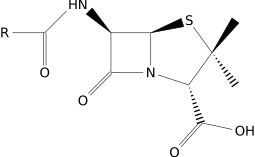
```latex
\usepackage{chemfig}
\begin{document}
\chemfig{[:-90]HN(-[::-45](-[::-45]R)=[::+45]O)>[::+45]*4(-(=O)-N*5(-(<:(=[::-60]O)-[::+60]OH)-(<[::+0])(<:[::-108])-S>)--)}
\end{document}
```
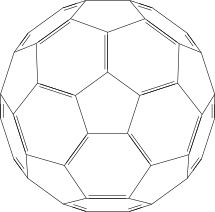
```latex
\usepackage{chemfig}
\begin{document}
\definesubmol\fragment1{
(-[:#1,0.85,,,draw=none]
-[::126]-[::-54](=_#(2pt,2pt)[::180])
-[::-70](-[::-56.2,1.07]=^#(2pt,2pt)[::180,1.07])
-[::110,0.6](-[::-148,0.60](=^[::180,0.35])-[::-18,1.1])
-[::50,1.1](-[::18,0.60]=_[::180,0.35])
-[::50,0.6]
-[::110])
}
\chemfig{
!\fragment{18}
!\fragment{90}
!\fragment{162}
!\fragment{234}
!\fragment{306}
}
\end{document}
```
The Babson Task: Mate in exactly 4 moves
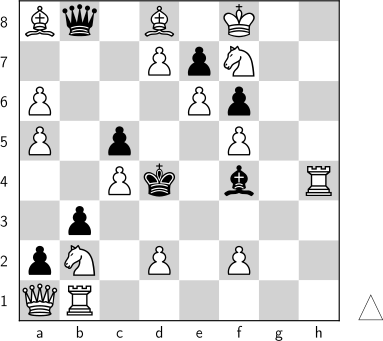
```latex
\usepackage{xskak}
\usepackage{chessboard}
\usepackage[LSB,LSBC4,T1]{fontenc}
\begin{document}
\setboardfontcolors{
    blackfieldmask=gray!35}

\storechessboardstyle{myboard}{%
    borderwidth=0.3mm,
    boardfontencoding=LSBC4,
    boardfontfamily=alphadia,
    moverstyle=triangle,
    showmover}
\setchessboard{style=myboard}
\chessboard[largeboard, setfen=Bq1B1K2/3PpN2/P3Pp2/P1p2P2/2Pk1b1R/1p6/pN1P1P2/QR6 w - - 0 1, showmover]
\end{document}
```
Acknowledgements
Thanks to fenjalien who created the original https://github.com/fenjalien/obsidian-latex-render which this plugin is based on,
A mention goes to https://github.com/gboyd068/obsidian-swiftlatex-render who also adapted fenjalien's original plugin, but took it in a different direction. I was inspired by the idea of rendering latex in obsidian and decided to make my own version that more closely aligned with my use cases and objectives.
Dev Notes:
You can simplify the version bump process by running npm version patch, npm version minor or npm version major after updating minAppVersion manually in manifest.json. The command will bump version in manifest.json and package.json, and add the entry for the new version to versions.json