JWL Linker EN-RU-ES
 Edward Titievskiy55 downloads
Link Bible references and publications of Jehovah's Witnesses to JW Library, and cite verses and paragraphs from jw.org in English, Russian, and Spanish.
- Overview
- Scorecard
- Updates8
Comprehensive multilingual JW Library linker supporting Bible references and JW publications in English, Russian, and Spanish. Features: auto-formatting (od 15 par. 3 → od chap. 15 par. 3).
This is a fork of Original plugin by MrBertie
✨ Key Features
- 📖 Bible References: Automatic conversion to JW Library links with verse text extraction
- 📚 Publication Support: Watchtower, Awake!, books (od, it-1, cl, si, etc.) in multiple formats
- 🌍 Multilingual: Full English, Russian, and Spanish support with auto-detection
- 🔄 Auto-formatting:
od 15 par. 3→od chap. 15 par. 3+ Watchtower month names (English/Russian/Spanish) - 📅 Year Filtering: Watchtower availability (Russian: 1986+, English/Spanish: 1950+)
- 🎯 Dual Language Mode: Show Bible verses and publications in two languages simultaneously with separate toggles
- 💬 Smart Citations: Extract paragraph text with callout formatting
- 📝 Text Quoting: Convert selected text to citation callouts
How to Install
Community Plugins (recommended)
Once this plugin is published to the Obsidian Community Plugins directory, install it from:
Settings → Community plugins → Browse.
Manual install (GitHub Releases)
- Download
main.js,manifest.jsonandstyles.cssfrom the latest GitHub release. - Put them in a new folder
{Obsidian Vault}/.obsidian/plugins/jwl-linker-en-ru-es/(the folder name matches the plugin id inmanifest.json). - Restart Obsidian and enable the plugin in
Settings→Community plugins.
📖 Supported Publication Formats
Bible References
- English:
Rom 1:20,1 Cor 9:26,Psalm 89:18 - Russian:
Рим 1:20,1 Кор 9:26,Псалом 89:18 - Spanish:
Rom 1:20,1 Cor 9:26,Salmo 89:18
Watchtower Publications
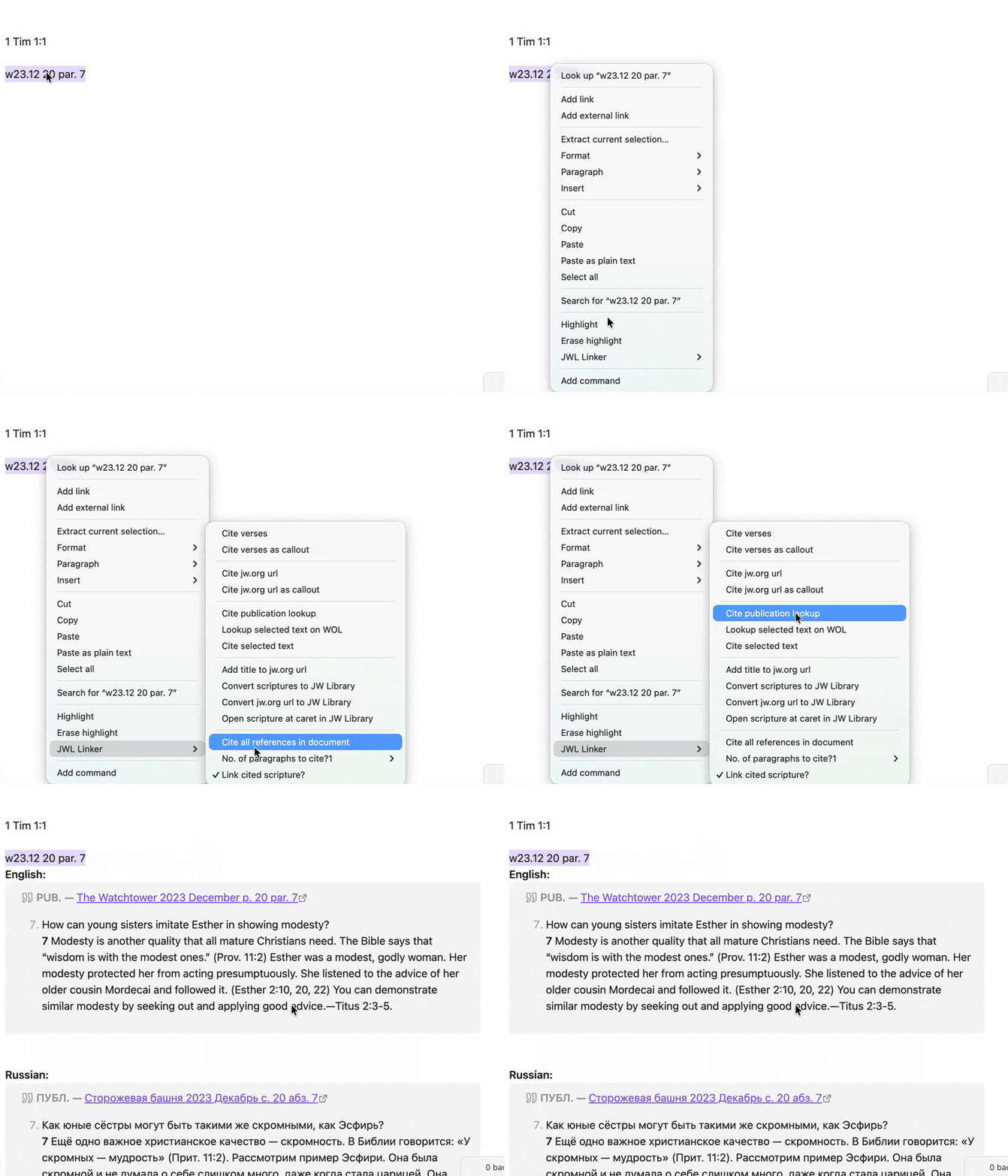 Issues before 2016 came out twice a month and are written with the day; from 2016 on, issues are monthly (
YY.MM).
English writes the date as month/day, Russian and Spanish as day/month.
- English:
w65 6/1 p. 329 par. 6,w23.12 p. 20 par. 7 - Russian:
w10 15/1 с. 3 абз. 1,w25.01 28, абз. 11,w25.3 с. 8 абз. 2 - Spanish:
w10 15/1 pág. 3 párr. 1,w23.12 pág. 20 párr. 7
Watchtower Study Edition (ws)
The study edition existed until 2015; from 2016 on, study articles are in the monthly w issues.
WOL resolves ws references in English only.
- English:
ws12 2/15 15 par. 2
Other Publications
- English:
od 15 par. 3,it-1 332,cl chap. 8 p. 77 par. 2 - Russian:
od 15 абз. 3,cl глава 8 с. 77 абз. 2 - Spanish:
od 15 párr. 3,cl cap. 8 pág. 77 párr. 2
Auto-formatting Examples
Publication Auto-formatting
- English:
od 15 par. 3→od chap. 15 par. 3 - Russian:
od 15 абз. 3→od глава 15 абз. 3 - Spanish:
od 15 párr. 3→od cap. 15 párr. 3
Watchtower Month Names Auto-formatting
Pre-2016 (Two issues per month):
- Russian:
w10 15 Января с. 3 абз. 1→w10 15/1 с. 3 абз. 1 - English:
w10 15 January p. 3 par. 1→w10 01/15 p. 3 par. 1 - Spanish:
w10 15 Enero pág. 3 párr. 1→w10 15/1 pág. 3 párr. 1
Without a day (w10 January ...) the issue is ambiguous, so add the day for issues before 2016.
Post-2016 (One issue per month):
- Russian:
w16 Январь с. 3 абз. 1→w16.01 3, абз. 1 - English:
w25 March p. 8 par. 2→w25.03 p. 8 par. 2 - Spanish:
w25 Marzo pág. 8 párr. 2→w25.03 pág. 8 párr. 2
🎯 How to Use In Reading View
Displays all valid scripture references as JW Library links with automatic language detection. Open any page with scripture references and switch to Reading View to see hyperlinks with full book names.
Note: This only affects the Reading View, it does not modify the underlying Markdown text. Headings, callouts, existing links and code are left as they are.
⚡ How to Use In Editing View
The plugin provides comprehensive commands for scriptures, publications, and citations.
To access the commands:
- On Desktop: right-click next to the scripture, and hover on JWL Linker to see the list of commands.
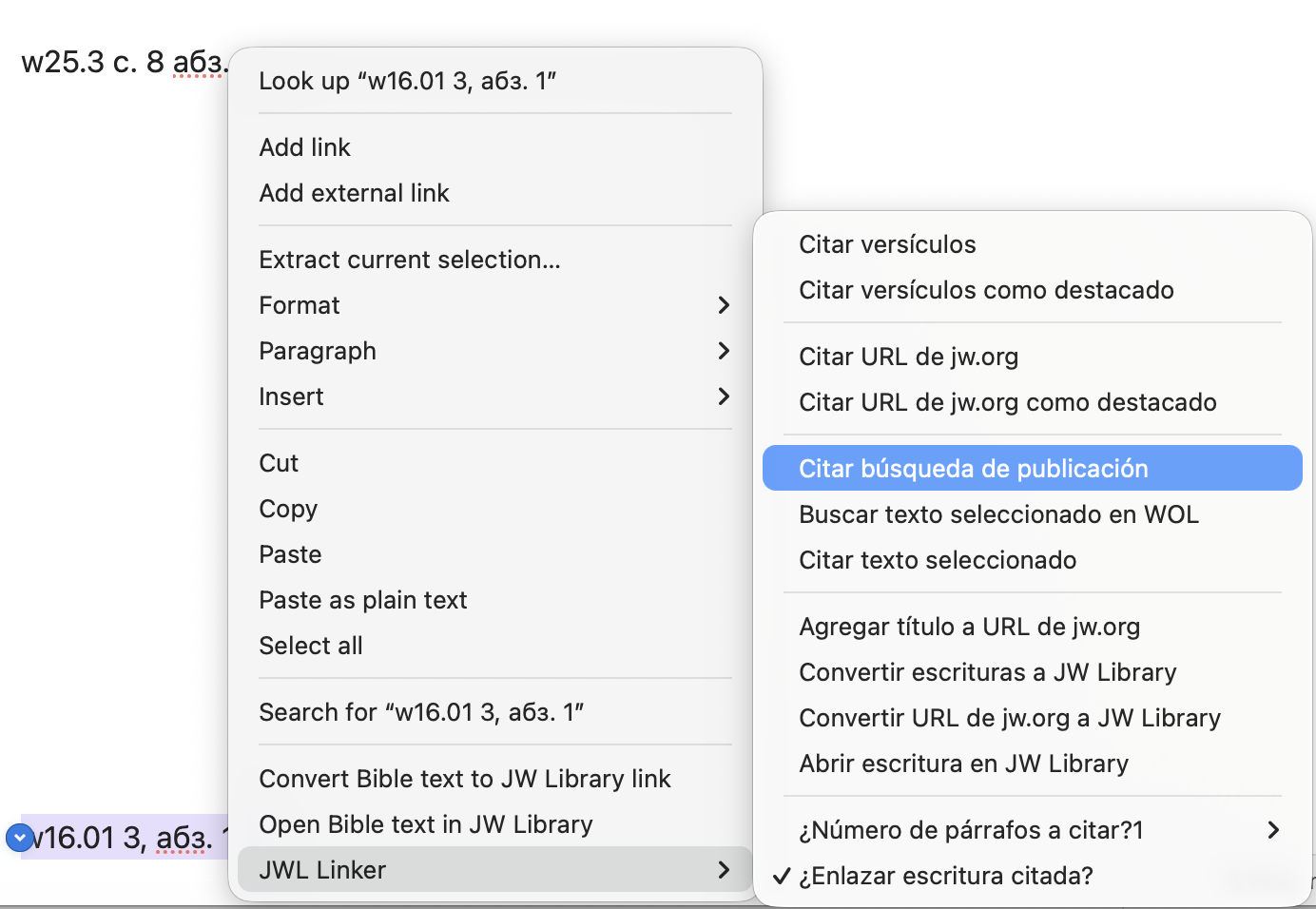
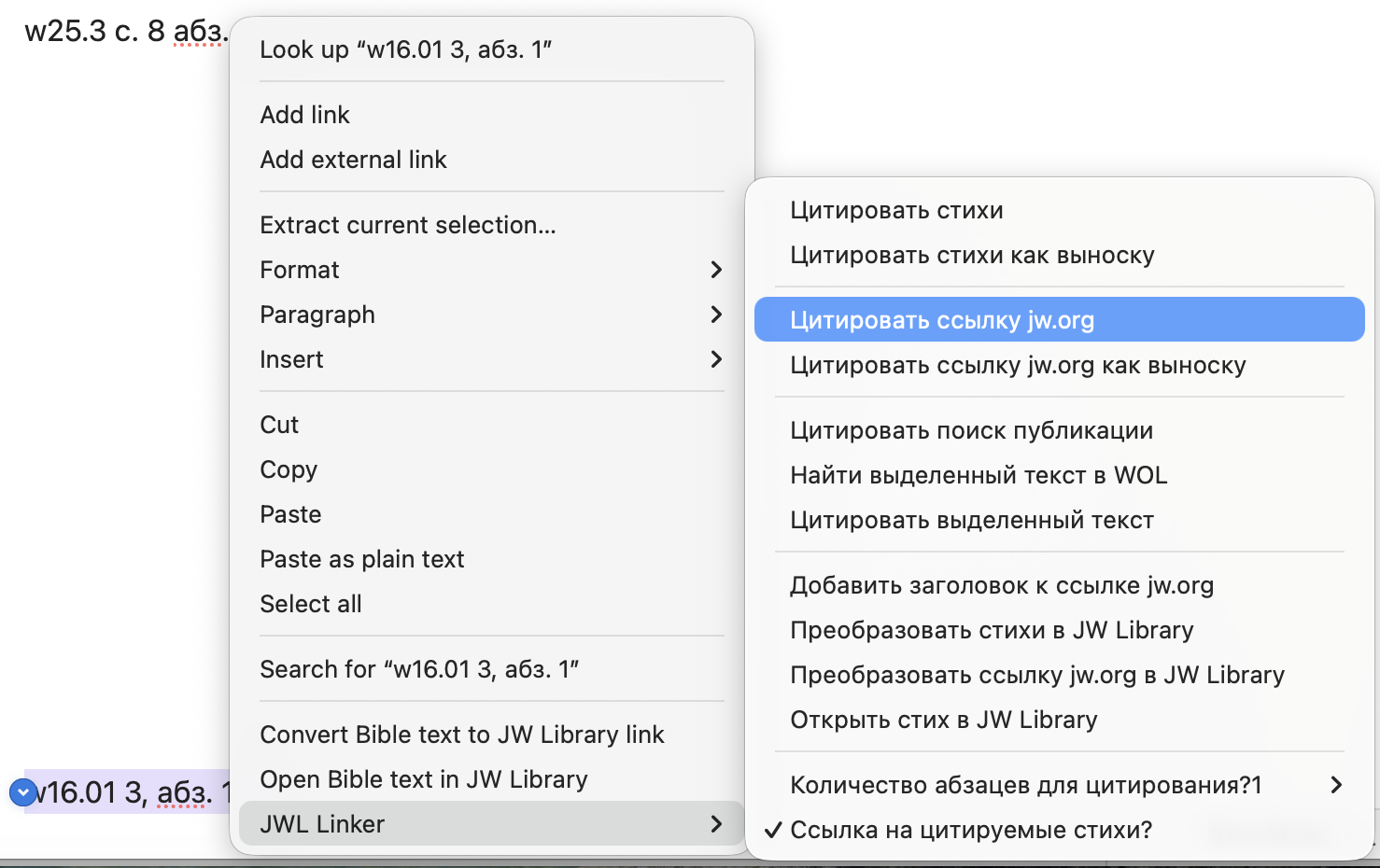
- On Mobile: add a toolbar item for the JWL Linker command.
📋 Available Commands
| Command | Target | Result | Action |
|---|---|---|---|
| Cite verses | Scripture reference | Verse text with JW Library link in plain format | Adds below |
| Cite verses as callout | Scripture reference | Verse text with JW Library link in callout format | Adds below |
| Cite jw.org url | WOL/JW.org URL | Article content with navigation title in plain format | Adds below |
| Cite jw.org url as callout | WOL/JW.org URL | Article content with navigation title in callout format | Adds below |
| Cite publication lookup | Publication reference | Publication content with auto-formatting and language detection | Adds below |
| Lookup selected text on WOL | Any text | Opens WOL search with selected text | Opens browser |
| Cite selected text | Selected text | Wraps text in [!cite] callout format |
Replaces |
| Add title to jw.org url | WOL/JW.org URL | Adds proper navigation title to existing URL | Replaces |
| Convert scriptures to JW Library | Scripture reference | Converts to JW Library markdown link | Replaces |
| Convert jw.org url to JW Library | WOL/JW.org URL | Converts to JW Library URL | Replaces |
| Open scripture in JW Library | Scripture reference | Opens scripture directly in JW Library app | Opens app |
| Cite all references | Entire document | Adds callout citations with full text for all scriptures and publications | Adds below each |
🌍 Multilingual Support
Language Detection
- Automatic: Detects Cyrillic characters for Russian, Spanish Bible book names, defaults to English
- Manual: Set the citation language in plugin settings (English/Russian/Spanish). Publication references typed in another language format are converted, e.g.
w23.12 p. 20 par. 7is cited from the Russian edition asw23.12 20, абз. 7. Page numbers match across languages for recent issues; in very old issues (for example 1960s) they can differ, so a converted reference may point to another article - Dual Language Mode: Show content in two languages simultaneously
- Separate toggles for Bible verses and publications
- Configurable first and second language (ru, en, es)
- Language-specific headers: PUB. (English), ПУБЛ. (Russian), PUBL. (Spanish)
Publication Availability
- Russian Watchtower: Available from 1986 onwards (
w86.01and later) - English/Spanish Watchtower: Available from 1950 onwards (
w50 1/1and later) - Offline Publications: Automatic detection with localized messages in all three languages
Language-Specific Features
- Auto-formatting:
- English:
par.↔chap.↔p. - Russian:
абз.↔глава↔с. - Spanish:
párr.↔cap.↔pág.
- English:
- Publication Titles: Displays in appropriate language
- "The Watchtower" / "Сторожевая башня" / "La Atalaya"
- "The Watchtower (Study Edition)" / "Сторожевая башня (выпуск для изучения)" / "La Atalaya (edición de estudio)"
- "Awake!" / "Пробудитесь!" / "¡Despertad!"
- Interface: Menu items and messages in selected interface language
📝 Example Outputs
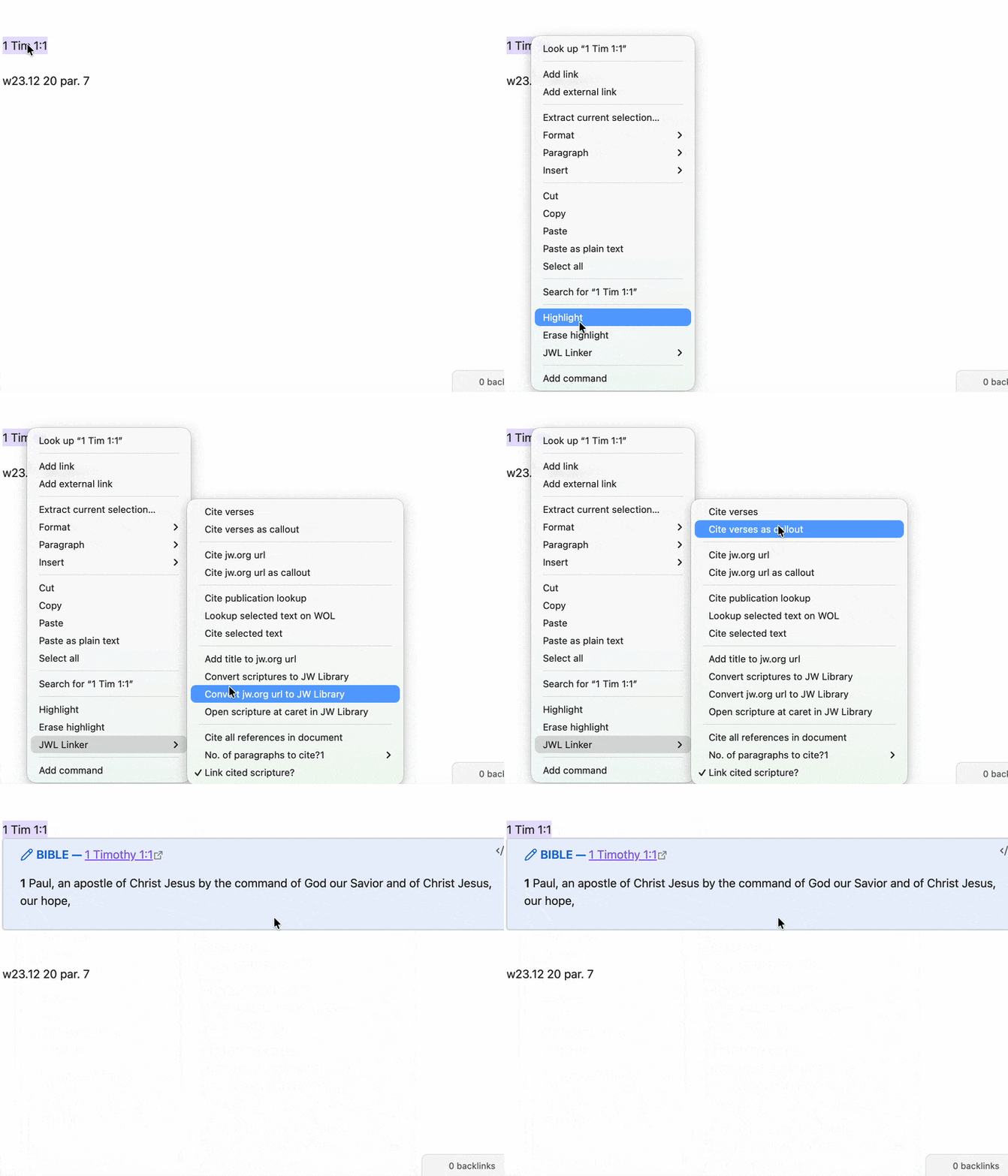
Bible Citation (English)
Rom 1:20
> [!verse] BIBLE — [Romans 1:20](jwlibrary://...)
> **20** For his invisible qualities are clearly seen from the world's creation onward...
Publication Citation (Russian)
w25.3 с. 8 абз. 2
> [!cite] ПУБЛ. — [Сторожевая башня 2025 Март с. 8 абз. 2](https://wol.jw.org/...)
> **2** Иисус любил Иегову всем разумом...
Publication Citation (Spanish)
od 15 párr. 3
> [!cite] PUBL. — [Organizados para hacer la voluntad de Jehová cap. 15 párr. 3](https://wol.jw.org/...)
> **3** La mayoría de las personas hoy no reconocen el principio de la jefatura...
Dual Language Mode Output
Bible Verses (Dual Mode)
Рим 1:20
**English:**
> [!verse] BIBLE — [Romans 1:20](jwlibrary://...)
> **20** For his invisible qualities are clearly seen from the world's creation onward...

**Russian:**
> [!verse] БИБЛИЯ — [Римлянам 1:20](jwlibrary://...)
> **20** Его невидимые качества ясно видны от сотворения мира...
Publications (Dual Mode)
w25.3 с. 8 абз. 2
**English:**
> [!cite] PUB. — [The Watchtower 2025 March p. 8 par. 2](https://wol.jw.org/...)
> **2** Jesus loved Jehovah with his whole mind...

**Russian:**
> [!cite] ПУБЛ. — [Сторожевая башня 2025 Март с. 8 абз. 2](https://wol.jw.org/...)
> **2** Иисус любил Иегову всем разумом...
English + Spanish (Dual Mode)
od 15 par. 3
**English:**
> [!cite] PUB. — [Organized to Do Jehovah's Will chap. 15 par. 3](https://wol.jw.org/...)
> **3** Most people today do not recognize the principle of headship...

**Spanish:**
> [!cite] PUBL. — [Organizados para hacer la voluntad de Jehová cap. 15 párr. 3](https://wol.jw.org/...)
> **3** La mayoría de las personas hoy no reconocen el principio de la jefatura...
Text Citation Examples
English: "This is important information"
> [!cite] QUOTE
> This is important information

Russian: "Это важная информация"
> [!cite] ЦИТАТА
> Это важная информация

Spanish: "Esta es información importante"
> [!cite] CITA
> Esta es información importante
⚙️ Plugin Settings
Display Options
- Verse Template: Customize format for Bible verse citations
- Callout Templates: Customize format for callout-style citations
- Language Settings: Interface language (Russian/English/Spanish) and citation language
Dual Language Mode Settings
- Dual Mode for Verses: Toggle dual language output for Bible verses
- Dual Mode for Publications: Toggle dual language output for Watchtower and other publications
- First Language: Select primary output language (Auto/Russian/English/Spanish)
- Second Language: Select secondary output language (Russian/English/Spanish)
- Language validation prevents selecting the same language for both
Advanced Options
- History Size: Number of recent citations to keep in sidebar
- Bold Numbers: Apply bold formatting to verse/paragraph numbers
- Citation Links: Enable JW Library links for scripture references
- Paragraph Count: Default number of paragraphs to cite
🔗 Opening Links
Click any generated link to open directly in your installed JW Library app at the exact scripture or publication reference.
💡 Tips for Usage
Command Access Methods
- Right-click Menu: Right-click in editor → hover "JWL Linker" → select command
- Command Palette:
Ctrl/Cmd + P→ type "jw..." → select command - Commander Plugin: Add commands to toolbar for quick access
- Pinned Commands: Pin frequently used commands in Command Palette
Best Practices
- Select text before running commands for best results
- Use dual mode when working with multilingual content
- Check publication years - older Watchtowers may not be available online
- Verify auto-formatting - plugin automatically adds language-appropriate terms:
- English: "chap.", "par.", "p."
- Russian: "глава", "абз.", "с."
- Spanish: "cap.", "párr.", "pág."
- Use natural month names - plugin auto-converts Watchtower month names:
- Russian: "Январь", "Февраль", "Март", etc.
- English: "January", "February", "March", etc.
- Spanish: "Enero", "Febrero", "Marzo", etc.
- Historical accuracy - plugin respects pre-2016 two-issue format vs. post-2016 single-issue format
Supported Publication Codes
- Books:
od,it-1,it-2,si,cl,jv,dp,ip-1,ip-2,be,th - Periodicals:
w(Watchtower),ws(Watchtower Study Edition),g(Awake!),km,mwb - Study Aids:
lff,rr,rs
🔒 Privacy and permissions
- Network: the plugin only contacts
www.jw.org(Bible verse text) andwol.jw.org(publication paragraphs and article titles), and only when you run a citation command. Nothing is sent anywhere else, and there is no tracking or telemetry. - Clipboard: the plugin only writes to the clipboard, and only when you click an item in the history sidebar to copy it. It never reads the clipboard.
- Files: citations are inserted into the note you are editing; no other files are read or changed. Citation history is kept in Obsidian's workspace layout.
- Release files:
main.js,manifest.jsonandstyles.cssin each GitHub release are built by GitHub Actions with a signed build provenance attestation. You can check them withgh attestation verify main.js -R argonfatl/jwl-linker-ENRU.
🛠️ Development
The plugin is a single main.js file (no build step). Tests use Node's built-in test runner and need no dependencies:
npm test          # parsing, formatting and citation tests (tests/)
npm run check     # syntax check of main.js
Releasing
- Update the version in
manifest.json,package.jsonandversions.json("<version>": "<minAppVersion>"). - Commit, then push a tag that is exactly the version number (no
vprefix):git tag 0.8.0 git push origin 0.8.0 - The Release GitHub Action checks that the tag matches
manifest.json, runs the tests, attests build provenance and publishes a release withmain.js,manifest.jsonandstyles.css.
Pull the merged changes before tagging (git checkout main && git pull): the tag must point to the commit that has the new version, otherwise the release check stops.
☕ Support
If you find this plugin helpful and want to support its development:
Version: 0.8.2 | Languages: English, Russian, Spanish | Platform: Obsidian Desktop & Mobile