Inkwell
 westkronos147126 downloads
Color, highlight, size and style font families for selected text with inline HTML spans.
- Overview
- Scorecard
- Updates7
Visual inline styling and formatting for Obsidian.
Color, highlight, resize, style typography, and format text with a clean contextual floating toolbar. Inkwell stores all inline formatting as standard HTML <span> tags directly in your Markdown notes, keeping your notes readable and styled everywhere.
Features
1. Unified Inline Formatting (Zero Markdown Delimiter Clutter)
- Bold (
font-weight: bold;) - Italic (
font-style: italic;) - Underline (
text-decoration: underline;) - Strikethrough (
text-decoration: line-through;) - Combined decorations (e.g.
underline line-through;) - No asterisks or tildes: Inkwell commands and shortcuts never generate
**,*, or~~. All inline styles live inside a consolidated, clean HTML span. - Independent style removal: Remove bold from a word without stripping its color, size, or underline. When all styles are removed, the span tag is automatically and cleanly deleted.
2. Compact Floating Selection Toolbar
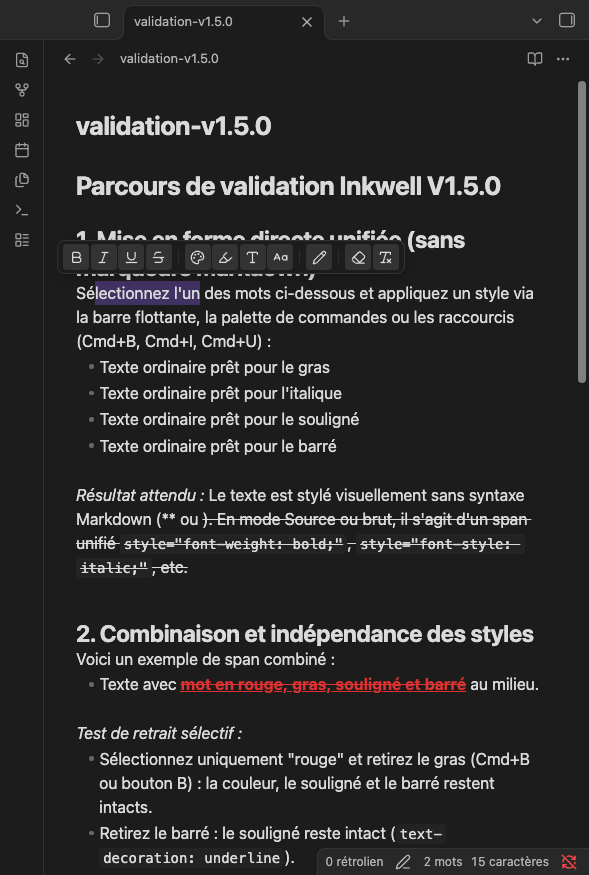
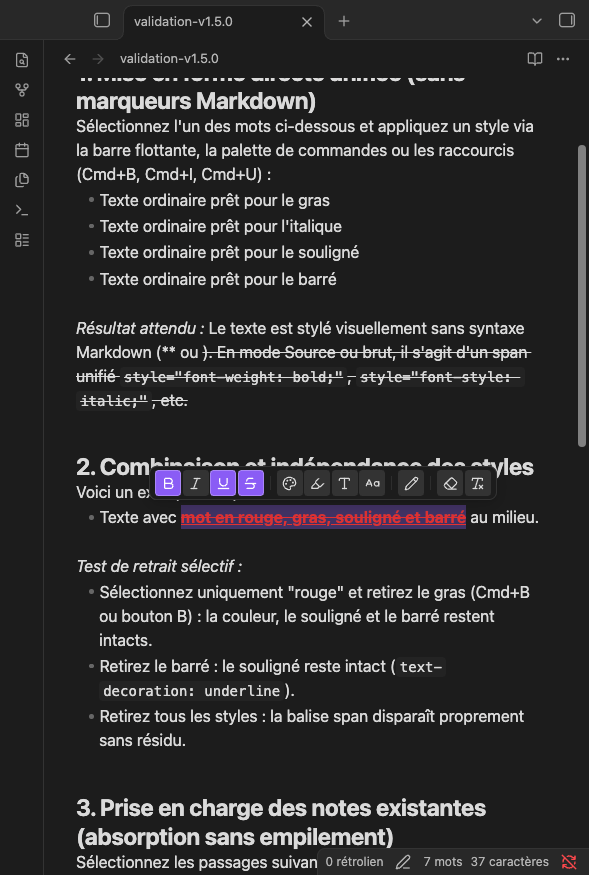
Appears automatically above selected text in Live Preview (desktop and mobile), organized into 4 logical groups:
- Group 1: Basic Typography — Bold (
Mod+B), Italic (Mod+I), Underline (Mod+U), Strikethrough. - Group 2: Rich Styling — Text Color, Custom Highlight, Font Size & Headings, Font Family.
- Group 3: Content Editing — Quick text edit modal to alter text without breaking tags.
- Group 4: Cleanup Tools — Targeted cleanup menu (remove color, remove highlight) + 1-click global clear formatting button.
- Accessible States: Active styles feature a solid accent fill, while mixed styles (partial selections) display a distinct inset border and a textured dotted indicator.
3. Rich Colors & Custom Highlight Appearance
- Curated 8-Color Palette + custom hex color picker with live contrast ratio preview against your current theme.
- Custom Highlight Appearance: Configure highlight opacity, border corner radius ($0\text{ to }12\text{ px}$), line height thickness ($15%\text{ to }100%$), and vertical offset position.
4. Typography & Font Sizes
- Font Sizes: Relative presets (Small
0.85em, Normal, Large1.25em) and absolute point sizes ($4\text{ to }144\text{ pt}$, Word-style). - Headings Helper: Quick switch between Normal text and Markdown headings ($H1\text{ to }H6$).
- Font Families: Standard generic families (
sans-serif,serif,monospace) and personal font import (.ttf,.otf,.woff,.woff2) loaded locally into your vault.
5. Seamless Masking & Transparent Editing
- Balises and raw HTML code are hidden in both Live Preview and Source Mode.
- Free character-by-character caret navigation and selection.
- Natural typing, Backspace/Delete across span boundaries, Enter to split spans across lines, and atomic undo/redo (
Mod+Z). - Markdown structures (headings, lists, checkboxes, tables, code blocks) and code syntax are strictly preserved and never altered.
How Inkwell Stores Formatting
Inkwell records all inline formatting directly in the Markdown text using standard HTML tags:
<span data-inkwell="1" style="color: #e03131; font-weight: bold; text-decoration: underline;">styled text</span>
Why HTML Spans?
Standard Markdown syntax (**, *, ~~) does not support text colors, custom background highlights, font sizes, or font families. Rather than introducing proprietary or non-standard Markdown syntax that would break other tools, Inkwell uses standard HTML5 inline spans recognized by all modern HTML and Markdown renderers.
What Happens Without Inkwell?
- In Obsidian (if plugin is disabled): Obsidian's native Markdown renderer supports inline HTML. Your formatted text will still render correctly in Reading View and Live Preview.
- In External Markdown Viewers (e.g. GitHub, Typora, VS Code): The text is fully readable. Renderers with HTML support will display the CSS styling; plain text editors will display the raw
<span>tags. Your content is never locked into a proprietary database. - Existing Notes: Inkwell does not convert your vault automatically. If you format text that contains legacy Markdown delimiters (
**...**,~~...~~,<u>...</u>), Inkwell cleanly absorbs and replaces them with the unified HTML span without creating messy redundant tags.
Installation
From Obsidian Community Plugins
- Open Settings → Community plugins.
- Make sure Restricted mode is turned Off.
- Click Browse and search for
Inkwell. - Click Install, then Enable.
Manual Installation
- Download
main.js,manifest.json, andstyles.cssfrom the latest GitHub Release. - Create a folder named
inkwellinside your vault's plugins directory:<YourVault>/.obsidian/plugins/inkwell/ - Copy
main.js,manifest.json, andstyles.cssinto that folder. - Reload Obsidian, then go to Settings → Community plugins and enable Inkwell.
Usage
Floating Toolbar
- Select any text in a note in Live Preview.
- Click any formatting button on the floating toolbar to apply or toggle a style.
- Click outside or press
Escapeto close popovers or dismiss the toolbar.
Keyboard Shortcuts
Mod + B: Toggle Bold (HTML)Mod + I: Toggle Italic (HTML)Mod + U: Toggle Underline (HTML) (You can customize these shortcuts in Settings → Hotkeys).
Command Palette (Cmd/Ctrl + P)
- Inkwell: Focus floating toolbar
- Inkwell: Apply default text color
- Inkwell: Choose text color...
- Inkwell: Remove text color
- Inkwell: Choose text highlight...
- Inkwell: Remove text highlight
- Inkwell: Choose font family...
- Inkwell: Choose text size...
- Inkwell: Clear all Inkwell formatting
Limitations
- Multi-line Paragraph Selections: As with standard inline HTML elements, formatting spans cannot span across multiple paragraph breaks. To style multiple paragraphs, apply the style to each paragraph.
- External Plaintext Editors: Editors that do not interpret HTML will display raw
<span>tags instead of markdown asterisks.
Compatibility & Platforms
- Obsidian Target Version: Minimum declared app version is v1.4.4+ (baseline for modern CodeMirror 6 inline decoration APIs). Actively tested and validated on Obsidian v1.7+ / v1.8+. Compatibility with older 1.4.x historical versions has not been back-tested.
- Tested Platforms:
- macOS (Desktop): Fully tested and validated in active use.
- Theoretically Compatible (Untested):
- Windows & Linux (Desktop): Uses standard cross-platform Obsidian APIs without native binaries. Not yet tested.
- iOS, iPadOS & Android (Mobile): CodeMirror 6 and HTML styling are standard across mobile apps, but mobile touch gestures and virtual keyboards have not been formally validated yet.
License
This project is licensed under the 0BSD License (or choice of license upon final release). See the LICENSE file for details.