Search...Search plugins and themes...
⌘K
Sign in
  • Get started
  • Download
  • Pricing
  • Enterprise
  • Account
  • Obsidian
  • Overview
  • Sync
  • Publish
  • Canvas
  • Mobile
  • Web Clipper
  • CLI
  • Learn
  • Help
  • Developers
  • Changelog
  • About
  • Roadmap
  • Blog
  • Resources
  • System status
  • License overview
  • Terms of service
  • Privacy policy
  • Security
  • Community
  • Plugins
  • Themes
  • Discord
  • Forum / 中文论坛
  • Merch store
  • Brand guidelines
Follow us
DiscordTwitterBlueskyThreadsMastodonYouTubeGitHub
© 2026 Obsidian

Image Picker

ariamckinleyariamckinley2k downloads

A blazingly fast way to browse, search, and embed pictures across your vault

Add to Obsidian
  • Overview
  • Scorecard
  • Updates4

Image Picker is a blazingly fast way to browse and find media in your Obsidian vault. It's extremely performant, automatically generating thumbnails and background indexing your vault for instant search results.
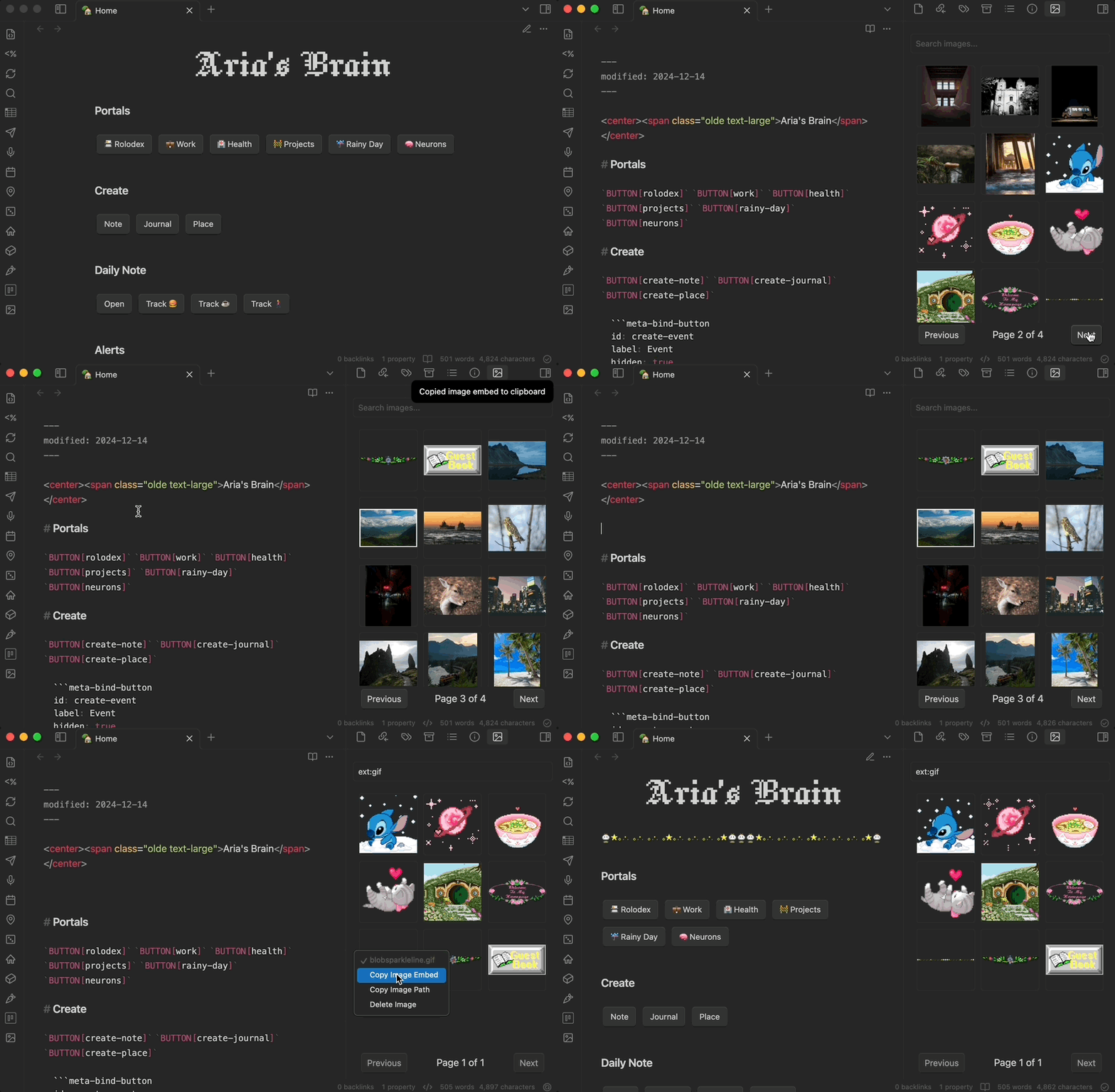
Image Picker Preview

🐙 GitHub | 📖 Docs | 💝 Donate

⚙️ Settings

  • Image Folder: The highest root folder that you want Image Picker to search for images in. If you store your attachments in a specific folder, please select it for better performance.
  • Animate Gifs: Whether or not to animate gifs in the preview. Disabling this will improve performance if you have a lot of gifs in your vault.
  • Debug Mode: Enable this to see helpful debug logs in the console. Please use this if you're experiencing issues and want to report them.
  • Reset Image Index: Click this button to reset the image index and reload Obsidian. This will force Image Picker to re-index your vault, which is useful if you've changed your Image Folder.

🗺️ Roadmap

  • Performantly browse photos across your vault
  • Search for photos by name and extension
  • Background image indexing for instant search results
  • Automatically generate thumbnails for images
  • Support for renaming images
  • Support local LLMs for generating searchable descriptions
  • Index and search for images by metadata, such as location, date, and more
  • Support for video and audio files

🛠️ Contributing

Quick start:

# Clone the repository
git clone https://github.com/AriTheElk/obsidian-image-picker
cd obsidian-image-picker

# Install the dependencies
npm install

# To build the plugin
npm run build

# If you want to build the plugin directly into your vault
echo "/ABSOLUTE/PATH/TO/YOUR/VAULT" > .env
npm run build:vault

This will clone the repository, install the dependencies, and build the plugin. If you've set the path correctly, the plugin should be available in your Obsidian vault. It copies to {vault}/.obsidian/plugins/obsidian-image-picker-dev immediately after building.

If you'd like to help out, I'd recommend checking out the help wanted tag 🫶🏻

I'm eternally grateful for any help I get :)

👩‍⚖️ License

Obsidian Image Picker is licensed under the MIT License. See LICENSE for more information.

71%
HealthGood
ReviewCaution
About
Browse and find images and media across your Obsidian vault with background indexing for instant search results. Generate thumbnails automatically, search by name or file type, and preview media instantly for quick selection.
ImagesAttachmentsSearch
Details
Current version
1.1.1
Last updated
Last year
Created
Last year
Updates
4 releases
Downloads
2k
Compatible with
Obsidian 0.15.0+
Platforms
Desktop, Mobile
License
MIT
Report bugRequest featureReport plugin
Sponsor
Support
Author
ariamckinleyariamckinley
ari.the.elk.wtf
GitHubariamckinley
  1. Community
  2. Plugins
  3. Images
  4. Image Picker

Related plugins

Image Context Menus

Image context menus (mostly on right click): Copy to clipboard, Open in default app, Show in system explorer, Reveal file in navigation, Open in new tab.

Ink

Hand write or draw directly between paragraphs using a digital pen, stylus, or Apple pencil.

Local Images Plus

A reincarnation of Local Images to download images in Markdown notes to local storage.

Paste image rename

Rename image after pasting, support name pattern and auto renaming.

Image auto upload

Upload images from your clipboard by PicGo.

Imgur

Upload images from your clipboard to imgur.com and embeds uploaded image to your note.

Unofficial Supernote by Ratta Integration

View Supernote notes, generate markdown from note and capture screen mirror.

Note Gallery

A masonry gallery that will visualize your notes, similar to Craft note view.

Book Search

Create book notes and insert book metadata from providers including Google Books and Naver.

Image Manager

Insert, rename, and sort images within your notes.