Search...Search plugins and themes...
⌘K
Sign in
  • Get started
  • Download
  • Pricing
  • Enterprise
  • Account
  • Obsidian
  • Overview
  • Sync
  • Publish
  • Canvas
  • Mobile
  • Web Clipper
  • CLI
  • Learn
  • Help
  • Developers
  • Changelog
  • About
  • Roadmap
  • Blog
  • Resources
  • System status
  • License overview
  • Terms of service
  • Privacy policy
  • Security
  • Community
  • Plugins
  • Join the community
  • Discord
  • Forum / 中文论坛
  • Merch store
  • Brand guidelines
Follow us
DiscordTwitterBlueskyThreadsMastodonYouTubeGitHub
© 2026 Obsidian

Git Integration

noradroidnoradroid2k downloads

Easily backup vault on a remote repository.

Add to Obsidian
  • Overview
  • Scorecard
  • Updates8

This is a Git Integration plugin for Obsidian (https://obsidian.md) to allow users to easily backup their obsidian vault on a remote repository.

This plugin works on Windows 10+ and requires Git to be installed in the local system.

  • Open the git menu
  • Setup remote repository
  • Create a commit
  • Sync with remote repository

Open the git menu

Click "Open git menu" ribbon icon.

Git menu ribbon

The menu will pop up, which shows options to init, commit or sync.
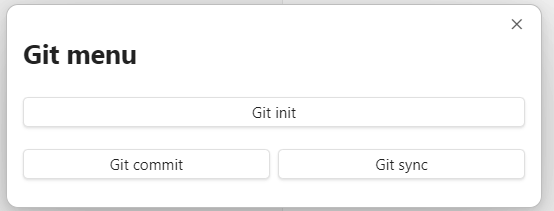
Git menu modal

Setup remote repository

Create an empty repository on GitHub.

Open to the git menu and select "Git init" or open the command palette (Ctrl+P on Windows) and search "Open init repository modal".
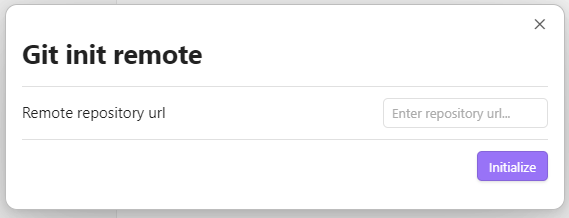
Git init modal

Paste the remote repository url and click "Initialize" to finish setting up.

Create a commit

Open to the git menu and select "Git commit" or open the command palette (Ctrl+P on Windows) and search "Open commit changes modal".
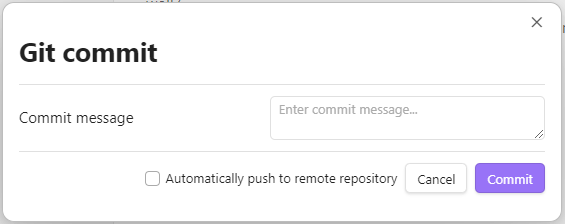
Git commit modal

Enter a commit message and click "Commit". This is equivalent to performing git add . followed by git commit -m "<message>". You may also check "Automatically push to remote repository" to push immediately after commit.

Sync with remote repository

Open to the git menu and select "Git sync" or open the command palette (Ctrl+P on Windows) and search "Sync with remote repository".
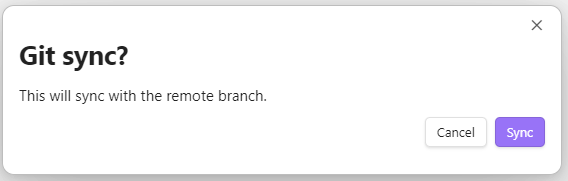
Git sync modal

Click "Sync" to push new changes to remote.

68%
HealthFair
ReviewCaution
About
Sync your vault with a remote Git repository directly from Obsidian via an integrated git menu. Initialize repositories, create commits with messages, and push or pull changes; requires Git and works on Windows 10+.
GitBackupSyncing
Details
Current version
0.4.0
Last updated
2 years ago
Created
2 years ago
Updates
8 releases
Downloads
2k
Compatible with
Obsidian 1.5.3+
License
MIT
Report bugRequest featureReport plugin
Author
noradroidnoradroid
github.com/noradroid
GitHubnoradroid
  1. Community
  2. Plugins
  3. Git
  4. Git Integration

Related plugins

GitHub

GitHub Sync

Sync vault to personal GitHub.

Remotely Save

Sync notes between local and cloud with smart conflict: S3, Dropbox, webdav, OneDrive, Google Drive, Box, pCloud, Yandex Disk, Koofr, Azure Blob Storage.

YAOS

Simple real-time sync powered by your own Cloudflare Worker.

Git

Integrate Git version control with automatic backup and other advanced features.

GitHub

GitHub Gitless Sync

Sync a GitHub repository with vaults on different platforms without requiring git installation

Remotely Sync

Security fixes for the remotely-save unofficial plugin allowing users to synchronize notes between local device and the cloud service. Not backwards compatible.

Self-hosted LiveSync

Sync vaults securely to self-hosted servers or WEBRTC.

Cloud sync

Sync your notes to multiple cloud storage services and provide end-to-end encryption protection.

Rsync

Sync notes and automate backups using Rsync.

Notes Sync Share

Sync and share (publish) your notes in your own private service.