Gallery View Dashboard
 Kawê Cezar1k downloads
Transforms your vault's directory structures into a streamlined grid of card visuals with fallback banners and interactive metadata.
- Overview
- Scorecard
- Updates22
A powerful, visual gallery plugin for Obsidian that transforms your vault folders into a beautiful, navigable dashboard. Organize your resources, courses, and media with custom banners and intuitive folder structures.
Preview
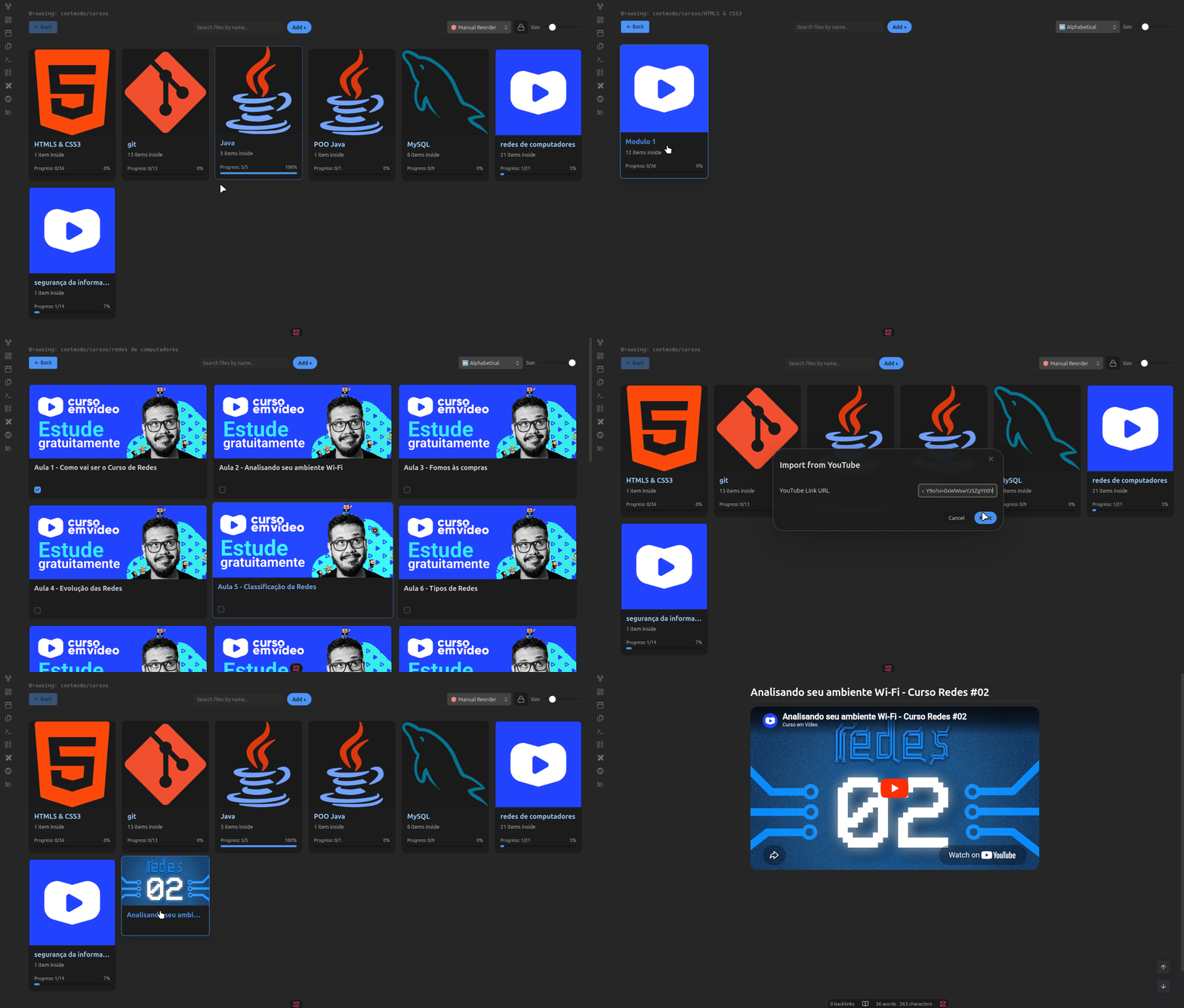
🚀 Features
- Dynamic Dashboard View: Browse your vault as a visual library with custom banners.
- Hierarchical Navigation: Seamlessly move between subfolders and files with an integrated navigation system.
- Customizable Banners: Set unique banner images for folders and individual notes.
- Metadata Integration: Display file metadata (like status or tags) directly on library cards.
- Quick Action Checkboxes: Manage task statuses directly from the library view.
- Live Settings Sync: Instant updates to your library structure without needing to reload.
- Smart Folder Suggestion: Auto-complete path selection for easy configuration.
⚙️ Setup
- Open Settings > Gallery Dashboard.
- Set your Library Root Target Path (e.g.,
conteudo/cursos). - Configure your Visible Metadata Keys to see your frontmatter properties.
- Use the Live Library Vault Tree section to assign custom banners to specific folders.
- Add Manual Customizations for specific overrides.
🖼️ How to use
- Browsing: Click any folder card to enter it, or click a file card to open the note.
- Navigation: Use the "Back" button in the gallery toolbar to return to the parent folder.
- Customization: Edit banners via the plugin settings to match your vault's theme.
🛠️ Development
This plugin was built using the Obsidian Plugin API.
Build
npm install
npm run build
HealthExcellent
ReviewSatisfactory
About
Transform your vault folders into a visual, navigable dashboard with custom banners and hierarchical navigation. Display file metadata on library cards, toggle task checkboxes directly from the gallery, and browse files and subfolders with live updates and smart folder suggestions.Details
Current version
3.0.9
Last updated
Last month
Created
4 months ago
Updates
22 releases
Downloads
1k
Compatible with
Obsidian 1.12.7+
Platforms
Desktop, Mobile
License
0BSD