Search...Search plugins and themes...
⌘K
Sign in
  • Get started
  • Download
  • Pricing
  • Enterprise
  • Account
  • Obsidian
  • Overview
  • Sync
  • Publish
  • Canvas
  • Mobile
  • Web Clipper
  • CLI
  • Learn
  • Help
  • Developers
  • Changelog
  • About
  • Roadmap
  • Blog
  • Resources
  • System status
  • License overview
  • Terms of service
  • Privacy policy
  • Security
  • Community
  • Plugins
  • Themes
  • Discord
  • Forum / 中文论坛
  • Merch store
  • Brand guidelines
Follow us
DiscordTwitterBlueskyThreadsMastodonYouTubeGitHub
© 2026 Obsidian

Footlinks

dahawongdahawong11k downloads

Extract URLs from main text to footer.

Add to Obsidian
  • Overview
  • Scorecard
  • Updates3

En | 简

⚠️ Make sure you are using the latest version.
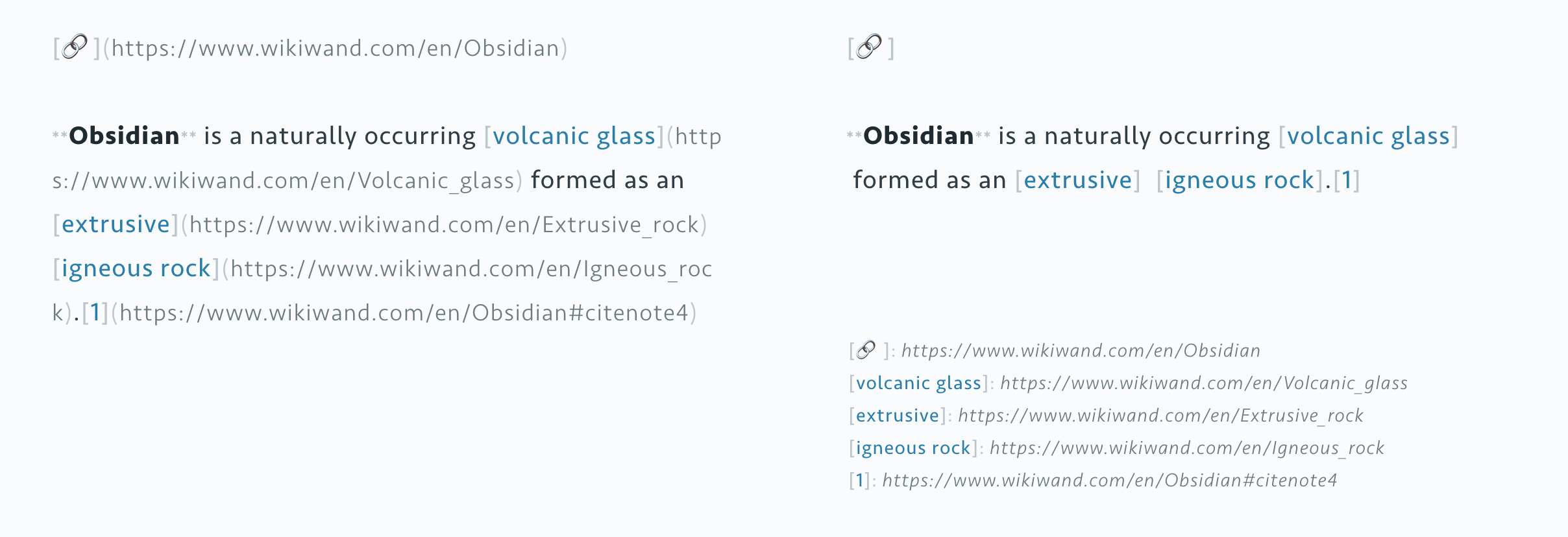
Demo

Use

  • Click the icon of Footlinks on the left side menu.
  • Or, type command Footlinks.

Preference

On Footlinks setting page, you can:

  • Add a seperator between main body and footlinks, say ---. (stay empty by default)
  • Decide whether the side menu icon is shown or not.

Known Issues

  1. Footlinks cannot be parsed by Obsidian in block quote, this could be considered as a bug of app. Just in case you are heavily using block quotes.
  2. More issues please report on GitHub Issues or Obsidian Forum to let me know.

Development Roadmap

See this page.


☕️ To express your thankfulness: Buy Me a Coffee

58%
HealthNeeds work
ReviewSatisfactory
About
Extract and list a note's links as footlinks separated from the main body by a configurable divider. Open the left-side Footlinks panel or run the Footlinks command to view and manage your note's footlinks.
LinksSidebar
Details
Current version
0.1.7
Last updated
5 years ago
Created
5 years ago
Updates
3 releases
Downloads
11k
Platforms
Desktop, Mobile
Report bugRequest featureReport plugin
Author
dahawongdahawong
GitHubdahawong
  1. Community
  2. Plugins
  3. Links
  4. Footlinks

Related plugins

Atomic Insights

Analyze your Obsidian graph connections using the Adamic Adar index.

Notebook Navigator

A better file browser and calendar inspired by Apple Notes, Bear, Evernote and Day One.

Recent Files

Display a list of recently opened files.

Smart Connections

AI link discovery copilot. See related notes as you write. Lookup using semantic (vector) search across your vault. Zero-setup local model for embeddings, no API keys, private.

Excalidraw

Visual PKM powerhouse. Create and edit Excalidraw drawings.

Longform

Helps you write and edit novels, screenplays, and other long projects.

Flexplorer

Enhance the file explorer with custom sorting, pinning, and hiding.

Link Favicons

See the favicon for a linked website.

HiNote

Add comments to highlighted notes, use AI for thinking, and flashcards for memory.

Advanced URI

Control everything with URI.