Flash Navigation
 erl-koenig2k downloads
Jump to any visible text instantly by typing characters and using labeled shortcuts for fast navigation.
- Overview
- Scorecard
- Updates9
A powerful navigation plugin for Obsidian that lets you quickly jump to any visible text using search labels. Inspired by flash.nvim and similar tools.
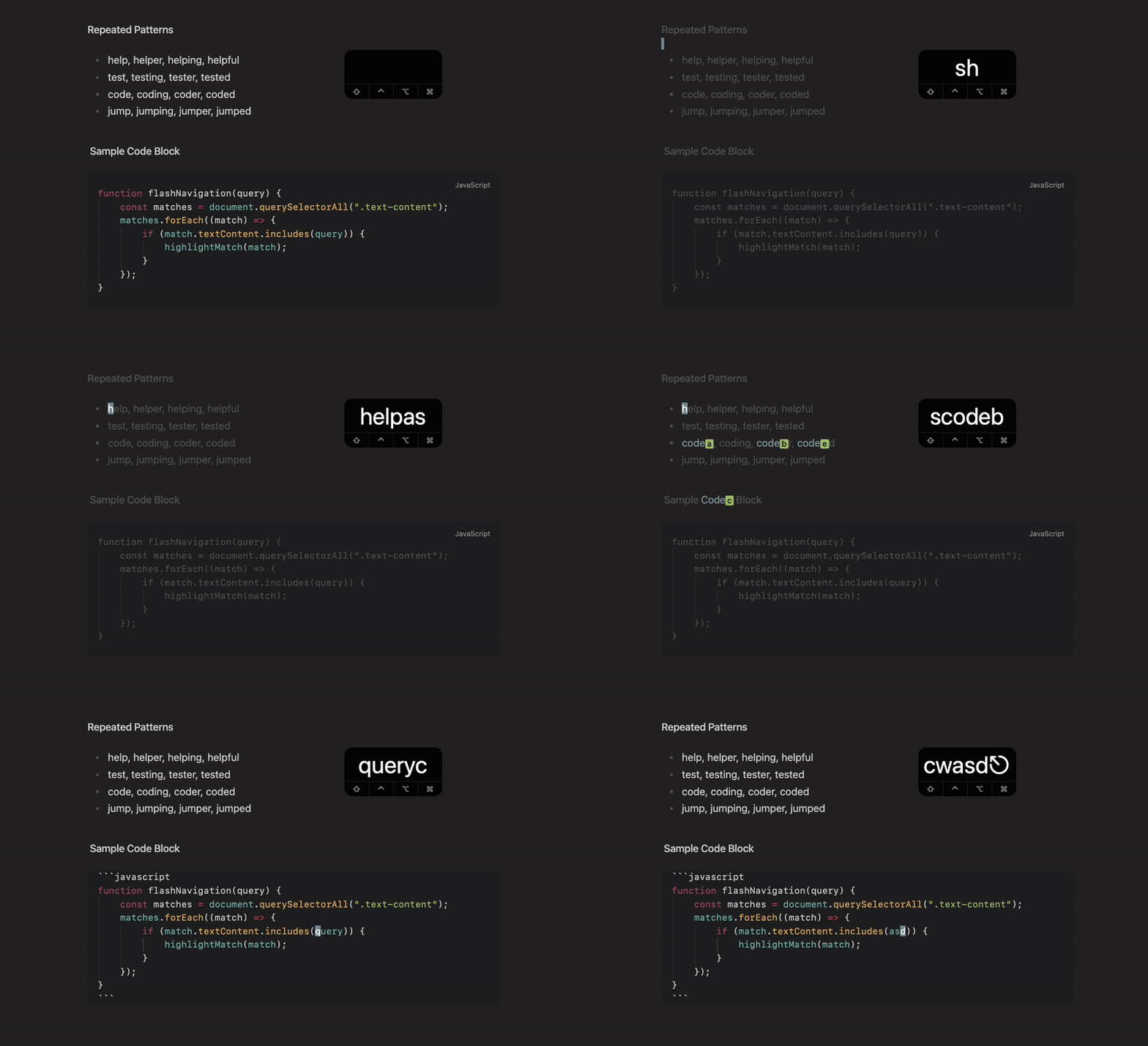
Features
- 🔍 Smart Search: Type characters to highlight matching text throughout your document
- 🏷️ Jump Labels: Automatically assigns labels to matches for instant navigation
- ⚡ Fast Navigation: Jump to any visible location with a single keypress
- 📊 Live Search Display: Real-time status bar shows what you're typing as you search
- 🎨 Customizable Appearance: Fully customizable colors and styling
- 📝 Precise Highlighting: Only highlights the exact characters you've typed
Installation
From Obsidian Community Plugins
- Open Obsidian Settings
- Go to Community Plugins and disable Safe Mode
- Click Browse and search for "Flash Navigation"
- Install and enable the plugin
Manual Installation
- Download the latest release from GitHub
- Extract the files to
VaultFolder/.obsidian/plugins/obsidian-flash-navigation/ - Reload Obsidian and enable the plugin in Settings
Setup
Basic Usage
Add a command to trigger flash navigation. You can use:
- Command Palette: Search for "Start Navigation"
- Hotkey: Set a custom hotkey in Obsidian Settings > Hotkeys
Vim Mode Setup (Recommended)
If you use Vim mode with the Vimrc plugin, add this to your .obsidian.vimrc:
" Unmap the default 's' command and remap to flash navigation
nunmap s
exmap flashNav obcommand flash-navigation:start-navigation
nmap s :flashNav<CR>
Usage
- Start: Trigger the flash navigation command (e.g.
sremap in vim mode or via hotkey) - Search: Type characters - matching text gets highlighted and your search query appears in the status bar with a ⚡ icon
- Jump: Press a label character (a-z, A-Z, 0-9) to jump to that location
- Refine: Continue typing to narrow down matches
- Exit: Press
EscapeorBackspaceuntil search is empty
Example
1. Press 's' to start flash mode
2. Type "hel" - all instances of "hel" get highlighted and status bar shows "⚡ hel"
3. See labels: hel[a]lo, hel[b]p, hel[c]icopter
4. Press 'a' to jump to "hello"
Behavior:
- Uses specified label characters; if exhausted, fills remaining labels with
?. - Automatically exits flash mode if:
- No matches are found (similar to flash.nvim)
escapeis pressedbackspaceis pressed until search is empty- Scrolling happens (mousewheel, scrollbar, etc.)
- The active view changes (e.g. switching files)
Customization & Colors
The plugin offers various customization options in Settings:
- Search Behavior: Case sensitivity and custom label characters
- Auto toggle source mode: Automatically toggle source mode when entering/leaving flash-mode
- Visual Styling: Colors and font weights for dimmed text and matches
- Label Styling: Appearance and position of jump labels
- Status Bar Item: Customize the statusbar item position, visibility and icon
Color Customization
All colors are optional and will use your current Obsidian theme colors as defaults:
- Dim Color: Uses faint text color (for non-matching text)
- Match Color: Uses accent color (for highlighted matches)
- Label Background: Uses green color (for jump label backgrounds)
- Label Text: Uses inverted accent text color (for jump label text)
- Question Mark Labels: Uses yellow color (for overflow labels)
Development & Contribution
Feel free to open an issue on GitHub for feature requets or bug reports.
Contributions are welcome.
Acknowledgments
- Inspired by flash.nvim and flash.vscode
- Built for Obsidian
- Uses CodeMirror 6 decorations for text highlighting
License
This project is licensed under the MIT License.
Say Thanks
This plugin is developed by Erl-koenig.
If you find this plugin helpful, consider supporting its development