First Draft
 grobmeier315 downloads
Write screenplays efficiently in portable Fountain text.
- Overview
- Scorecard
- Updates7
First Draft is an Obsidian community plugin for writing screenplays efficiently in plain-text Fountain syntax.
The guiding principle is simple: think about the movie, not the syntax. First Draft adds screenplay-aware assistance while keeping every document portable, human-readable, and useful when the plugin is not installed.
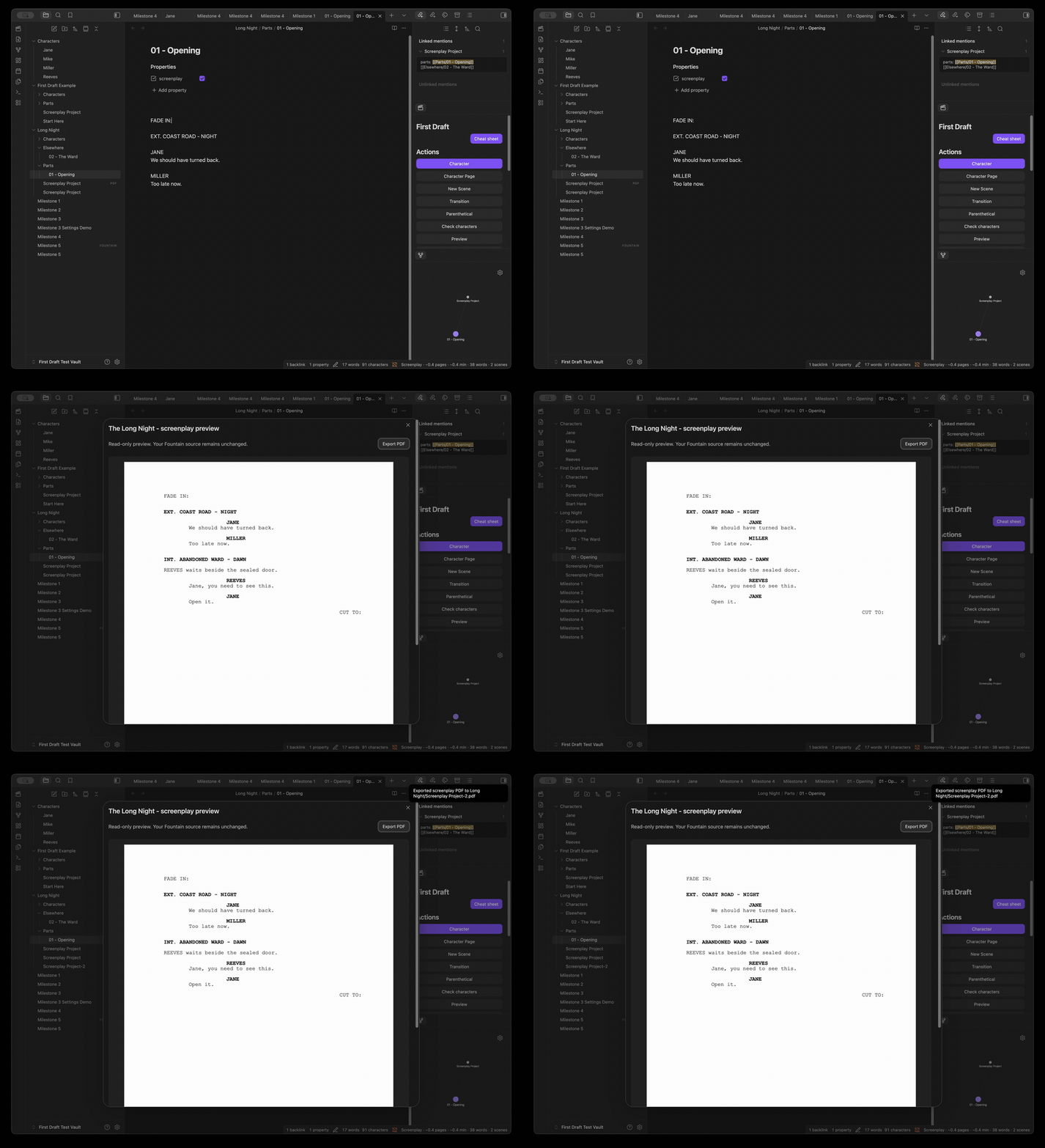
Install First Draft from Settings → Community plugins → Browse in Obsidian. Search for First Draft, install it, and enable it. See the visual feature tour for the complete workflow.
Features
0.13.0 adds the scene workspace and read-only continuity inspector described below. See the release notes for validation boundaries.
The current build provides:
- screenplay mode for
.fountainfiles; - screenplay mode for Markdown notes with
screenplay: truefrontmatter; - Fountain-aware scene and character parsing;
- a debounced status item with word and scene counts;
- screenplay-aware estimated pages for US Letter or A4;
- configurable runtime estimation based on minutes per page;
- a current-document statistics dialog with character dialogue rankings;
- parenthetical insertion with common, recently used, and custom choices;
- transition insertion with common, previously used, and custom choices;
- non-destructive export to a clean
.fountainfile; - non-destructive Final Draft
.fdxexport for the six core screenplay element types; - a read-only, page-like screenplay preview for individual files and combined multi-file projects;
- local, non-destructive PDF export in US Letter or A4 with screenplay margins, Courier typography, page breaks, and page numbers;
- a dockable First Draft Palette with contextual actions and recent screenplay elements;
- a scene workspace with project-wide navigation, filters, portable synopses, scene creation and conflict-checked rearranging, including cross-part recovery;
- portable Markdown character dossiers with aliases, screenplay links, and relationship links;
- derived per-character scene, cue, and dialogue usage without generated data being written into dossiers;
- deterministic character checks for missing pages, duplicate identities, ambiguous aliases, broken relationships, unused pages, and likely spelling variants;
- a read-only continuity inspector with original-source evidence, explicit incomplete-scope reporting and advisory empty-scene/missing-time checks;
- native Obsidian Local Graph access for character relationships;
- ordered multi-file screenplay projects whose parts can live in different vault folders;
- vertically stacked project-part links for easier reading and ordering;
- project-wide statistics, character checks, recent elements, autocomplete, Fountain/FDX export, and previous/next navigation;
- project-local character folders with a Markdown
character-folderoverride; - a conflict-safe example screenplay generator for first-time exploration;
- an offline, copy-friendly screenplay and Fountain cheat sheet;
- context-aware character, character-extension, scene-location, and time autocomplete;
- keyboard-first Character, Character Extension, and New Scene commands;
- settings for activation, autocomplete ranking, result limits, scene types, and times of day.
See PDF compatibility and FDX compatibility for the deliberately narrow format boundaries.
Open a screenplay or project, then choose Scenes in the palette or run Open scene workspace with Cmd/Ctrl+P. See the scene workspace guide and test checklist.
Inspect continuity provides read-only, source-linked character checks and scene advice. See the inspector guide for its deliberately limited scope.
First Draft 0.12 embeds a local Courier-compatible PDF font with
broader Latin, Greek and Cyrillic coverage. Missing characters stop export
with a clear diagnostic rather than silently becoming ?. This is not
universal Unicode support; see the PDF compatibility guide.
The plugin also supports horizontal Chinese, Japanese and Korean PDFs with an optional offline Noto font pack and measured wrapping. Run Install offline CJK PDF fonts once on each device that needs CJK PDFs. Select PDF language in First Draft settings for regional character forms. The core bundle is approximately 2.35 MB and its build enforces a 5 MB release-asset limit. Preview pagination is approximate; inspect the exported PDF. Physical-phone font installation and export testing remain important.
PDF title pages and dialogue continuation
Add an explicit title property to a screenplay or project note for an
unnumbered title page. Optional properties are credit, author, source,
draft-date (a quoted string), and contact (multiline text is supported).
For projects, set these on the project note, not individual parts. Without an
explicit title, PDF export keeps its existing body-only behaviour.
Plain Fountain files can start with:
Title: The Long Night
Credit: Written by
Author: Alex Example
Draft date: 1 October 2026
Contact:
    Example office
    Example City

INT. OFFICE - NIGHT
The body starts at page 1. Speeches crossing page boundaries get (MORE)
and a repeated speaker cue with (CONT'D); short speeches stay together
where possible. These markers appear in preview/PDF only, not in your source.
Oversized title metadata or parentheticals stop export with a clear message.
Create a screenplay project
Put a project note in the screenplay's folder and list its parts in reading order. The links resolve using normal Obsidian link rules, so the part files do not need to share a folder:
---
firstdraft: screenplay-project
title: The Long Night
parts:
  - "[[Parts/01 - Opening]]"
  - "[[Elsewhere/02 - The Ward]]"
character-folder: Characters
---
character-folder is relative to the project note's folder. Start it with /
to use a vault-relative folder. Project membership and order come from the
explicit parts list.
Parts inside the project note's folder tree are discovered without searching the whole vault. When a part lives elsewhere, add an explicit project link to that part's properties:
---
screenplay: true
screenplay-project: "[[Long Night/Screenplay Project]]"
---
The project note remains authoritative; the part-side link is only a scoped discovery hint and an ordinary Obsidian backlink.
Get started with an example
To use your own Markdown note, open it and click the clapperboard ribbon icon.
In the First Draft Palette, choose Use this note as a screenplay. This adds
screenplay: true to its properties without converting your text or changing
other properties. Writing actions appear once Obsidian updates the note's
metadata. Remove that property to return to ordinary-note mode. If the button
is disabled, enable Use screenplay frontmatter in Settings → First Draft.
You can also press Cmd+P (Ctrl+P on Windows/Linux) and choose
First Draft: Use this note as a screenplay while an ordinary Markdown note
is open.
Run First Draft: Create Example Screenplay from the command palette, or use
Create Example Screenplay in the First Draft Palette while no screenplay is
open. First Draft creates a new, self-contained First Draft Example folder and
opens its Start Here.md tour. If that folder already exists, a numbered folder
is used; existing vault content is never overwritten.
Open Cheat Sheet in the First Draft Palette—or run
First Draft: Open Screenplay Cheat Sheet—for quick screenplay terminology,
selectable Fountain examples, and First Draft project concepts. The cheat sheet
is bundled with the plugin, works offline, and does not create a vault note or
access the system clipboard.
Development
Requirements: Node.js 22.12+ within the 22 series, or Node.js 24+, and npm.
If you use nvm, run nvm use in the
repository before installing dependencies.
npm install
npm test
npm run lint
npm run build
Run npm run dev for a watch build.
Test safely in Obsidian
Never develop against your everyday vault. Build and install into the ignored,
repository-local First Draft Test Vault directory:
npm run test-vault
Then open the visible First Draft Test Vault directory as a separate Obsidian
vault, enable or reload First Draft in Settings → Community plugins, and
open Long Night/Screenplay Project.md for project testing or Milestone 4.md
for the standalone-screenplay checks.
Expected result:
the project note lists both ordered parts even though they live in different folders, displays each part on its own line, and opens either part from the palette;
project statistics, checks, recent items, and exports combine both parts;
Previous Part, Next Part, and Project Note navigate the project without the command palette;
creating JANE's page from either project part creates
Long Night/Characters/Jane.mdand links it to the project note;setting
character-folder: Peopleon the project changes the destination toLong Night/People; a leading slash makes the override vault-relative;click the clapperboard ribbon icon or run
Screenplay: Open First Draft Palette; the panel opens in the right sidebar;move the caret between a character cue, dialogue, and a blank line and confirm the highlighted first action changes appropriately;
click a recent character, parenthetical, or transition to insert it, or click a recent location to start a New Scene using that location;
use Open page beside JANE or MILLER, then confirm the dossier shows linked screenplay usage, relationships, and an Open Local Graph action;
use Create page beside REEVES and confirm First Draft creates
Characters/Reeves.mdwithout modifying the screenplay;before creating REEVES, run
Screenplay: Check Charactersand confirm it is reported as missing; run it again afterwards to clear that warning;open
Characters/Jane.md, choose Open Local Graph, and confirm Jane is connected to Milestone 4 and Miller through ordinary wikilinks;filter recent items from the panel without losing keyboard focus;
the status bar shows estimated pages, estimated runtime, words, and scenes;
run
Screenplay: Show Statisticsto see document totals and dialogue counts by character;put the caret in dialogue, run
Screenplay: Parenthetical, and choose a common or custom direction;run
Screenplay: Transitionon a blank line and choose a common or custom transition;run
Screenplay: Export to Fountain; First Draft opens a new sibling.fountainfile with the Obsidian frontmatter removed, leaving the original note untouched;run
Screenplay: Export to Final Draft FDX; First Draft creates a new sibling.fdxfile without changing the source. Open that file in Final Draft and confirm the scene heading, action, character extension, parenthetical, dialogue, and transition retain their element types;run
Screenplay: Previewfrom a standalone screenplay, a project part, and a project note; confirm the project preview combines its parts in order and the source remains unchanged;export from the preview or run
Screenplay: Export PDF; confirm the PDF opens, matches the configured Letter/A4 size, and a second export uses a numbered filename rather than overwriting the first;switch page size, minutes per page, or individual status fields under Settings → First Draft and confirm the display updates;
use
Milestone 3 Settings Demo.mdwhen comparing Letter/A4 or runtime ratios; its length makes the differences visible without editing the fixture;type
JAon the final blank line: chooseJANEwith Tab or Enter and start typing dialogue on the next line;type
INT. MIL, accept a known location, then accept a time;run
Screenplay: New Scenefrom the command palette and complete all three steps without the mouse;put the caret on a character cue and run
Screenplay: Character Extension;changing dialogue updates the word count after a short delay;
removing
screenplay: trueand reopening the note hides the item;creating a
.fountainfile activates it without frontmatter;ordinary Markdown notes are unchanged.
from an ordinary note, create an example screenplay; repeat the command and confirm the second example uses a numbered folder without changing the first;
open the cheat sheet from both its command and the sidebar, select one of its Fountain examples, and copy it with the normal system shortcut.
To use another dedicated test vault:
node scripts/install-test-vault.mjs /absolute/path/to/test-vault
Automated testing
npm test covers parsing, estimation, helpers, character cataloguing and
verification, derived dossier usage, Fountain/FDX/PDF export, deterministic
screenplay page layout, strict XML parsing, XML escaping, and structural FDX
compatibility. npm run test-vault builds the production bundle and installs
it into the isolated vault.
Browser Playwright alone cannot exercise an Obsidian plugin because Obsidian is an Electron desktop application rather than a website. A separate Electron UI harness is possible, but it would be platform-specific and more brittle than the model-level tests. The remaining acceptance check is therefore a short run in the isolated Obsidian vault; see FDX compatibility.
First Draft keeps mobile support enabled. Before the public release, follow the mobile testing checklist on at least one physical device and record the Obsidian and operating-system versions used.
Privacy
First Draft is local-only. It includes no telemetry and needs no network connection during ordinary use. See PRIVACY.md.
Contributing
See CONTRIBUTING.md. By participating, you agree to follow the Code of Conduct.
Release history is recorded in the changelog. Security issues must be submitted through the private process in SECURITY.md, not through a public issue.
Licence
Third-party licences are recorded in THIRD_PARTY_NOTICES.md.