Feynman - AI research assistant
 Icarian Systems387 downloads
A research agent for your vault. Runs locally in Docker against your own Anthropic API key.
- Overview
- Scorecard
- Updates6
A research agent for your vault. Runs locally in Docker against your own Anthropic API key.
Requirements
- Obsidian >= 1.5.0
- Docker Desktop installed and running (macOS, Linux, or Windows)
- An Anthropic API key (
sk-ant-...)
Usage
Once the plugin is installed, configured, and the local Docker server is running:
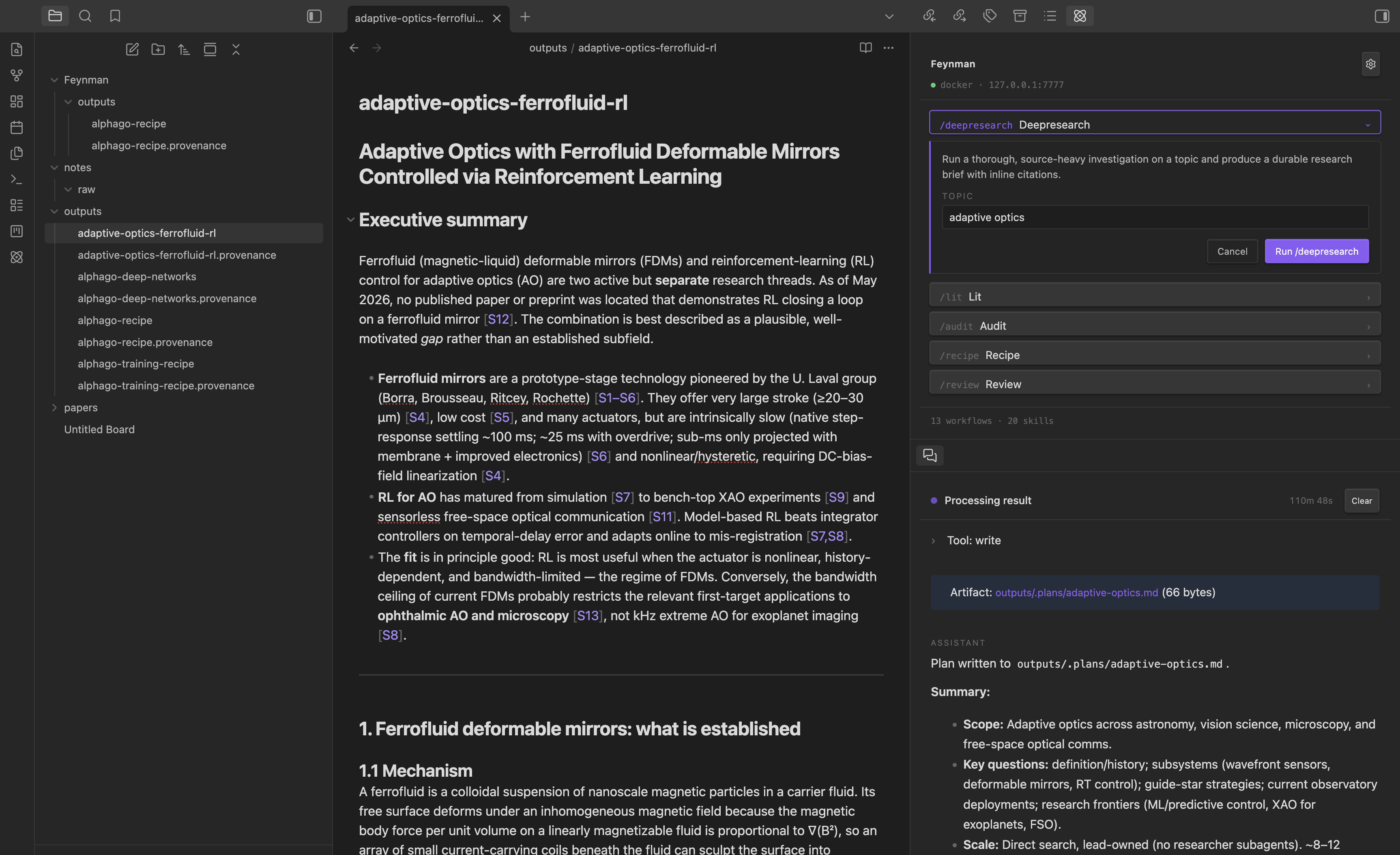
- Open the chat panel. Click the Feynman ribbon icon, or run Feynman: Open chat from the command palette. The panel shows the server's docker status and listens for slash commands.
- Pick a workflow. Type
/in the input to browse the built-in workflows —/deepresearch,/lit(literature review),/audit,/recipe,/review, and several others. Each one opens a small form with the arguments it expects (e.g. atopicfield). - Run it. Submit the form and the agent streams its progress into the panel: tool calls, intermediate reasoning, and citations as they come in. You can cancel at any point.
- Approve tool calls. When the agent wants to write a file, fetch a paper, or invoke another tool, a modal pops up with the exact command and target path. Deny is focused by default — nothing runs without your explicit click.
- Find your artifacts. Finished outputs land in
<vault>/Feynman/outputs/,<vault>/Feynman/notes/, and<vault>/Feynman/papers/as regular markdown files. Click the artifact link in the chat panel to jump straight to the file in Obsidian.
You can also invoke a workflow directly from the command palette (e.g. Feynman: Deep research…) without opening the chat panel first — useful when a vault note is the topic and you want to pass activeFile or the current selection as context.
Install
Option A — build from source
git clone https://github.com/icarian-systems/feynman-research-agent.git
cd feynman-research-agent
npm install
npm run build
Then copy main.js, manifest.json, and styles.css into your vault at:
<vault>/.obsidian/plugins/feynman-research-agent/
Reload Obsidian, open Settings → Community plugins, and enable Feynman.
Option B — BRAT (no local build)
If you'd rather not build locally, install via BRAT: add this repository as a beta plugin and BRAT will fetch the release artifacts for you.
Quick start
After enabling the plugin, follow docs/SETUP.md to pull the Docker image, configure your Anthropic key, and run your first workflow.
Privacy & Security
Read this carefully before using the plugin.
- API keys are stored in plaintext, outside the vault. Your Anthropic API key (and any optional provider keys you add — OpenAI, Exa, Perplexity, Gemini) are written verbatim to
~/.feynman/secrets.json(file mode0600). The plugin does not encrypt this file. Because secrets live outside the vault, they are not carried by Obsidian Sync and are not visible to the agent process inside the Docker container's bind mount. Non-secret settings (model preferences, workspace folder, etc.) still live in<vault>/.obsidian/plugins/feynman-research-agent/data.json. - The server runs on loopback by default. The plugin talks to a Docker container bound to
127.0.0.1. There is no cloud/managed-Modal tier shipped in v1 — that mode is disabled in settings until a later release. - A random bearer token guards the loopback server. On first Set up Docker the plugin mints a 32-byte hex
FEYNMAN_AUTH_TOKENand writes it into the container env-file. Without that header any other process on your machine (browser tabs included) gets401 Unauthorizedfromhttp://127.0.0.1:7777. Self-hosted users must set the same env var on their server and paste the value into Settings. - Self-hosted base URLs are HTTPS-only outside loopback. The settings UI rejects
http://for any host that isn't127.0.0.1,localhost, or::1, so the bearer token doesn't fly in plaintext. - Outbound LLM traffic goes from your local Docker container directly to Anthropic. The plugin itself does not forward prompt content, vault content, or tool I/O to any third party.
- The optional waitlist signup POSTs your email to
api.getwaitlist.com(a third-party service) if and only if you submit the waitlist form. The waitlist button is visible in Settings by default; the request is sent only when you submit the form, and you can hide the UI entirely by disabling the waitlist feature flag in Settings. - Tool calls require explicit approval. Any tool the agent wants to run (filesystem write, shell, etc.) surfaces a modal with the actual command and path. Deny is the default-focused button.
If you don't want your keys leaving the device on which you typed them, the default setup already keeps them on-device: ~/.feynman/secrets.json is outside any vault and is never touched by Obsidian Sync.
Notes on Obsidian APIs
The plugin uses one non-public API to deep-link into its own settings tab from inline "Open settings" affordances (the app.setting.open() / app.setting.openTabById(...) pair). The calls are wrapped in try/catch; if a future Obsidian release removes that surface the plugin falls back to a Notice that says "Open Settings → Community plugins → Feynman". No functionality is lost; the deep link just becomes a manual click.
License
MIT.