External Links View
 theamritanair1k downloads
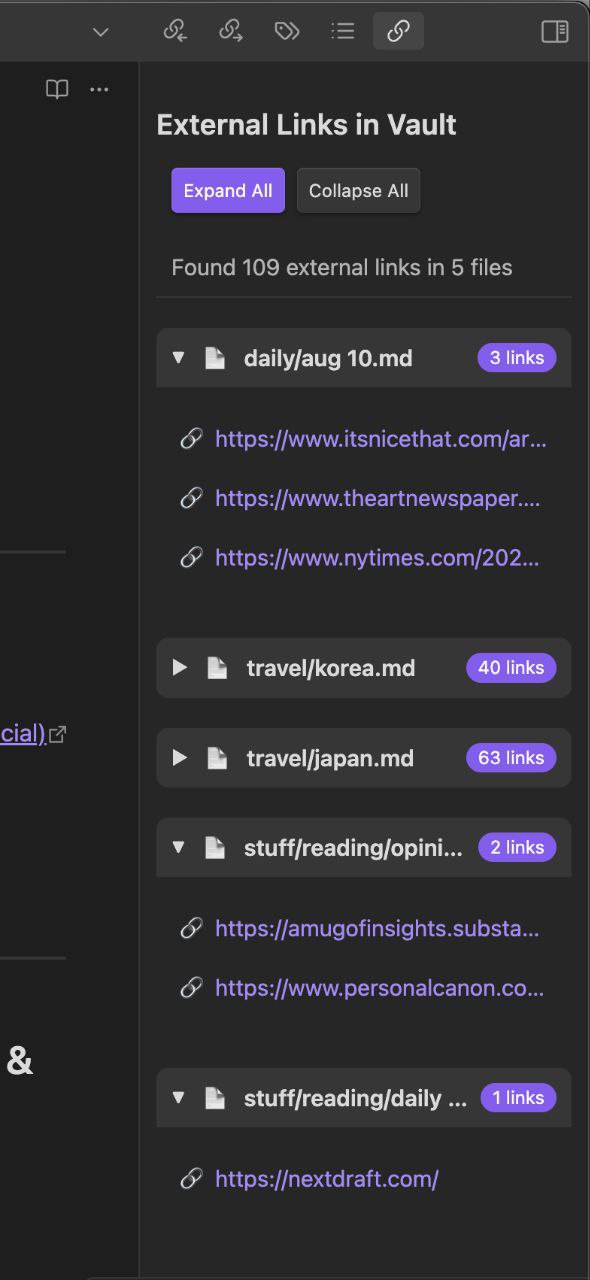
View all external links from your notes in one organized place, sorted by their source notes.
- Overview
- Scorecard
- Updates7
View all external links from your notes in one organized place, sorted by their source notes.
Features
- 📋 Collects all external links from your vault in one view
- 🗂 Organizes links by their source notes, with collapsible sections per note
- 🔗 Clickable links that open in your default browser
- ⚙️ Settings to exclude specific URLs or file paths
- 🎯 Quick access via ribbon icon or command palette
How to Use
- Install the plugin from Obsidian's Community Plugins
- Click the chain link icon in the ribbon to open the External Links view
- Alternatively, use the command palette and search for "Show External Links"
The plugin will show all external links found in your notes, organized by the note they appear in. Click any link to open it in your browser.
Settings
- Exclude patterns: Regex patterns to exclude certain URLs from appearing in the view. Enter one pattern per line.
- Exclude path regex: A regex pattern to exclude entire file paths from being scanned (e.g.
^private/to skip all notes in aprivatefolder).
Development
This plugin is built with TypeScript and uses the Obsidian API. To build from source:
- Clone this repository
- Run
npm installto install dependencies - Run
npm run devto start compilation in watch mode - Copy built files to your Obsidian plugins folder
To release a new version, update minAppVersion in manifest.json, then run npm version patch (or minor/major). This bumps the version in manifest.json and package.json and adds an entry to versions.json.
Manually installing the plugin
Copy main.js, styles.css, and manifest.json to your vault at VaultFolder/.obsidian/plugins/external-links-view/.
HealthExcellent
ReviewSatisfactory
About
Collect all external links from your vault and display them organized by their source notes. Open links in your default browser with a click and access the view from the ribbon or command palette. Exclude unwanted URLs using configurable regex patterns.Details
Current version
1.0.6
Last updated
3 months ago
Created
Last year
Updates
7 releases
Downloads
1k
Compatible with
Obsidian 0.15.0+
Platforms
Desktop, Mobile
License
0BSD
Sponsor