Search...Search plugins and themes...
⌘K
Sign in
  • Get started
  • Download
  • Pricing
  • Enterprise
  • Account
  • Obsidian
  • Overview
  • Sync
  • Publish
  • Canvas
  • Mobile
  • Web Clipper
  • CLI
  • Learn
  • Help
  • Developers
  • Changelog
  • About
  • Roadmap
  • Blog
  • Resources
  • System status
  • License overview
  • Terms of service
  • Privacy policy
  • Security
  • Community
  • Plugins
  • Themes
  • Discord
  • Forum / 中文论坛
  • Merch store
  • Brand guidelines
Follow us
DiscordTwitterBlueskyThreadsMastodonYouTubeGitHub
© 2026 Obsidian

D2 Standalone

m-harukim-haruki480 downloads

Render D2 diagrams without installing D2 — fully standalone and cross-platform. Unofficial, not affiliated with Terrastruct.

Add to Obsidian
D2 Standalone screenshot
  • Overview
  • Scorecard
  • Updates8

D2 Standalone is an unofficial Obsidian plugin that lets you render D2 diagrams directly in your vault — no D2 installation required, fully cross-platform.
Unlike the official D2 plugin, this plugin uses the official D2 JavaScript library to render diagrams entirely in-process, so it works out of the box on any machine without any additional setup.

Disclaimer: This is an independent, community-made plugin. It is not affiliated with, endorsed by, or supported by Terrastruct, the creators of D2.

This plugin is built using the obsidian-sample-plugin template.

Usage

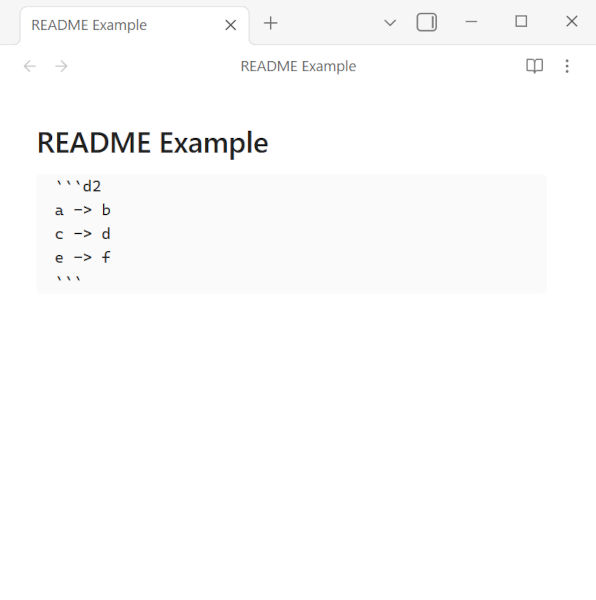
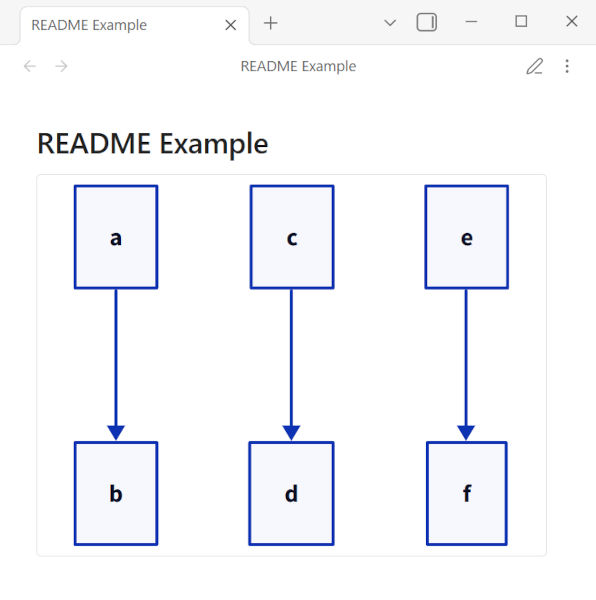
Write your D2 diagrams in markdown code blocks with the language identifier d2.

Markdown Rendered
markdown rendered

Configuration

If you want to choose a layout engine and other options, add a d2-config block inside your d2 code block in the markdown file.
The example below shows the format.

```d2
vars: {
  d2-config: {
    layout-engine: elk # dagre or elk
    theme-id: 300
    dark-theme-id: 200
    theme-overrides: {
      B1: "#ff0000"
      B2: "#00ff00"
    }
  }
}

a -> b
```

Sketch options can only be configured in the settings.

The TALA layout engine is not supported.

License

This project is licensed under the GNU General Public License v3.0 only (GPL-3.0-only). See the LICENSE file for details.

HealthExcellent
ReviewSatisfactory
About
Render D2 diagrams directly inside your vault using the official D2 JavaScript library without external installation. Write diagrams in markdown d2 code blocks and set layout and theme via embedded d2-config blocks for in-process, cross-platform rendering.
VisualizationMarkdownDrawing
Details
Current version
1.0.8
Last updated
2 weeks ago
Created
8 months ago
Updates
8 releases
Downloads
480
Compatible with
Obsidian 1.2.3+
Platforms
Desktop, Mobile
License
GPL-3.0
Report bugRequest featureReport plugin
Author
m-harukim-haruki
github.com/m-haruki
GitHubm-haruki
  1. Community
  2. Plugins
  3. Visualization
  4. D2 Standalone

Related plugins

Excalidraw

Visual PKM powerhouse. Create and edit Excalidraw drawings.

Mermaid Tools

Improved Mermaid.js experience: visual toolbar with common elements and more.

tldraw

Integration with tldraw, allowing users to draw and edit content on a virtual whiteboard.

Kroki

Render Kroki diagrams.

Simple mind map

A mind map that combines aesthetics and functionality. 一个颜值与功能并存的思维导图。

Advanced Canvas

Supercharge your canvas experience. Create presentations, flowcharts and more.

ExcaliBrain

An interactive, structured mind-map of your Obsidian vault.

Text Format

Format selected text upper/lower/capitalize.

Linter

Format and style your notes. Linter can be used to format YAML tags, aliases, arrays, and metadata; footnotes; headings; spacing; math blocks; regular Markdown contents like list, italics, and bold styles; and more with the use of custom rule options.

Breadcrumbs

Visualise the hierarchy of your vault using a breadcrumb trail or matrix view.