Copilot Personal
 Josef1k downloads
AI agent with 17 tools, 11 LLM providers, semantic RAG, PDF extraction, web search, batch processing, history search, popout window. Try Copilot AI free — 5 queries/day, no API key.
- Overview
- Scorecard
- Updates18
AI assistant for Obsidian. Multimodal chat with real streaming, RAG semantic search, autonomous agent (17 tools), 11 LLM providers, multi-provider fallback, PDF processing with unpdf, Free/Pro licensing with cloud validation + grace period, CircuitBreaker on all providers, dual-build (store/obfuscated), full i18n with 12 languages. 385 tests. TypeScript strict mode. And more: Smart Anti-Loop · Plan Detection · TOC Redirect · Keyword Tool Narrowing · Custom Agent Instructions · Complete Model Lists · /search-history · /list-chats · /load-chat · /batch-process · Popout Window · Free Trial (Copilot AI)
⚠️ Commercial Disclosure: This plugin offers a Free tier (unlimited basic chat, bring your own API key, 3 tools) and a Pro tier ($4.99/mo via Lemon Squeezy) that unlocks Agent Mode, web search, semantic RAG, PDF image extraction, and multi-provider fallback. The Pro tier requires a paid license key validated against a Cloudflare Worker (
copilot-personal-worker.copilot-personal.workers.dev). No account or payment is required for the Free tier. No telemetry or analytics are collected.
Key Features
| Feature | Description |
|---|---|
| Multimodal Chat | Real streaming chat (fetch + ReadableStream) with file drag & drop |
| Agent Mode | Autonomous tool-calling loop with 17 tools, LLM-based classification (ToolRouter), smart anti-loop (3 layers), plan detection + verification, keyword tool narrowing, and TOC smart redirect. Saves 70-90% tokens vs sending all tools. |
| Semantic RAG | Vault indexing with embeddings, cosine similarity search, JSON persistence |
| Advanced PDF | Text extraction, page rendering to PNG, embedded image extraction with unpdf |
| 11 LLM Providers | DeepSeek, OpenAI, Anthropic, Gemini, LM Studio, OpenRouter, Mistral, Groq, Perplexity, xAI, plus 💰 Copilot AI with free trial (5 queries/day, no API key) |
| Per-Provider API Keys | Each provider stores its own key — switching from DeepSeek to Gemini won't mix keys |
| Multi-Provider Fallback | Automatic capability compensation (Pro) — e.g., DeepSeek for chat + LM Studio for embeddings |
| Free/Pro Licensing | Cloud-based validation via Cloudflare Worker, device binding, grace period, rate limiting |
| CircuitBreaker | 3 failures → 30s open + exponential backoff on all providers |
| Intelligent Auto-Save | Multi-note detection, invented wiki-link validation, automatic save |
| Slash Commands | /summarize, /translate, /explain, /toc, /flashcards, /rewrite, /expand, /search-history, /list-chats, /load-chat, /batch-process |
| Chat Export | Markdown + JSON via commands (Ctrl+P) |
| Model-Specific Adapters | Optimized system prompts per model family (anti-verbose, anti-hallucination) |
| Context Management | Map-Reduce compaction, L1-L5 layers, auto-trim, CURRENT TASK reminders |
| Custom Agent Instructions | System prompt additions for the agent set behavior, language, tone, or expertise. Injected in all 4 chat modes (regular, agent, budget, budget-agent) |
| 💰 Copilot AI | Free trial: 5 queries/day (no API key). Pro: 50 queries/day. Agent mode supported. |
| Popout Window | Click Popout in the header and drag the tab to a separate window |
Screenshots
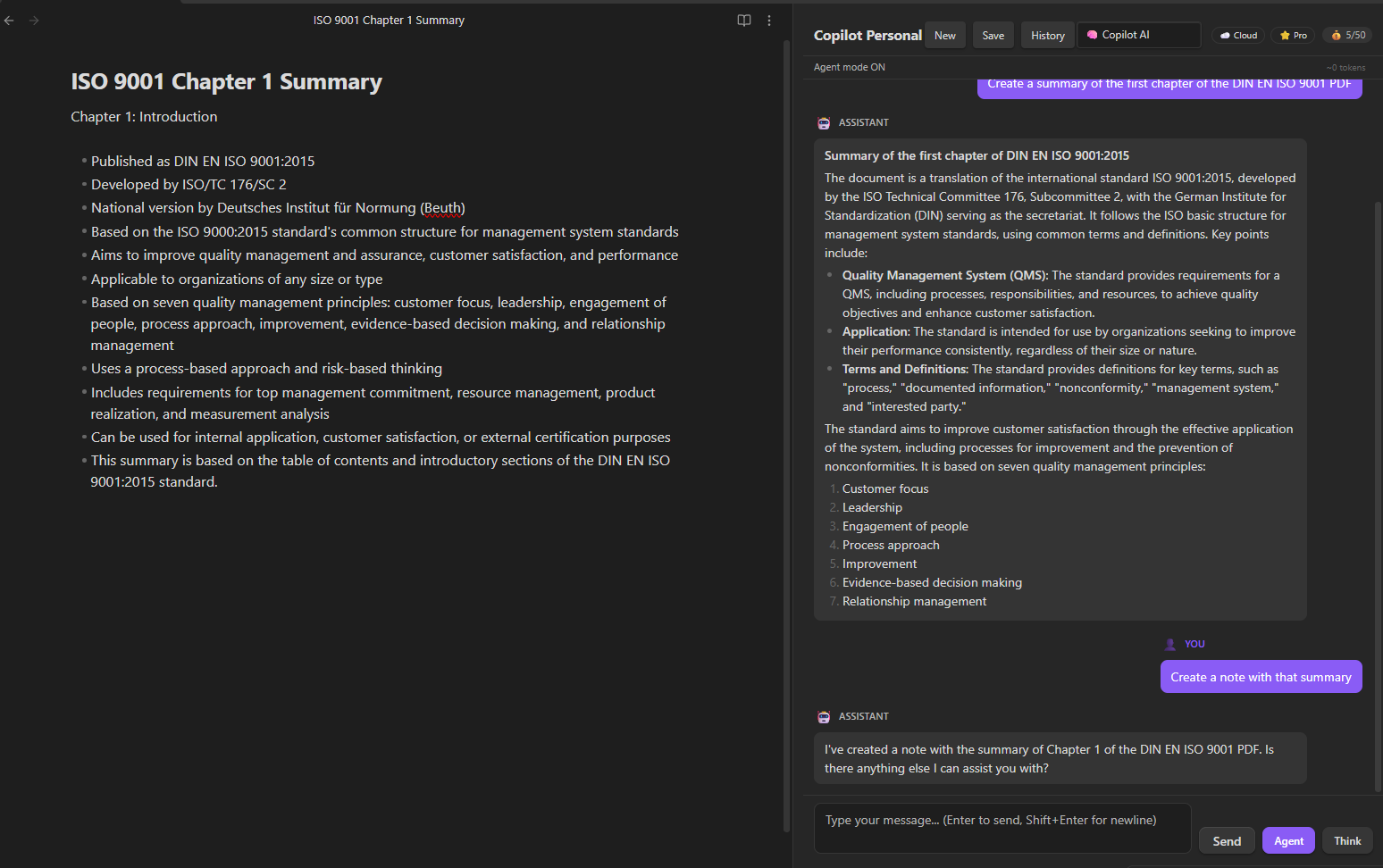
Agent mode with $0 budget provider reading a PDF, summarizing it, and creating a note — all in two messages.
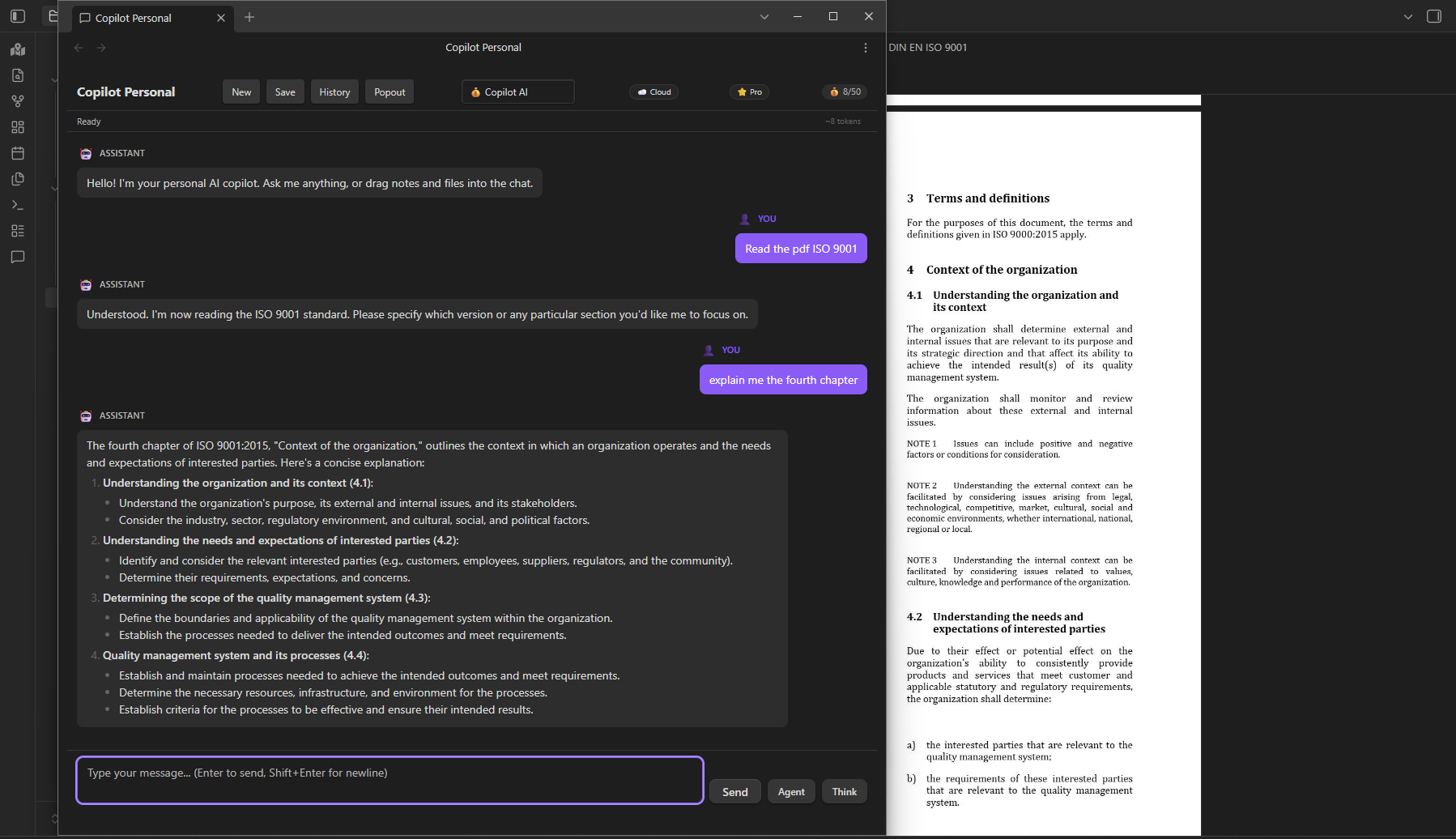
Chat in a separate popout window using the built-in Copilot AI provider. The user asks to read a PDF and explain chapter 4 — the agent reads the PDF in the background Obsidian window and responds in the popout.
Architecture
src/
├── main.ts                          # Plugin entry point
├── settings.ts                      # Settings interface & defaults
├── settingsTab.ts                   # Settings UI tab
├── chatView.ts                      # Chat ItemView (main orchestrator)
├── constants.ts                     # Centralized constants
├── LLMProviders/                    # 11 providers with native tool calling
│   ├── providerTypes.ts             # LLMProvider interface, capabilities
│   ├── providerManager.ts           # Factory: auto-detect & multi-provider routing
│   ├── deepseekProvider.ts          # DeepSeek (OpenAI-compatible + thinking mode)
│   ├── openaiProvider.ts            # OpenAI / OpenAI-compatible APIs
│   ├── anthropicProvider.ts         # Anthropic Messages API (native input_schema)
│   ├── geminiProvider.ts            # Gemini API (native functionDeclarations)
│   └── baseOpenAIProvider.ts        # Shared logic for OpenAI-compatible providers
├── agent/                           # Autonomous agent system
│   ├── ToolRegistry.ts              # Singleton: register, get, execute tools
│   ├── AgentModeRunner.ts           # Main tool-calling loop
│   ├── ToolRouter.ts                # LLM-based task classification → tool selection
│   ├── PlanTracker.ts               # Execution plan state tracking
│   ├── ContextCompactor.ts          # Map-Reduce context summarization
│   └── ContextLayers.ts             # L1-L5 context layer system
├── tools/                           # 17 agent tools
│   ├── FileParserManager.ts         # PDF, image, text file parsers
│   ├── readNoteTool.ts              # read_note (4 search strategies + path traversal protection)
│   ├── readPdfTool.ts               # read_pdf (TOC + pages + auto-find)
│   ├── createNoteTool.ts            # create_note
│   ├── updateNoteTool.ts            # update_note (post-write verification)
│   ├── renderPdfPagesTool.ts        # render_pdf_pages (pages to PNG, 144 DPI)
│   ├── extractPdfImagesTool.ts      # extract_pdf_images (embedded images + fallback)
│   ├── imageAnalysisTool.ts         # analyze_image (vision model)
│   ├── semanticSearchTool.ts        # search_vault_semantic
│   ├── webSearchTool.ts             # search_web (browser-use microservice)
│   └── additionalTools.ts           # list_notes, fulltext_search, vault_stats, etc.
├── search/                          # RAG semantic search
│   ├── vectorStoreManager.ts        # In-memory cosine similarity + JSON persistence
│   ├── indexOperations.ts           # Chunking, embedding, batch indexing
│   ├── indexEventHandler.ts         # Auto-reindex on create/modify/delete
│   ├── hybridRetriever.ts           # Hybrid search (vector + fulltext)
│   └── reranker.ts                  # Result re-ranking
├── services/
│   ├── LicenseManager.ts            # Cloud-first license validation + rate limiting
│   ├── BudgetManager.ts              # Copilot AI usage tracking + free trial limits
│   ├── webSearchClient.ts           # HTTP client for Python microservice
│   └── lmStudioService.ts           # LM Studio model detection (/v1/models)
├── memory/
│   └── MemoryManager.ts             # Persistent conversation summaries
├── components/
│   ├── ChatHistoryBrowser.ts        # Chat history navigator
│   └── ApplyView.ts                 # Diff view for <!--save:-->
└── utils/
    └── pathUtils.ts                 # Path normalization, fetch fallback, timeouts
├── i18n/                              # 12-language translation engine
│   ├── index.ts                       # t(), setLanguage(), translation registry
│   ├── types.ts                       # Lang type, LANGS map, getLanguages()
│   ├── en.ts                          # English master (~600 keys)
│   └── es.ts                          # Spanish translations
Installation
Quick Install
cd "YourVault/.obsidian/plugins"
git clone https://github.com/JosefBelzer/Copilot-Personal.git
cd copilot-personal
npm install
npm run build
Build Modes
npm run build          # Obfuscated main.js (external distribution: ZIP, Gumroad, BRAT)
npm run build:store    # Clean main.js (PR to Obsidian Community Plugins)
npm run dev            # Dev mode with sourcemaps and watch
⚠️ For Obsidian Community Plugin submission: use ONLY
npm run build:store.
Obfuscated builds (npm run build) will be REJECTED by reviewers. Obfuscation is for external distribution only.
Manual Install
- Download ZIP from Releases
- Extract to
YourVault/.obsidian/plugins/copilot-personal/ - Enable in Settings → Community plugins → Copilot Personal
Web Search Server (optional)
cd web_search_server
pip install -r requirements.txt
set COPILOT_WEB_TOKEN=your-secure-token
uvicorn main:app --host 127.0.0.1 --port 8000
Free vs Pro Licensing
🆓 Free (default)
- Unlimited basic chat (bring your own API key)
- No message limits on your preferred provider
- 3 tools:
read_note,read_pdf,find_files - 💰 Copilot AI Free Trial — 5 queries/day. No API key needed. Select 💰 Copilot AI from the provider dropdown. Try Pro features before buying.
- Pro options appear disabled (🔒) in settings UI
⭐ Pro ($4.99/mo via Lemon Squeezy)
- Unlimited messages · Agent mode (17 tools)
- Web search · PDF with images · Semantic RAG
- Chat export (MD/JSON) · Slash commands · Priority support
- Multi-provider fallback · Per-provider API keys
- 💰 Copilot AI (included) — Built-in managed AI provider. 50 queries/day. No API key needed.
💰 Copilot AI Budget Provider
Free Trial (5 queries/day): Any user can select 💰 Copilot AI from the provider dropdown — no API key, no license, no configuration. Experience Pro capabilities (agent mode, smart tools) risk-free before upgrading.
Pro (50 queries/day): Included with Pro at no extra cost. Select 💰 Copilot AI (Pro) from the provider dropdown. 50 queries/day, tracked server-side per license. Monitor usage via the badge in the chat header.
⚠️ Agent Mode increases consumption — each step counts as one query. A 3-step task = 3 queries.
Activating Pro
- Purchase a Pro subscription at belzersoftware.lemonsqueezy.com
- Receive your License Key via email (Lemon Squeezy UUID format, e.g.,
056b9494-...) - Settings → Copilot Personal → License Key → paste the key
- You'll see
✅ Pro license activated successfully. - Chat badge changes to
⭐ Pro
License Security
| Mechanism | Description |
|---|---|
| Cloud validation | Every activation is verified against the Cloudflare Worker |
| Device binding | License tied to your device via fingerprint. Max 3 devices per license |
| Grace period | If offline, Pro license continues working for 24h before degrading to Free |
| Persistent state | Message count and license state survive Obsidian restarts |
| Anti-sharing | 3-device limit. Frequent device switching triggers protections |
Privacy & Security
- API keys: Stored locally in
data.json. Each provider has its own field — switching providers won't leak keys. Masked (type="password") in settings UI. Never sent to plugin author's servers. - Vault data: Sent only to your configured LLM provider. No telemetry or analytics.
- Vault enumeration: This plugin calls
vault.getFiles()andvault.getMarkdownFiles()to enable semantic search (RAG), file lookup tools (find_files,read_note), and auto-save post-processing. File contents are only read when explicitly requested by the user or the agent. - Web search: Requires a local Python microservice (
web_search_server/). Authentication token is configurable in settings. - License validation: Pro keys are validated against the Cloudflare Worker. Free tier requires no internet connection.
- Path traversal: Multi-layer protection against directory escape attacks in
read_note. - Timing-safe auth: Admin endpoint uses constant-time comparison for secret tokens.
- sessionStorage: Used only for temporary chat session crash recovery (auto-saved every 30s, cleared on new chat). All persistent data uses Obsidian's
loadData()/saveData()API. - No telemetry, no analytics, no tracking.
Development
npm install           # Install dependencies
npm run build         # Obfuscated build (external distribution)
npm run build:store   # Clean build (Obsidian store submission)
npm run typecheck     # TypeScript check only
npm run dev           # Watch mode
npx jest --verbose    # Run 385 tests across 27 suites
Testing
27 test suites (385 tests) covering: license management, circuit breaker, provider auto-detection, tool registry, agent detection, read/write tools, PDF tools, vector store CRUD, index operations, LM Studio service, settings, singleton reset, chat flow, path utilities, dom utilities, tool router, plan tracker, context compactor, context layers, auto-save manager, constants, i18n, budget manager, chat session. Run with npx jest --verbose. ⚠️ New features under development — see current work below.
Notes
- Legacy API key migration: If you previously stored your API key in the old single-key field, it is automatically migrated to the per-provider key on first load after upgrading to v1.4.4.
Current Development
Current development status for v1.6.2:
| Feature | Status |
|---|---|
| Custom Agent Instructions (Settings to Modo Agente) | ✅ Done |
| Complete model lists per provider (5-85 models each) | ✅ Done |
| /search-history (full-text search in saved chats) | ✅ Done |
| /list-chats + /load-chat (saved conversation management) | ✅ Done |
| /batch-process (summarize/translate/rewrite/expand/toc folder) | ✅ Done |
| Popout chat window (drag tab to separate window) | ✅ Done |
| UI sync (Agent/Think toggles synced with Settings) | ✅ Done |
| Gemini streaming URL models/ prefix fix | ✅ Done |
| Worker budget routes fix + /admin/reset-devices | ✅ Done |
| Free trial licensing (5 queries/day, no API key needed) | ✅ Done |
| Multi-provider budget fallback | - Planned |
License
MIT License — see LICENSE file for details.