Convert Base64 to PNG
 nykkolin1k downloads
Convert base64-encoded images in notes to local PNG images.
- Overview
- Scorecard
- Updates1
This plugin for Obsidian converts base64-encoded images in your notes to local PNG files. Reduce the size of your markdown files and make them more portable!
Demo
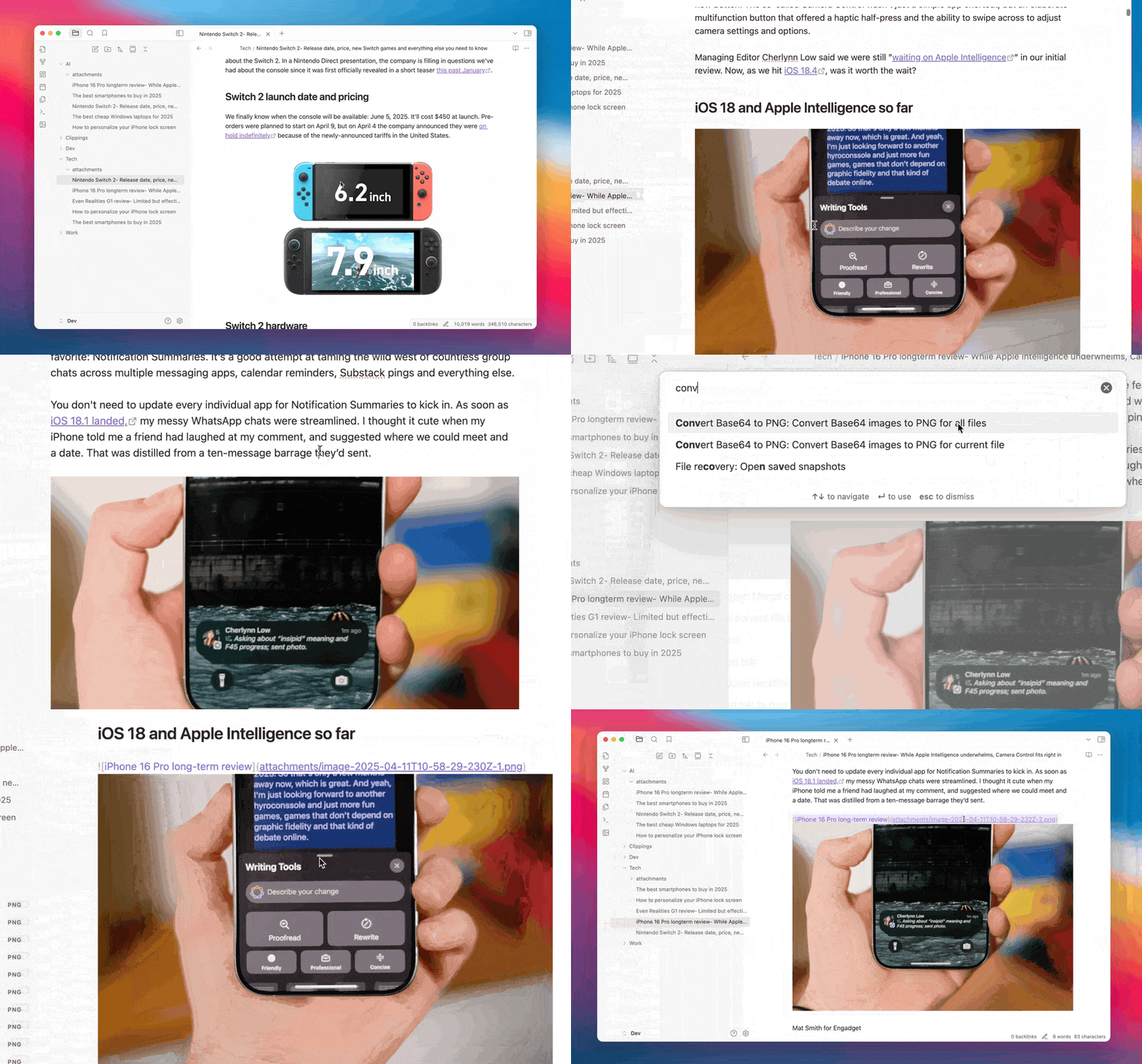
Features
- Base64 Detection: Automatically detects base64-encoded images in your notes
- Local Conversion: Converts base64 images to local PNG files
- Batch Processing: Process individual files or all files in your vault
- Customizable Storage: Configure where and how PNG files are stored
- Automatic Conversion: Option to automatically convert base64 images when pasting
How It Works
When you run the plugin:
- It scans your notes for base64-encoded images
- Decodes the base64 data to binary
- Saves the binary data as PNG files in your configured folder
- Updates the links in your notes to point to the local PNG files
This makes your notes smaller, more portable, and easier to work with.
Settings
General Settings
- Auto Convert: Automatically convert base64 images when pasting
- Output Folder: Folder where PNG files will be saved (relative to the note)
- Filename Format: Format for generated filenames with placeholders for date, index, and image type
Commands
- Convert Base64 images to PNG for current file: Process the currently active file
- Convert Base64 images to PNG for all files: Process all markdown files in the vault
Installation
From Obsidian Community Plugins
- Open Obsidian Settings
- Go to Community Plugins
- Search for "Convert Base64 to PNG"
- Click Install, then Enable
Use Cases
- Reduce File Size: Base64-encoded images can make your markdown files very large
- Improve Portability: Local PNG files are more portable and can be used outside of Obsidian
- Better Organization: Keep your images in a dedicated folder instead of embedded in your notes
- Easier Editing: Smaller markdown files are easier to edit and work with
If you find this plugin useful, consider supporting me:
or
HealthGood
ReviewSatisfactory
About
Convert base64-encoded images in your notes into local PNG files to shrink markdown size and improve portability. Detect base64 images automatically and save decoded PNGs to a chosen folder while updating links in your notes. Process the current file or the entire vault and enable automatic conversion on paste.Details
Current version
1.0.0
Last updated
Last year
Created
Last year
Updates
1 release
Downloads
1k
Compatible with
Obsidian 0.15.0+
Platforms
Desktop, Mobile
License
MIT