Context Block
 Junyoung Bang1 downloads
Compact context blocks for supplementary information in Markdown notes.
- Overview
- Scorecard
- Updates2
Supporting details, without interrupting your notes.
Turn supplementary information into compact, title-free blocks in Obsidian. Keep your links, lists and code, with less space around them.
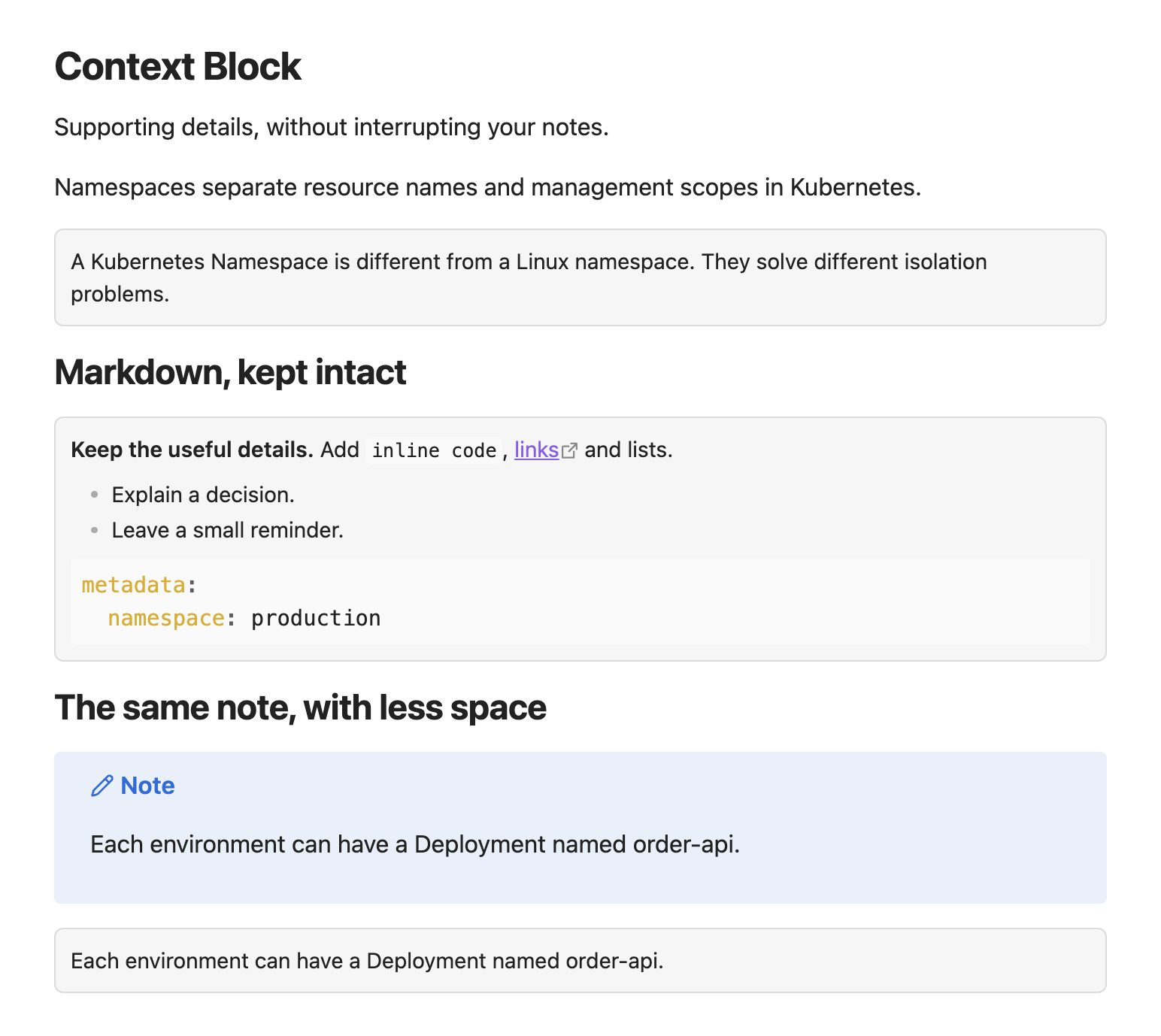
Actual Obsidian rendering · Default settings · Light and dark themes
Light preview · Dark preview


| Compact by default | Native Markdown | Your theme |
|---|---|---|
| Equal padding and text at 90% of the note size. | Links, lists and code in Reading view and Live Preview. | Colors follow Obsidian, with adjustable background and border strength. |
Write a context block
> [!context]
> Linux Namespace와는 다른 수준의 개념임을 명시하자.
Use the existing callout syntax. The plugin handles the compact appearance; your note stays plain Markdown.
Commands
- Context Block: Wrap selection wraps the selected paragraphs. A partial paragraph selection expands to the full paragraph. With no selection, it wraps the current paragraph; on an empty line it inserts an empty block.
- Context Block: Unwrap current block unwraps the block containing the cursor. The selection must stay inside one block. Nested quotes remain intact.
Both commands use one editor transaction and support Undo/Redo. Assign shortcuts under Settings → Hotkeys.
Wrapping rejects existing blockquotes, frontmatter, fenced code and indented code. Use a plain > [!context] header for blocks you want to unwrap with the command. Source mode retains normal Markdown syntax.
Appearance
Under Settings → Context Block, configure:
| Setting | Default | Range |
|---|---|---|
| Text size | 90% of note text | 75–100% |
| Padding | 10px on all sides | 4–24px |
| Background strength | 4% | 0–12% |
| Border strength | 12% | 0–30% |
Colors follow the active theme. Changes apply immediately and persist across restarts. Reset to defaults restores the appearance. Other callout types keep their existing styles.
Disabling the plugin leaves valid callout Markdown in the note. Obsidian then renders it as a regular callout.
Local installation
Requires Obsidian 1.8.9 or newer.
- Run
npm installandnpm run build. - Create
<Vault>/.obsidian/plugins/context-block/. - Copy
main.js,manifest.json, andstyles.cssinto that folder. - Reload Obsidian and enable Context Block under Settings → Community plugins.
Development
npm run dev: watch and rebuild.npm run build: type check and production bundle.npm run lint: lint.npm test: document transformation regression tests.
No network requests, telemetry or external services are used by the plugin. The implementation uses browser-compatible APIs; actual iOS/Android device testing has not been performed.
Based on the official Obsidian sample plugin.