Search...Search plugins and themes...
⌘K
Sign in
  • Get started
  • Download
  • Pricing
  • Enterprise
  • Account
  • Obsidian
  • Overview
  • Sync
  • Publish
  • Canvas
  • Mobile
  • Web Clipper
  • CLI
  • Learn
  • Help
  • Developers
  • Changelog
  • About
  • Roadmap
  • Blog
  • Resources
  • System status
  • License overview
  • Terms of service
  • Privacy policy
  • Security
  • Community
  • Plugins
  • Themes
  • Discord
  • Forum / 中文论坛
  • Merch store
  • Brand guidelines
Follow us
DiscordTwitterBlueskyThreadsMastodonYouTubeGitHub
© 2026 Obsidian

Compact Links

uofishboxuofishbox3k downloads

Displays links in a compact format to reduce visual clutter during typing.

Add to Obsidian
  • Overview
  • Scorecard
  • Updates10

An Obsidian plugin that compacts links and image alt text in the editor to reduce visual clutter, expanding them automatically when you place your cursor on them.

Overview demo of Obsidian Compact Links Plugin

Features

Compact Aliased Links

For wikilinks with an alias ([[NoteTitle|Alias]]), the plugin hides the note title and displays [[|Alias]]. The full note title expands when your cursor is positioned inside the title section.
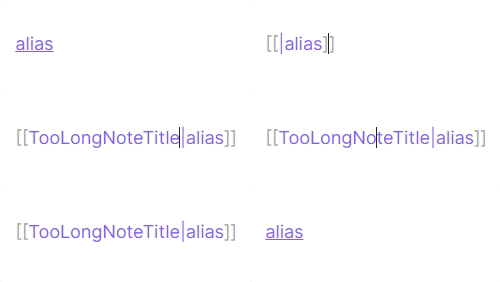
Demo of compact aliased links

Example:

  • Normal view: [[|ShortTitle]]
  • When cursor is in the title section: [[TooLongNoteTitle|ShortTitle]]

Compact External Links

For Markdown external links ([Title](url)), the plugin shortens the URL display according to the selected mode. The full URL expands when your cursor is on the URL portion or when you click the shortened text.

Domain mode:

Demo of external links in domain mode

Hidden mode:

Demo of external links in hidden mode

Example:

  • Normal view (Domain mode): [GitHub](github.com)
  • Normal view (Hidden mode): [GitHub](...)
  • When cursor is on the URL: [GitHub](https://github.com/username/repository)

Compact Image Alt Text

For Markdown image embeds (![alt](link)), alt text exceeding the configured display length is shortened. CJK characters count as 2 and other Unicode code points count as 1. Alt text within the limit is shown in full. Place the cursor in the alt text or click the shortened version to edit the full text.

Note: This applies only to Markdown image embeds (![alt](link)), not wikilink embeds (![[image.png|alt]]).

Example:

  • Normal view: ![A very long ...](image.png)
  • When cursor is in the alt text: ![A very long description](image.png)

Installation

Development

Setup

Use Node.js 20 with npm 10 (matching the CI environment):

npm ci
npm test
npm run lint
npm run build
HealthExcellent
ReviewSatisfactory
About
Display links in a compact, clutter‑reducing view while editing. Collapse aliased wikilinks to show only the alias and reveal the full title when the cursor is in the link. Shorten external URLs and image alt text, revealing full content on click or edit.
EditingLinks
Details
Current version
1.2.1
Last updated
Last week
Created
2 years ago
Updates
10 releases
Downloads
3k
Compatible with
Obsidian 1.13.0+
Platforms
Desktop, Mobile
License
MIT
Report bugRequest featureReport plugin
Author
uofishboxuofishbox
GitHubuofishbox
  1. Community
  2. Plugins
  3. Editing
  4. Compact Links

Related plugins

Easy Copy

Easily copy the text within inline code, bold text (and many other formats), or quickly generate an elegant link to a heading or block.

Note Refactor

Extract note content into new notes and split notes.

Paste URL into selection

Paste URL "into" selected text.

Excalidraw

Visual PKM powerhouse. Create and edit Excalidraw drawings.

LanguageTool Integration

Advanced grammar and spell checking, powered by LanguageTool.

ExcaliBrain

An interactive, structured mind-map of your Obsidian vault.

Smart Connections

Find related notes and excerpts while writing. Your AI link building copilot displays relevant content in graph + list view. A local embedding model powers semantic search. Zero setup. No API key.

Breadcrumbs

Visualise the hierarchy of your vault using a breadcrumb trail or matrix view.

Meta Bind

Make your notes interactive with inline input fields, metadata displays, and buttons.

Advanced URI

Control everything with URI.