Citation Callouts
 marvive874 downloads
Elegantly formats quotes with citations from various sources into custom callouts.
- Overview
- Scorecard
- Updates1
An Obsidian plugin that formats quotes with citations from various sources into beautiful callouts.
Features
- Smart Book/Source Name Extraction: Automatically extracts the source name from your citation
- Rich Text Support: Preserves formatting including bold, italic, and hyperlinks
- Beautiful Callouts: Creates formatted callouts with the book icon and extracted source name as the callout title
- Multiple Access Methods: Use command palette, ribbon icon, or keyboard shortcut
Installation
From Obsidian Community Plugins
- Open Obsidian Settings
- Go to Community Plugins and ensure Safe Mode is OFF
- Click Browse and search for "Citation Callouts"
- Click Install and then Enable
This plugin is available in the official Obsidian Community Plugin directory.
Usage
- Copy content that includes a citation with a URL or source reference
- In Obsidian, use one of these methods:
- Command Palette: Press
Ctrl/Cmd + Pand search for "Paste as Citation Callout" - Ribbon Icon: Click the book icon in the left sidebar
- Keyboard Shortcut: Assign a custom shortcut in Settings → Hotkeys
- Command Palette: Press
Example
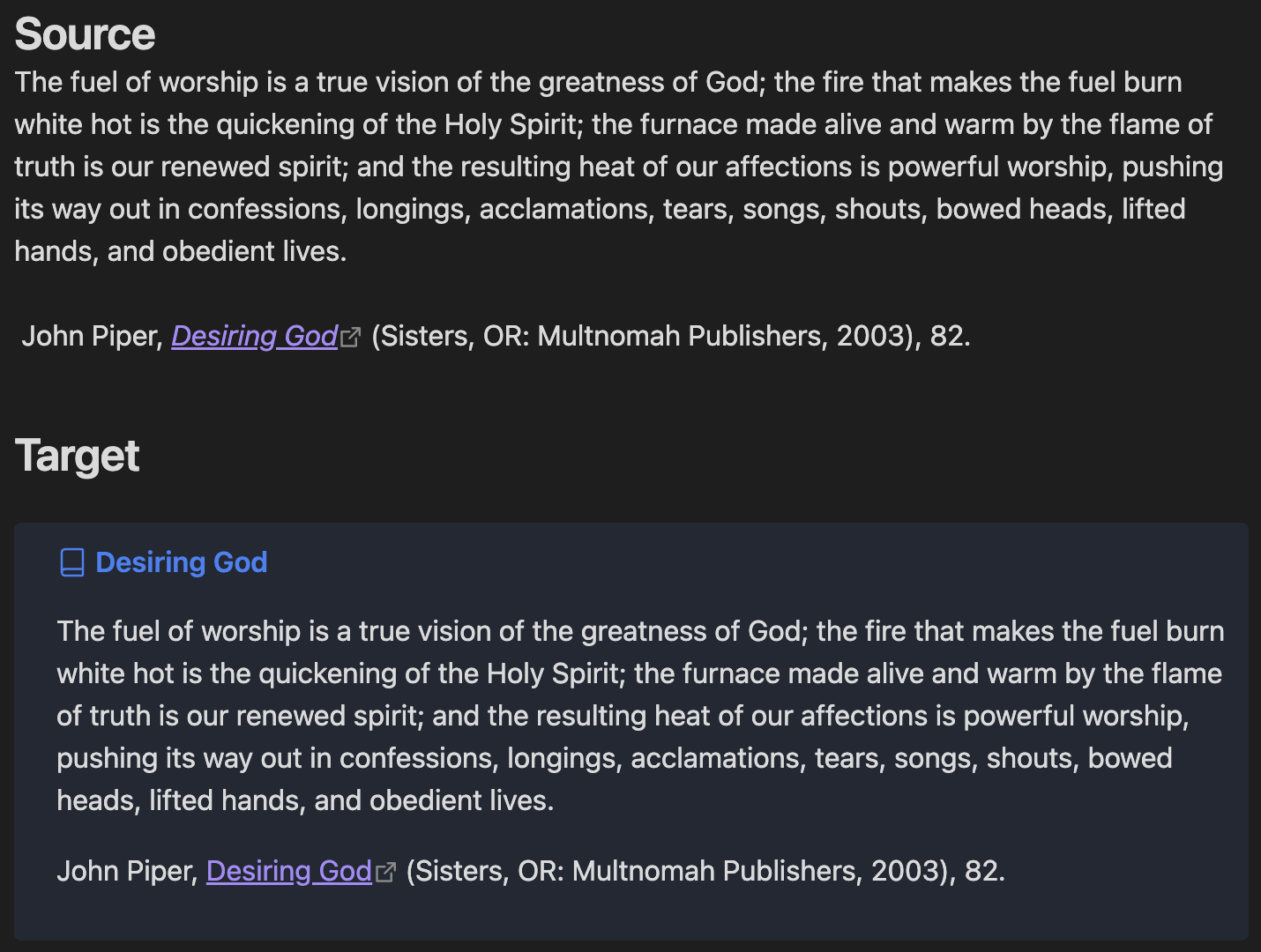
Quote in Clipboard:
The fuel of worship is a true vision of the greatness of God; the fire that makes the fuel burn white hot is the quickening of the Holy Spirit; the furnace made alive and warm by the flame of truth is our renewed spirit; and the resulting heat of our affections is powerful worship, pushing its way out in confessions, longings, acclamations, tears, songs, shouts, bowed heads, lifted hands, and obedient lives.

John Piper, [_Desiring God_](https://ref.ly/logosres/desiringgod?ref=Page.p+82&off=1501&ctx=mplete+our+picture.+~The+fuel+of+worship+) (Sisters, OR: Multnomah Publishers, 2003), 82.
Pasted as Citation Callout:
> [!Citation] Desiring God
> The fuel of worship is a true vision of the greatness of God; the fire that makes the fuel burn white hot is the quickening of the Holy Spirit; the furnace made alive and warm by the flame of truth is our renewed spirit; and the resulting heat of our affections is powerful worship, pushing its way out in confessions, longings, acclamations, tears, songs, shouts, bowed heads, lifted hands, and obedient lives.
>
> John Piper, [_Desiring God_](https://ref.ly/logosres/desiringgod?ref=Page.p+82&off=1501&ctx=mplete+our+picture.+~The+fuel+of+worship+) (Sisters, OR: Multnomah Publishers, 2003), 82.
Requirements
- Obsidian v0.15.0 or higher
- Content with proper citation formatting for best results
Development
Setup
Clone this repository into your vault's plugins folder:
cd /path/to/your/vault/.obsidian/plugins/
git clone https://github.com/Marvive/Citation-Callouts.git
Install dependencies:
cd Citation-Callouts
npm install
Build the plugin:
npm run buildEnable the plugin in Obsidian
Scripts
npm run dev: Start development with file watchingnpm run build: Build for productionnpm run version: Bump version and update files
Support
If you encounter any issues or have feature requests, please create an issue on GitHub.
Contributing
Contributions are welcome! Please feel free to submit a Pull Request.
Author
Michael Marvive - GitHub Profile
License
MIT License
This plugin works best with properly formatted citations that include source references or URLs.
HealthGood
ReviewCaution
About
Format quotes with citations into styled callouts that automatically extract the source name and display a book icon as the title. Preserve rich text (bold, italic, links) when pasting clipboard content or invoking the command to insert citation callouts.Details
Current version
1.0.0
Last updated
Last year
Created
Last year
Updates
1 release
Downloads
874
Compatible with
Obsidian 0.15.0+
Platforms
Desktop, Mobile
License
MIT
Sponsor