Search...Search plugins and themes...
⌘K
Sign in
  • Get started
  • Download
  • Pricing
  • Enterprise
  • Account
  • Obsidian
  • Overview
  • Sync
  • Publish
  • Canvas
  • Mobile
  • Web Clipper
  • CLI
  • Learn
  • Help
  • Developers
  • Changelog
  • About
  • Roadmap
  • Blog
  • Resources
  • System status
  • License overview
  • Terms of service
  • Privacy policy
  • Security
  • Community
  • Plugins
  • Join the community
  • Discord
  • Forum / 中文论坛
  • Merch store
  • Brand guidelines
Follow us
DiscordTwitterBlueskyThreadsMastodonYouTubeGitHub
© 2026 Obsidian

Callout menu

ReatyReaty21k downloads

Adds some extra options to callouts context menu and allows you to add your own custom callouts.

Add to Obsidian
  • Overview
  • Scorecard
  • Updates14

This plugin can be useful for people who use a lot of custom callouts instead of default ones and want to have ability to quickly change callout types from context menu. Now you can chose which callout types will be shown in the menu. Also it adds the ability to easily add or remove callout metadata and "+" or "-" signs for collapsing.
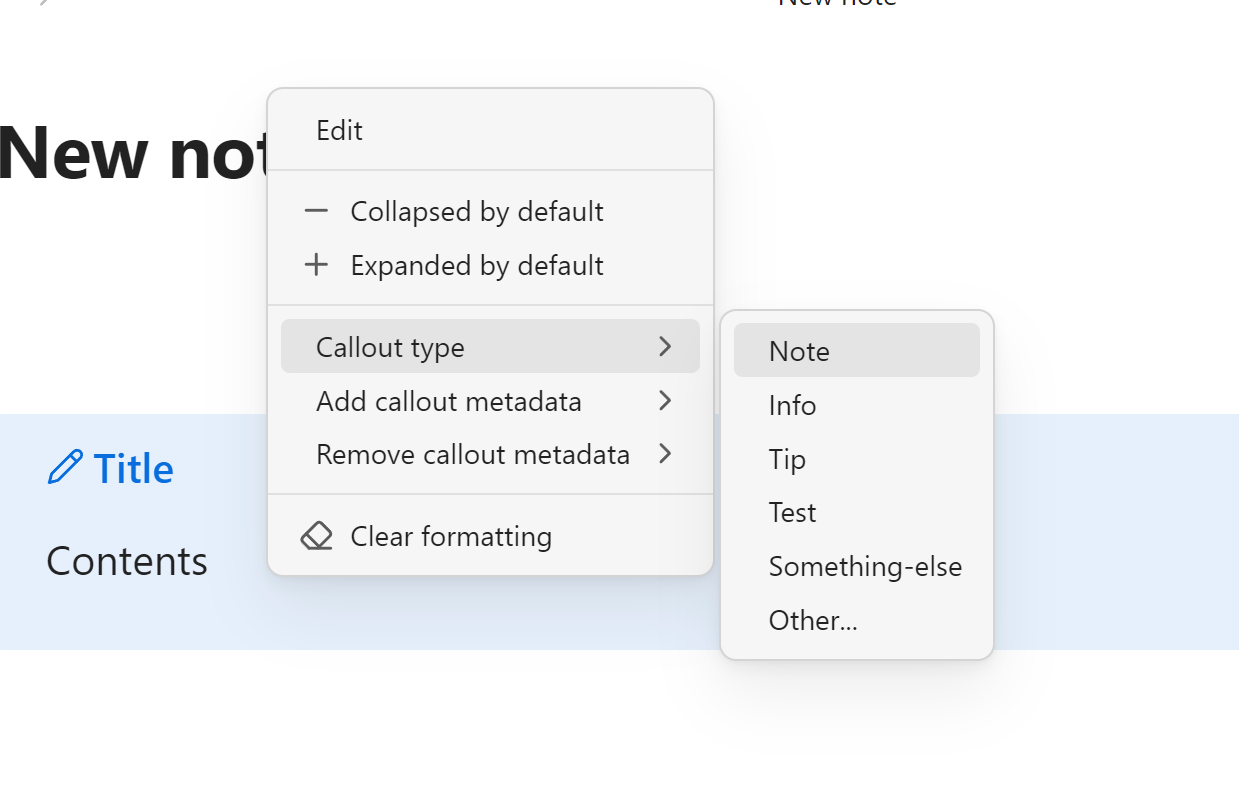
How to use

Open plugin settings an enter the list of callout types and metadata types you want to appear in the context menu.

Installation via BRAT

  1. Install the BRAT plugin from "Community plugins" page.
  2. Go to the BRAT settings.
  3. Click "Add Beta Plugin" button.
  4. Paste the following URL in the text field: https://github.com/anareaty/callout-menu.
  5. Make sure that "Enable after installing the plugin" is checked.
  6. Click "Add Plugin" button.
75%
HealthGood
ReviewSatisfactory
About
Change callout types from the context menu and choose which custom callouts appear. Add or remove callout metadata and toggle +/− collapse markers for concise, collapsible callouts.
EditingFormattingCommands
Details
Current version
1.2.7
Last updated
7 months ago
Created
2 years ago
Updates
14 releases
Downloads
21k
Compatible with
Obsidian 1.6.7+
License
MIT
Report bugRequest featureReport plugin
Author
ReatyReatyreaty
GitHubanareaty
  1. Community
  2. Plugins
  3. Editing
  4. Callout menu

Related plugins

Paste URL into selection

Paste URL "into" selected text.

List Callouts

Create simple callouts in lists.

Vimrc Support

Auto-load a startup file with Vim commands.

Code Editor Shortcuts

Add keyboard shortcuts (hotkeys) commonly found in code editors such as Visual Studio Code (VS Code) or Sublime Text.

Slash Commander

Customize the slash command list, assign each command an icon.

Symbols Prettifier

Prettify the symbols with actual symbols you commonly type, like arrows.

Smart Typography

Convert quotes to curly quotes, dashes to em dashes, and periods to ellipses.

Heading Shifter

Easily Shift and Change Markdown headings.

Number Headings

Automatically number or re-number headings.

Find and replace in selection

Find what you are looking for in the selected text and replace it with the specified text.