
- Overview
- Scorecard
- Updates14
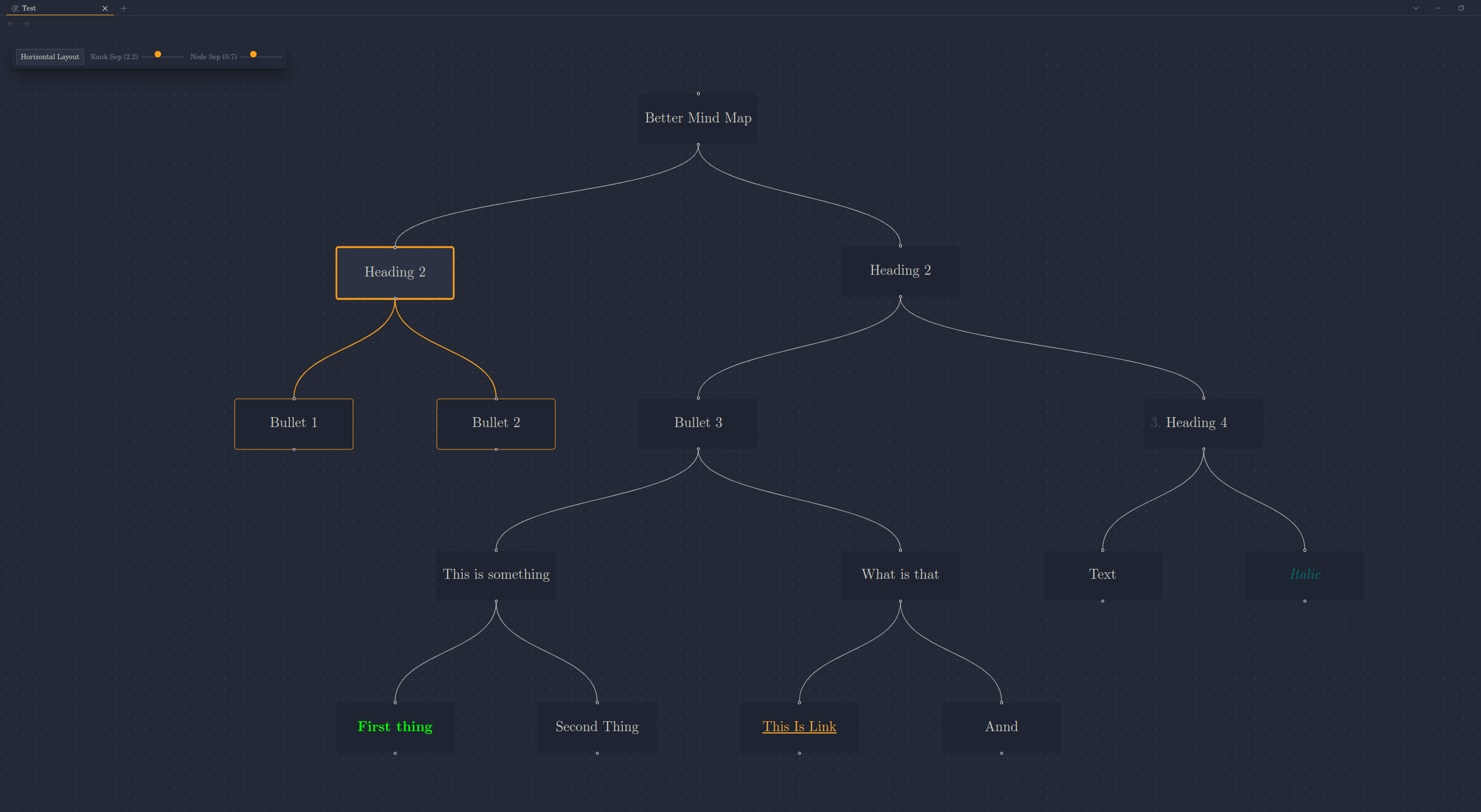
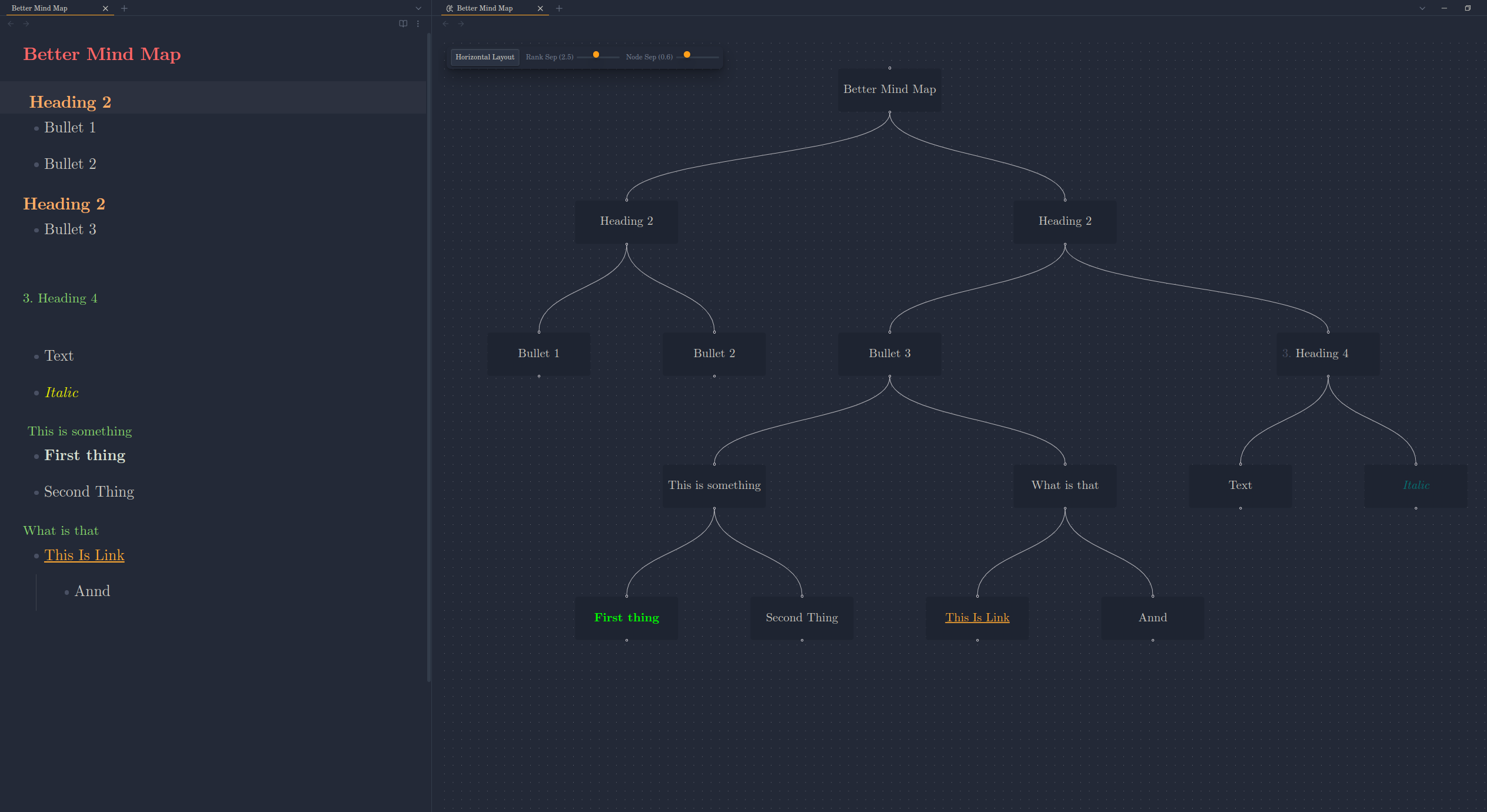
Visualize your Markdown outlines as interactive, dynamic mind maps within Obsidian. This plugin provides enhanced navigation, layout customization, and spacing controls directly within the mind map view.
Features
- Visualize Markdown Outlines: Automatically generates a mind map from the heading structure / bullet points of your active Markdown file.
- Live Updates: The mind map automatically updates to reflect the content of the currently active Markdown note as you edit / navigate within Obsidian.
- Interactive Layouts:
- Toggle between Vertical (Top-to-Bottom) and Horizontal (Left-to-Right) layouts using the in-view control panel.
- View automatically fits to content after layout changes.
- Dynamic Spacing Controls:
- Adjust Rank Separation (space between levels) using an interactive slider.
- Adjust Node Separation (space between nodes on the same level) using an interactive slider.
- See layout changes applied instantly.
- In-View Control Panel: Access layout and spacing adjustments directly within the mind map view without navigating away.
- Node Interaction:
- Collapse/Expand: Double-click nodes to collapse or expand their children.
- Selection Highlight: Click a node to highlight it and its descendants.
- Note Navigation: Click links within node text (if they are standard Markdown links) to navigate to other notes.
- Themed Interface: Controls utilize Obsidian theme variables for seamless visual integration.
How to Use
- Open the Mind Map:
- Ensure a Markdown file is open and active.
- Run the command
Better Mindmap: Open Mind Map Viewfrom the command palette (Ctrl/Cmd+P). This will typically open the mind map in a new pane.
- Interact with the Map:
- Pan & Zoom: Use standard mouse/trackpad gestures to navigate the canvas.
- Collapse/Expand: Double-click a node.
- Select: Single-click a node.
- Follow Links: Click on standard Markdown links within node text.
- Use the Control Panel (Top-Left):
- Layout: Click the
Switch to Horizontal/Vertical Layoutbutton to toggle the orientation. - Spacing: Use the
Rank SepandNode Sepsliders to dynamically adjust the spacing between nodes.
- Layout: Click the
- Reset View State:
- Run the command
Better Mindmap: Reset Mind Map Viewto clear selection highlights and uncollapse all nodes.
- Run the command
- Center View:
- Run the command
Better Mindmap: Center Mind Map Viewto fit the entire mind map within the current viewport.
- Run the command
Installation
From Community Plugins (Recommended)
- Ensure Obsidian's Community Plugins are enabled (
Settings->Community Plugins->Turn on community plugins). - Click
Browsecommunity plugins. - Search for "Better mind map".
- Click
Install. - Once installed, click
Enable.
Manual Installation
- Download the latest
main.js,manifest.json, andstyles.cssfiles from the Releases page of this repository. - Navigate to your Obsidian vault's plugins folder:
VaultFolder/.obsidian/plugins/. - Create a new folder named
better-mindmap. - Copy the downloaded
main.js,manifest.json, andstyles.cssinto thebetter-mindmapfolder. - Reload Obsidian (Ctrl/Cmd+R).
- Enable the "Better Mindmap" plugin under
Settings->Community Plugins.
Configuration
Most configuration is handled directly via the In-View Control Panel (layout direction, spacing).
For advanced users, the spacing sliders control the following CSS variables on the root element (:root or html). You can set base values for these in your own Obsidian CSS snippets if desired, although the panel sliders will override them during interaction:
--mindmap-ranksep-multiplier: Multiplies the node height to determine rank separation.--mindmap-nodesep-multiplier: Multiplies the node width to determine node separation.
Commands
The following commands are available via the Obsidian Command Palette (Ctrl/Cmd+P):
Better Mindmap: Open Mind Map View: Opens the mind map for the currently active Markdown file.Better Mindmap: Reset Mind Map View: Clears selection and uncollapses all nodes in the active mind map view.
Contributing
Contributions, issues, and feature requests are welcome. Please check the Issues page before submitting a new one.
License
This plugin is released under the MIT License.