Auto Link Suggester
 hornat532 downloads
Automatically suggests internal link completions when you type a filename from a specified folder in the editor, with support for exact prefix and fuzzy matching.
- Overview
- Scorecard
- Updates9
我在小红书发布了许多obsidian的教程和插件开发进度,你的关注就是对我最大的支持
简体中文
Examples 快速示例
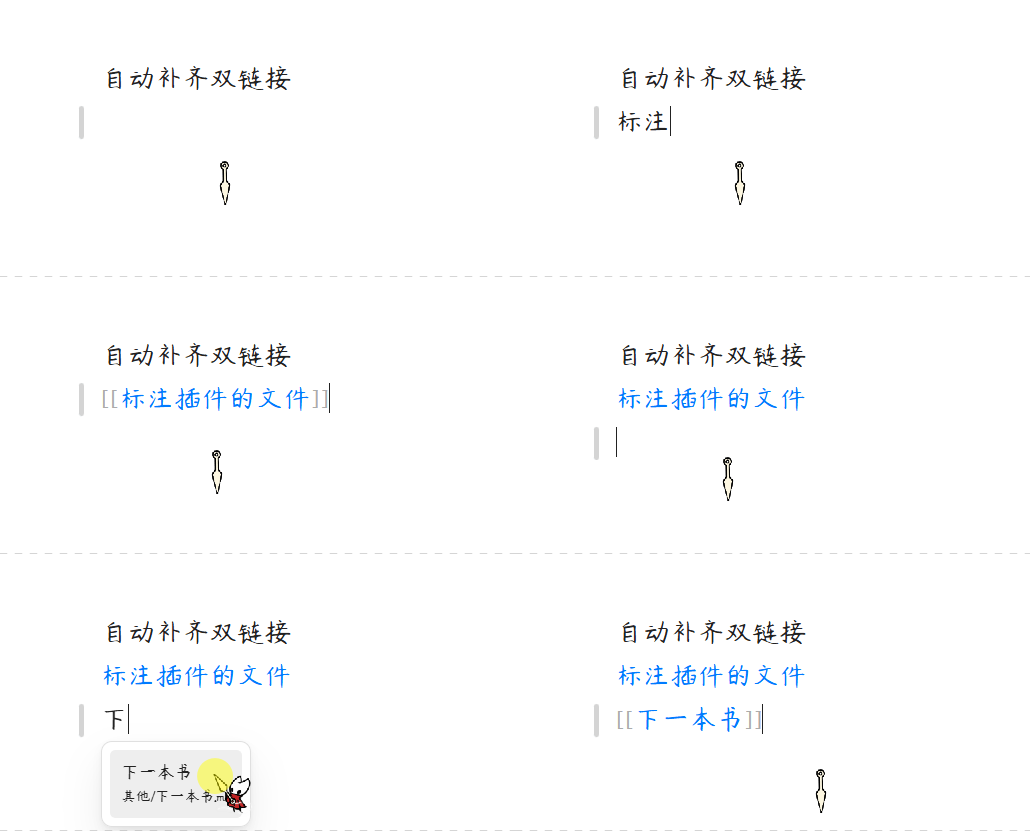
1、输入笔记名称自动补全双链
在编辑器中输入"日",自动弹出补全建议:
日记本
日常随笔
日记 - 2024
选择后自动生成 [[]] 双链语法。
2、模糊匹配发现隐性关联
开启模糊匹配后,输入"流"可关联到:
文件限流
信息流
工作流程
3、防误触开关
开启后,点击指向「指定文件夹」中文件的双链时,不再触发页面跳转,防止频繁误触。
4、智能中英文触发
| 输入 | 触发行为 |
|---|---|
日 |
✅ 立即触发(CJK 单字符) |
a |
❌ 不触发(英文需 ≥2 字符) |
ab |
✅ 触发补全 |
核心功能
1. 指定文件夹扫描 (Folder-Targeted Indexing)
- 按需建立索引:无需对整个知识库进行全局扫描,您可以自由指定一个或多个高频使用的核心文件夹(如日常随笔、人名库、项目列表等)。
- 自动去重与合并:即使指定的文件夹存在包含关系,内部的 Map 数据结构也能自动去重,确保缓存占用与检索效率处于理想状态。
2. 智能触发与防打扰机制 (Smart Trigger Rules)
- 精准词汇提取:插件会根据光标前的最后一个空格或标点符号自动切分,提取您当前输入的关键字,避免无谓的弹窗干扰。
- 双链状态识别:当检测到光标已经处于已有的双链中(如
[[...]]),补全器将自动静默,防止二次干扰。 - 中英文差异化触发:输入中文、日文等非 ASCII 字符时支持单字符触发;输入英文等 ASCII 字符时,自动过滤单字母输入,需达到 2 个字符才触发,平衡输入流畅度。
3. 多匹配模式切换 (Fuzzy & Prefix Matching)
- 前缀模式 (Prefix):默认仅检索以输入字词开头的笔记名称,适合结构清晰的规范化命名。
- 模糊模式 (Fuzzy):开启后支持任意位置的包含匹配(例如输入"流"即可关联到"文件限流"、"信息流"),帮您快速发现笔记间的隐性关联。
4. 无缝原生双链生成 (Official Path Resolution)
- 遵循用户偏好:调用 Obsidian 官方的
generateMarkdownLink接口,生成的链接格式(如:相对路径、绝对路径、最短路径)将完全契合您在 Obsidian 软件中配置的全局首选项。 - 内联图示过滤:自动识别并剔除可能因 API 默认生成的内嵌叹号(
!),保障双链的纯净呈现。
5. 守护 CPU 的性能设计 (Performance-Oriented Architecture)
- 多重防抖机制:无论是文件系统层面的"新建、重命名、删除"变动,还是您在后台输入文件夹配置的间歇,插件均内置了防抖控制器(Debounce)。合并多余计算,避免对硬盘和 CPU 造成高频读写压力。
- 列表限流展现:补全建议框单次至多渲染 10 条结果,降低频繁键入时的 UI 渲染开销。
用法
- 打开 Obsidian 设置,进入 Auto Link 自动补全双链 设置。
- 在「指定文件夹」文本框中,输入您希望启用自动补齐的文件夹路径(如
Notes、Work/Projects)。多个路径请用回车换行分隔。 - 在编辑区中输入该文件夹下笔记名称的部分字词,即可看到双链补全建议,选择后自动生成
[[]]双链语法。 - 可选:开启「模糊匹配」支持任意位置的包含匹配;开启「防误触」阻止点击双链时跳转。
赞赏支持
🎁 如果觉得有用,请作者喝杯咖啡

QQ 交流群:1094620986
English
Smart Double-Link Autocompletion — Designed for deep Chinese input experience in Obsidian
Examples
1. Type a note name to auto-complete double-links
Type "日" in the editor and get instant suggestions:
日记本
日常随笔
日记 - 2024
Select one to auto-generate [[]] link syntax.
2. Fuzzy matching discovers hidden connections
With fuzzy matching enabled, typing "流" matches:
文件限流
信息流
工作流程
3. Click Navigation Guard
When enabled, clicking a double-link pointing to files in your target folders will no longer trigger page navigation, preventing accidental jumps.
4. Smart CJK/ASCII Trigger
| Input | Behavior |
|---|---|
日 |
✅ Triggers immediately (single CJK character) |
a |
❌ Not triggered (ASCII requires ≥2 characters) |
ab |
✅ Triggers autocompletion |
Features
1. Folder-Targeted Indexing
- Selective Indexing: No need to scan the entire vault. Freely specify one or more high-frequency folders (e.g., daily notes, contacts, projects).
- Smart Deduplication: Even with overlapping folder paths, the internal Map structure auto-duplicates, keeping cache and retrieval optimal.
2. Smart Trigger & Anti-Disturb Logic
- Context-Aware Extraction: Automatically splits input based on the last space or punctuation before the cursor, extracting the current keyword without intrusive popups.
- Bracket Detection: When the cursor is already inside an existing
[[...]]link, the suggester stays silent. - CJK/ASCII Differentiation: Triggers on a single CJK character; requires at least 2 characters for ASCII input to balance fluency.
3. Fuzzy & Prefix Matching
- Prefix Mode: Default mode — only matches note names starting with your input. Ideal for structured naming conventions.
- Fuzzy Mode: Matches any note name containing your input as a substring (e.g., typing "流" matches "文件限流", "信息流").
4. Native Link Resolution
- Respects User Preferences: Uses Obsidian's official
generateMarkdownLinkAPI, so generated links follow your configured path format (relative, shortest, absolute). - Embed Cleaning: Automatically strips leading
!characters from generated links.
5. Performance-Oriented Architecture
- Double-Layer Debouncing: Debounce controls on file system events (
create/delete/rename) and settings saves, merging redundant operations. - Limited UI Render: The suggestion dropdown renders at most 10 items, reducing DOM overhead.
Usage
- Open Obsidian Settings and navigate to Auto Link Settings.
- In the "Target Folders" text box, enter the folder paths you want to enable autocompletion for (e.g.,
Notes,Work/Projects). Separate multiple paths with new lines. - While editing, type any part of a note name from those folders — a double-link suggestion will appear. Select it to auto-generate
[[]]link syntax. - Optional: Enable "Fuzzy Match" for substring matching anywhere in the name; enable "Click Guard" to prevent navigation when clicking double-links.
QQ Group:1094620986