Auto Classifier
 hyeonseonam16k downloads
Automatically classify tag from your notes using ChatGPT API. It analyze your note (It can be title, frontmatter, content or selected area) and automatically insert tag where you set.
- Overview
- Scorecard
- Updates7
Auto Classifier is an Obsidian plugin that helps you automatically classify tags in your notes using either OpenAI-compatible APIs (ChatGPT, Ollama, LocalAI, etc.) or Jina AI Classifier. The plugin can analyze your note (including its title, frontmatter, content, or selected area) and suggest relevant tags based on the input with tags in your vault. This can be used for various specific purposes, for example, DDC classification for books, keyword recommendation, research paper categorization, and so on. Save time and improve your note organization.
How to use
Configure your classification engine and API settings in the settings tab:
Choose your Classification Engine:
OpenAI-compatible API: Uses OpenAI API, Local AI (Ollama, LocalAI), or other compatible APIsJina AI: Uses Jina AI Classifier (cost-effective, multilingual)
For OpenAI-compatible API:
- Enter your API key (leave empty for local AI)
- Set the base URL:
- OpenAI:
https://api.openai.com/v1(default) - Local OpenAI-compatible API (Ollama, LocalAI):
- Ollama:
http://localhost:11434/v1 - LocalAI:
http://localhost:8080/v1
- Ollama:
- OpenAI:
- Choose your model:
- OpenAI:
gpt-4.1-mini(recommended),gpt-4.1,gpt-4o, ... - Local OpenAI-compatible API:
llama3,mistral,phi3,qwen2, ... (Ollama/LocalAI)
- OpenAI:
- Test your configuration using the Test API call button
For Jina AI:
- Enter your Jina AI API key (free tier available with 10M tokens)
- Choose your preferred model (default: jina-embeddings-v3)
- Test your configuration using the Test Jina API button
- Getting a Jina AI API Key: Visit the Jina AI website to obtain a free temporary API key (you can get the key without creating an account).
This plugin consists of 4 Input Commands that you can run. By simply running these commands, it will automatically classify your note:
Classify tag from Note titleClassify tag from Note FrontMatterClassify tag from Note ContentClassify tag from Selected Area
Toggle and choose from different Tag Reference types. The LLM will select the appropriate tag from these references:
All tags(default)Filtered Tagswith regular expressionManual Tagsthat are defined manually
Specify the Output Type from the response of the LLM:
#Tag: at yourCurrent CursororTop of Content[[WikiLink]]: at yourCurrent CursororTop of ContentFrontMatter: withkeyTitle Alternative: at the end of note's title
(Optional) Add a
PrefixorSuffixfor the output format.(Optional) You can use your custom request for your selected API:
Custom Prompt Template- The LLM will respond based on this prompt. The input coming from your Command will be replaced by
{{input}}, and the reference tags you set will be placed in{{reference}}.
- The LLM will respond based on this prompt. The input coming from your Command will be replaced by
Custom Chat Role- You can guide the AI's behavior by setting this system role
Classification Engines
OpenAI-compatible API
- Flexibility: Supports custom prompts and chat roles
- Multiple Providers: Works with OpenAI, Ollama, LocalAI, and other compatible APIs
- Local AI Support: Run models locally without internet connection
- Recommended OpenAI models:
gpt-4.1-mini,gpt-4.1,gpt-4o - Advanced Features: Custom prompt templates, system roles, and token control
Jina AI Classifier
- Cost-Effective: Generous free tier with 10 million tokens
- Multilingual: Supports multiple languages including non-English content
- High Performance: Zero-shot classification with up to 8192 tokens input and 256 distinct classes
- Optimized: Works best with semantic labels (e.g., "happy", "sad", "angry")
- Easy Setup: Often no account creation required, can generate fresh API keys as needed
Local AI Setup (Ollama, LocalAI)
Experimental Support: ⚠️ You may use local OpenAI-compatible APIs such as Ollama or LocalAI. However, support for these engines is experimental and full compatibility or stability is not guaranteed. Some features may not work as expected. Please test thoroughly before relying on these engines for important workflows. If you encounter issues or want to help improve compatibility, contributions and pull requests are very welcome!
Example setup:
- Install Ollama or LocalAI
- Prepare your model: For Ollama, run
ollama pull llama3. For LocalAI, configure your models as needed. - Set Base URL: Ollama -
http://localhost:11434/v1, LocalAI -http://localhost:8080/v1 - Set Model: e.g.,
llama3,mistral, etc. - API Key: Leave empty
Example
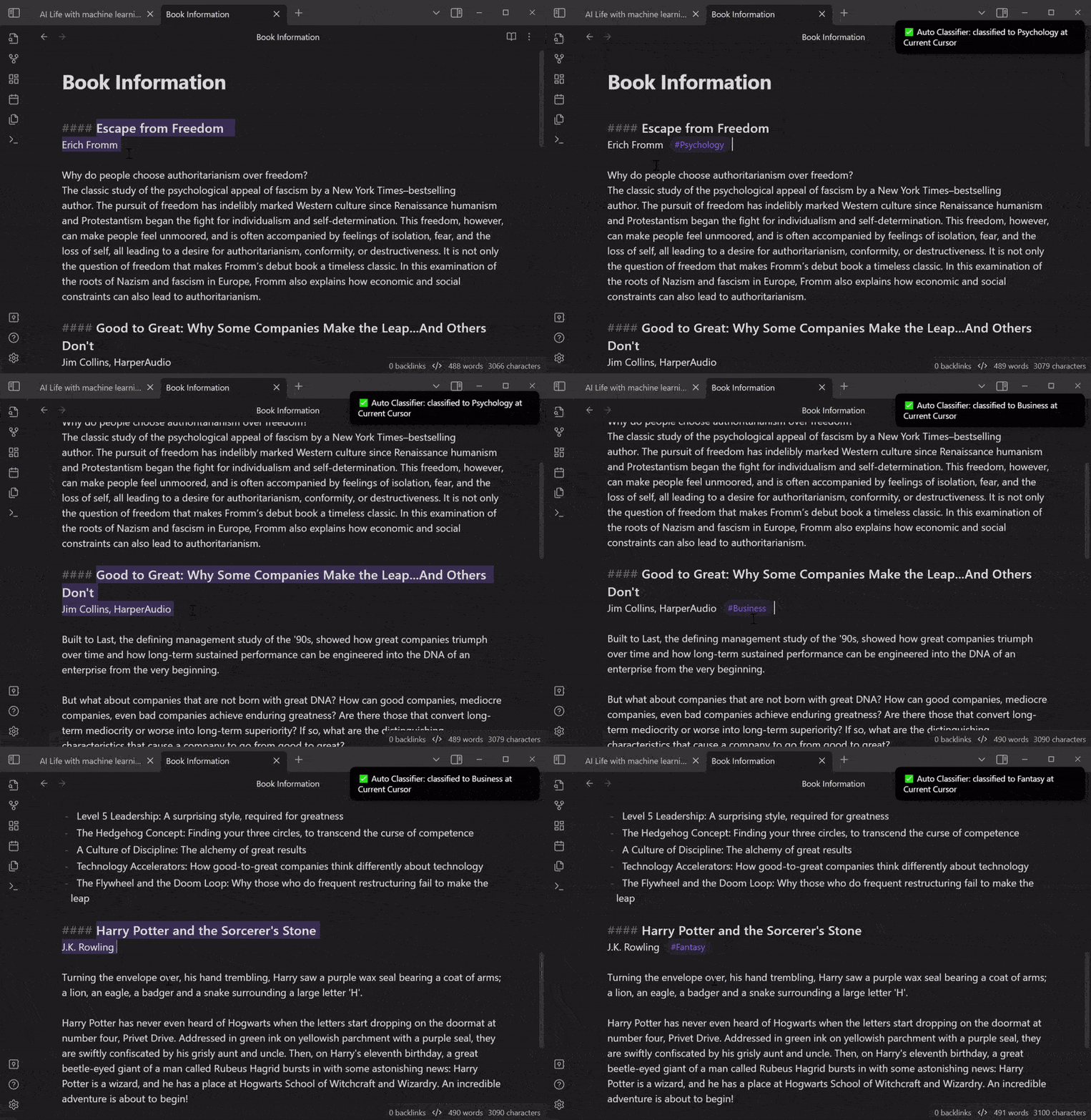
Use Case #1: Selected area → Current cursor
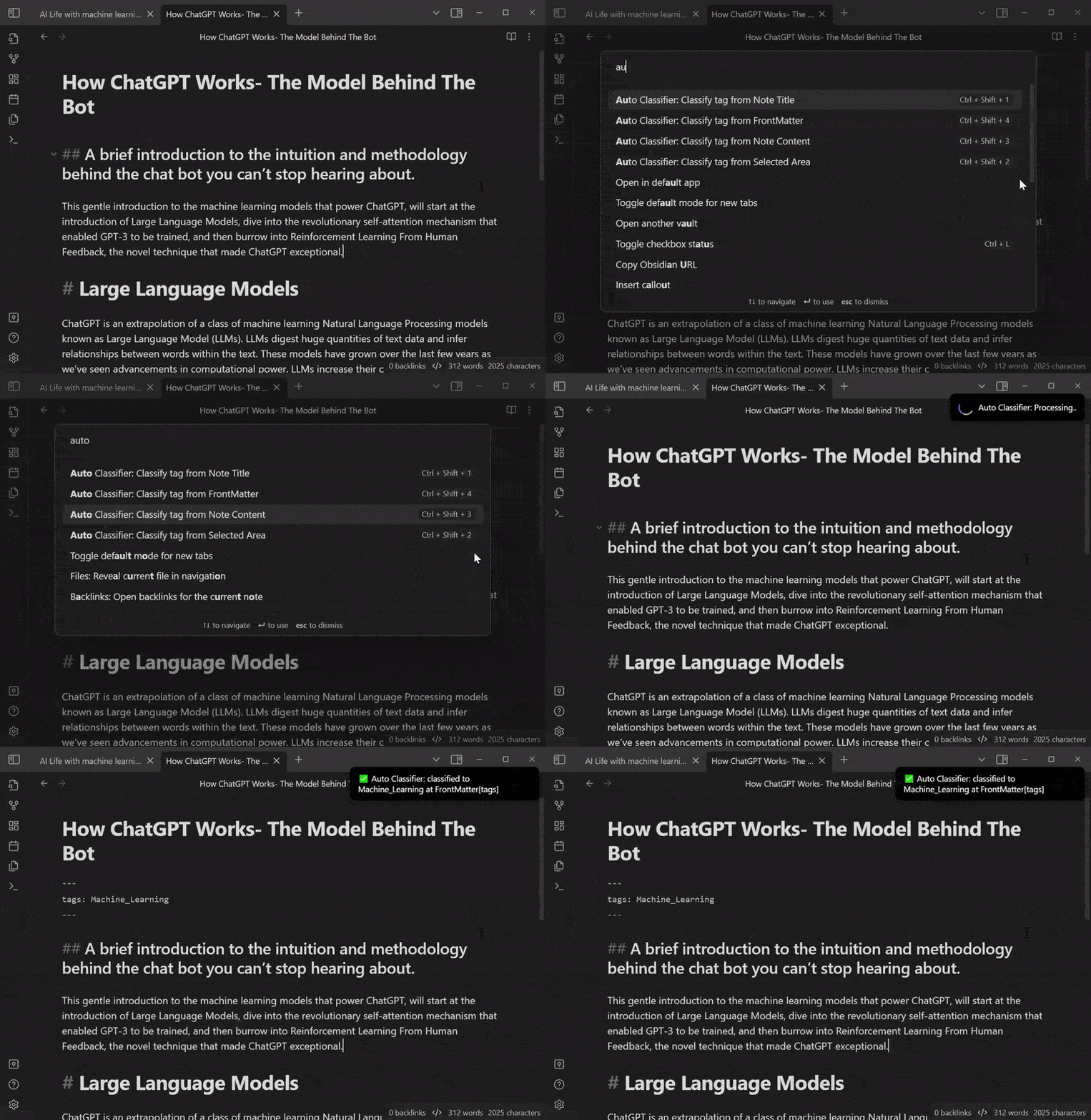
Use Case #2: Content → FrontMatter
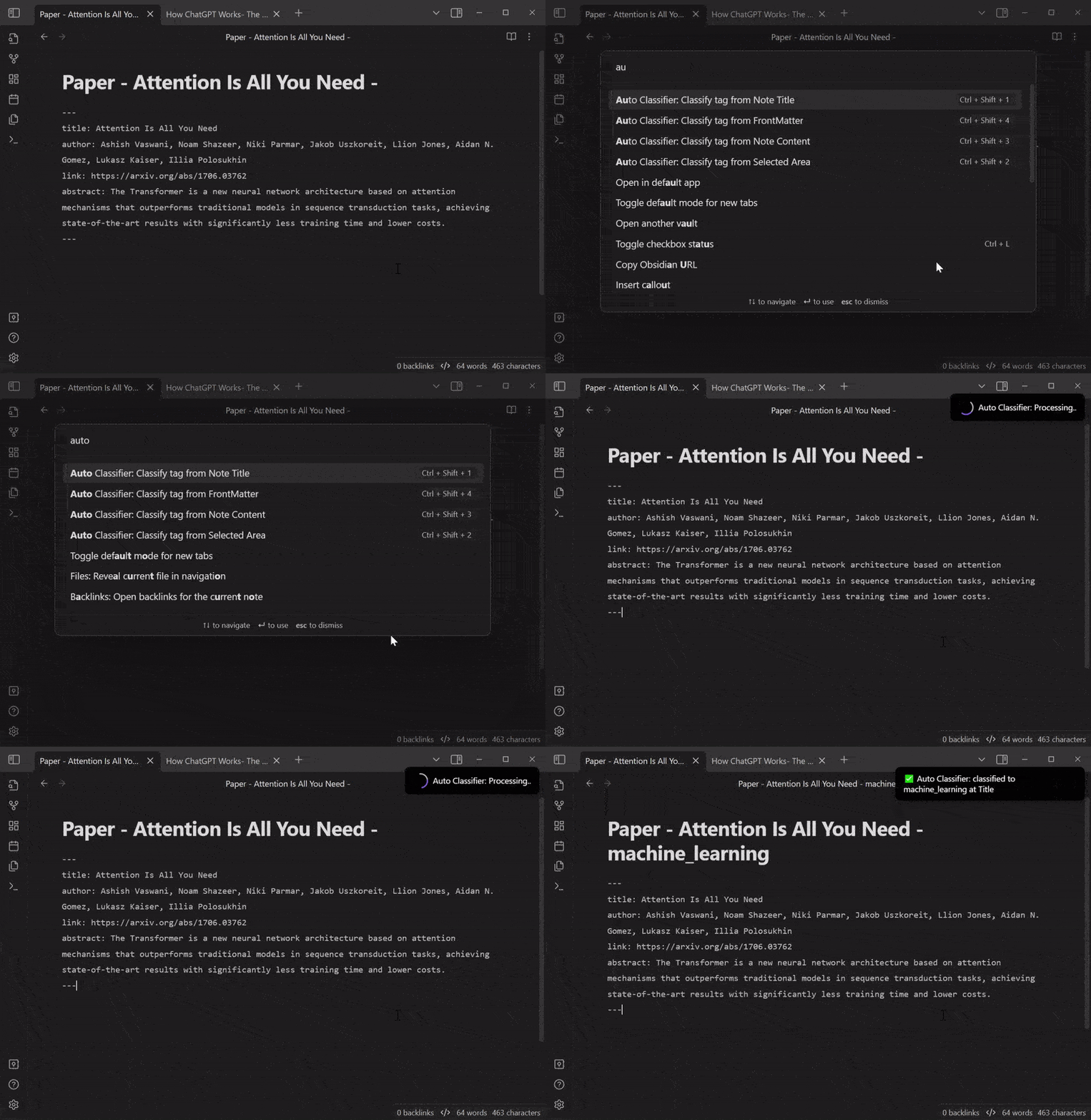
Use Case #3: FrontMatter → Title
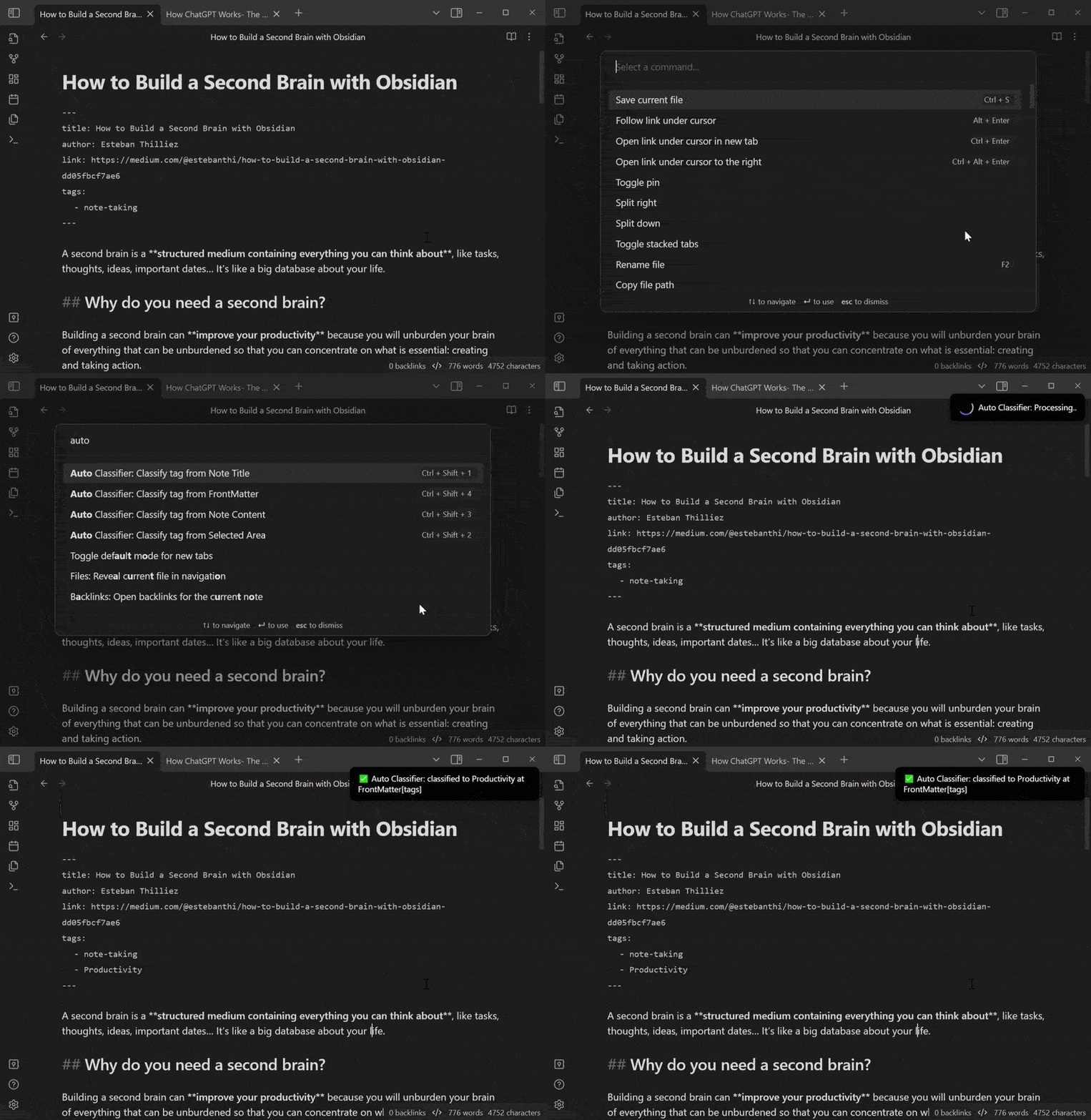
Use Case #4: Title → FrontMatter
DDC number classification
If you want to use this plugin for DDC number classification, edit the Custom Prompt Template like this:
Please use Dewey Decimal Classification (DDC) to classify this content:
"""
{{input}}
"""
Answer format is JSON {reliability:0~1, output:"[ddc_number]:category"}.
Even if you are not sure, qualify the reliability and select one.
Convert the blank spaces to "_" in the output.
LCSH classification
LCSH classification can be similar:
Please use Library of Congress Subject Headings (LCSH) to classify this content:
"""
{{input}}
"""
Answer format is JSON {reliability:0~1, output:"[First LCSH term]--[Second LCSH term]--[Third LCSH term]"}.
Even if you are not sure, qualify the reliability and select one.
Convert the blank spaces to "_" in the output.
Installation
- Search for
Auto Classifierin the Community plugin tab of the Obsidian settings. - Alternatively, you can manually download the latest release from this repository's GitHub releases and extract the ZIP file to your Obsidian plugins folder.
Support
If you encounter any issues while using this plugin or have suggestions for improvement, please feel free to submit an issue on the GitHub repository. Pull requests are also welcome.
🙌 Contributors
- @gravityfargo
- @rtuszik
- @tk42
- @SophomoreSo
- @ThiagoVsky
License
MIT License