Annotated Equations
 Ken Graham19 downloads
Attach color-coded labels and leader lines to LaTeX equations.
- Overview
- Scorecard
- Updates1
Label individual terms in a LaTeX equation in Obsidian. Each label matches its highlighted term and connects to it with a leader line. Equations render in Reading view and Live Preview.
Install manually
- Use Obsidian 1.15.0 or later.
- Download and unzip
annotated-equations.zipfrom the latest release. - Move the extracted
annotated-equationsfolder into your vault's.obsidian/plugins/folder. - Restart Obsidian and enable Annotated Equations under Settings → Community plugins.
Examples
Label two terms
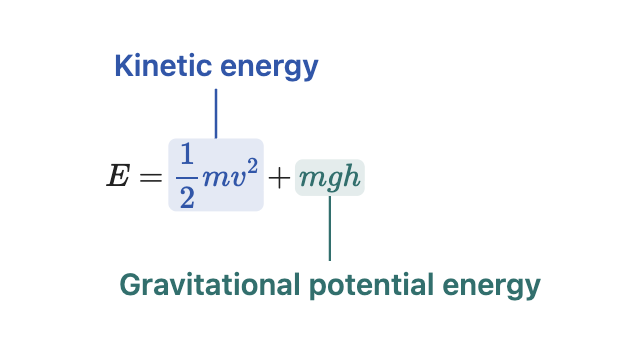
Paste this block into a note to reproduce the screenshot.
```annotated-equation
E = \annotate[above,blue]{\frac{1}{2}mv^2}{Kinetic energy}
  + \annotate[below,teal]{mgh}{Gravitational potential energy}
```
Use the default color
Leave out the options to place a label below its term in your theme's accent color. Supply just above to move the label above its term.
```annotated-equation
F = \annotate{m}{Mass}\,\annotate[above]{a}{Acceleration}
```
Label an aligned equation with text and math
Use aligned for multiple lines. Wrap a label in single dollar signs to typeset it as math.
```annotated-equation
\begin{aligned}
s(t) &= \annotate[above,purple]{\tfrac12 at^2}{Displacement} \\
v(t) &= \annotate[below,teal]{at}{$\mathrm{m\,s^{-1}}$}
\end{aligned}
```
Annotation syntax
Use \annotate[position,color]{LaTeX term}{label} inside an annotated-equation fence. Write the rest of the equation as you would inside an Obsidian math block. The fence replaces the $$ delimiters.
- Use
aboveorbelowfor the position andaccent,blue,teal,green,orange,red, orpurplefor the color. - Omit the options to use
belowandaccent. - Labels accept plain text or a single math expression enclosed in dollar signs.
- Translate existing TikZ annotations into
\annotatecommands before pasting.
Scroll wide equations horizontally to see every label.
Build from source
Run npm ci and npm run build. Copy main.js, manifest.json, and styles.css into your vault's .obsidian/plugins/annotated-equations/ folder. Run npm test to check annotation parsing and label placement.
License
Inspired by synercys/annotated_latex_equations.