Ancient Poetry Printer
 Calf46 downloads
基于赫蹏(https://sivan.github.io/heti/)为古文诗词提供表单化编辑和专业排版渲染
- Overview
- Scorecard
- Updates1
基于 赫蹏 (Heti) 的 Obsidian 古文诗词排版插件。使用自定义 .sc 文件格式,通过表单 UI 编辑古文诗词,自动渲染为排版精美的 HTML,支持拼音注音和竖排版式。
安装
从源码构建
git clone <仓库地址>
cd ob-extends-gwsc
npm install
构建命令
# 开发模式(监听文件变化自动构建)
npm run dev

# 生产构建
npm run build
构建产物为根目录下的 main.js。styles.css 需手动从 src/styles.css 同步到根目录(两者内容相同)。
部署到 Obsidian
将以下文件复制到 Vault 的 .obsidian/plugins/obsidian-gwsc/ 目录:
main.js
manifest.json
styles.css
重启 Obsidian,进入 设置 → 第三方插件,启用「古文诗词排版插件」。
使用
新建古文诗词
按 Ctrl+P(macOS 为 Cmd+P)打开命令面板,输入「新建古文诗词」并回车。
插件会在 古文诗词/ 目录下创建 .sc 文件并自动打开编辑视图。
编辑视图
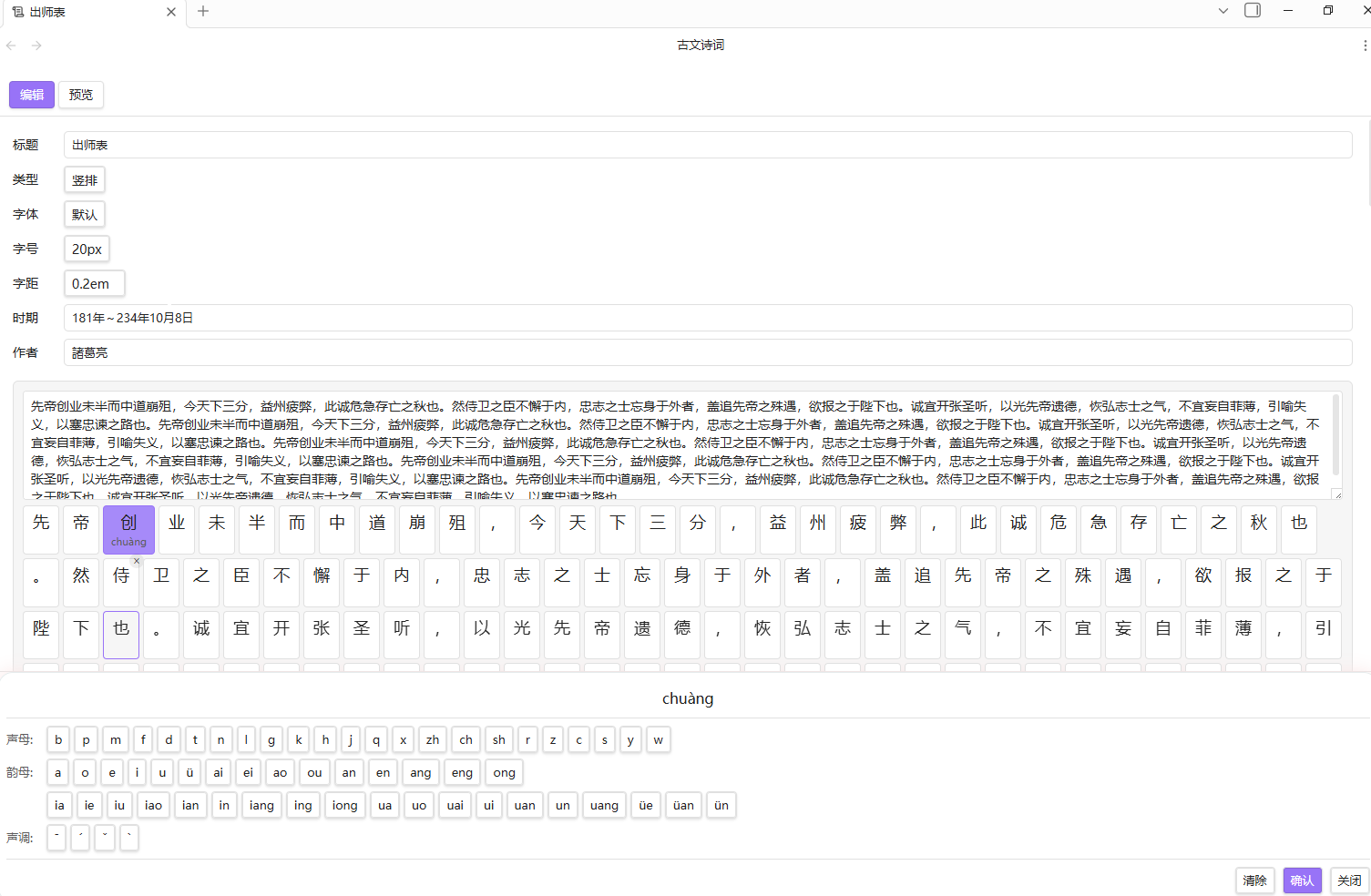
打开 .sc 文件后显示表单编辑界面:
- 顶部工具栏:切换「编辑」和「预览」模式
- 表单字段:标题、类型(诗词/古文/竖排)、字体、字号、字距、时期、作者
- 诗词段(行):每段(行)一个文本输入框,下方显示字符卡片
- 字符卡片:点击卡片打开拼音键盘,可添加/清除拼音
- 拼音键盘:选择声母、韵母、声调后确认
- 添加段(行):点击「+ 添加一段(行)」按钮
- 折叠/删除:每段(行)可折叠字符卡片区域,多段时可删除
预览视图
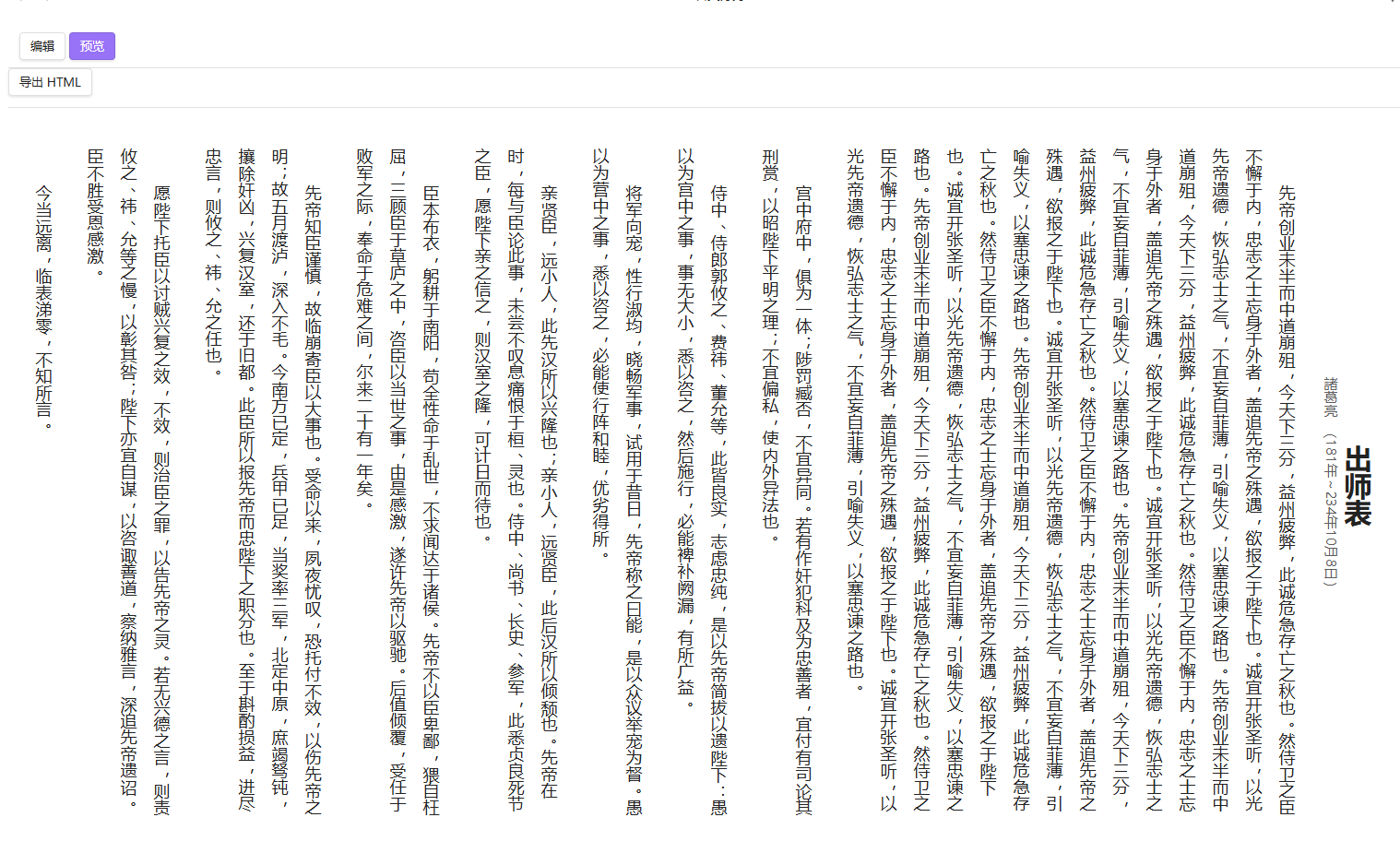
点击工具栏「预览」按钮,查看渲染后的排版效果:
- 诗词格式:
[时期] 作者+ 居中排版 - 古文格式:标题 +
(时期) 作者居中 - 竖排格式:传统从右到左竖排
- 拼音注音:使用
<ruby>标签显示
导出 HTML
预览模式下点击「导出 HTML」按钮,可将当前诗词导出为独立的 HTML 文件。
文件格式
.sc 文件为纯 JSON 格式:
{
  "title": "静夜思",
  "hetiType": "poetry",
  "dynasty": "唐",
  "author": "李白",
  "font": "",
  "fontSize": 0,
  "charGap": 0,
  "lines": [
    {
      "chars": [
        { "char": "床" },
        { "char": "前" },
        { "char": "明", "pinyin": "míng" },
        { "char": "月" },
        { "char": "光" }
      ]
    }
  ]
}
| 字段 | 类型 | 说明 |
|---|---|---|
title |
string | 诗词标题 |
hetiType |
string | 排版类型:poetry(诗词)、ancient(古文)、vertical(竖排) |
dynasty |
string | 时期(如唐、宋、公元前369~公元前286年) |
author |
string | 作者 |
font |
string | 字体名称(空为默认) |
fontSize |
number | 字号 px(0 为默认,可选 16/18/20/24/28/32/36) |
charGap |
number | 字间距 em(0 为默认,可选 0.1~0.5) |
lines |
array | 诗词段(行)数组 |
lines[].chars |
array | 字符数组 |
chars[].char |
string | 单个汉字 |
chars[].pinyin |
string? | 拼音(可选) |
文件结构
建议在 Vault 中创建专门的目录:
你的Vault/
├── 古文诗词/
│   ├── 静夜思.sc
│   ├── 赠汪伦.sc
│   └── 出师表.sc
└── 日常笔记/
    └── 读书笔记.md
常见问题
Q: .sc 文件双击打开后是空白? A: 确保插件已启用。如果还是空白,尝试重启 Obsidian。
Q: 如何在其他笔记中引用诗词?
A: 当前版本暂不支持 ![[]] 嵌入 .sc 文件。后续可考虑添加阅读视图支持。
Q: 拼音键盘不弹出? A: 点击字符卡片(单个汉字方块)即可弹出拼音键盘。
技术架构
| 文件 | 职责 |
|---|---|
src/main.ts |
插件入口,注册 .sc 扩展名和自定义视图,创建新诗词命令 |
src/sc-view.ts |
自定义 ItemView,表单 UI + 预览 + 文件读写 |
src/poem-data.ts |
数据类型定义、JSON 序列化、HTML 渲染生成 |
src/char-card.ts |
字符卡片组件(汉字 + 拼音 + 删除按钮) |
src/pinyin-keyboard.ts |
拼音输入键盘(声母/韵母/声调选择) |
src/font-detector.ts |
系统中文字体检测(Canvas 测量法) |
src/export.ts |
导出为独立 HTML 文件 |
src/styles.css |
所有样式(表单、卡片、键盘、排版渲染) |
核心设计:使用 Obsidian 的 registerExtensions 注册 .sc 文件类型,通过 registerView 绑定自定义 ItemView。编辑视图完全独立于 CM6 编辑器,通过 Vault API 直接读写文件。所有变更实时同步到 .sc 文件。
开源协议
MIT