AI Exporter Hub
 Jack · AI Exporter Hub142 downloads
Organize and search exported AI conversations as local Markdown files in your vault.
- Overview
- Scorecard
- Updates5
Turn exported AI conversations into a private, searchable knowledge hub inside Obsidian.
AI Exporter Hub organizes conversations from ChatGPT, Claude, Gemini, Perplexity, Grok, Genspark, and compatible Markdown exports without moving them out of your vault.
Your Markdown files are the source of truth.
View AI Exporter Hub in the Obsidian Community directory
Why AI Exporter Hub?
Research, code, writing, decisions, and project knowledge are increasingly scattered across separate AI services. AI Exporter Hub brings exported conversations together in one local library so they can remain useful after the original chat is over.
The plugin works on top of ordinary Markdown files. It does not require a particular AI provider, proprietary database, cloud account, or Dataview.
Screenshots
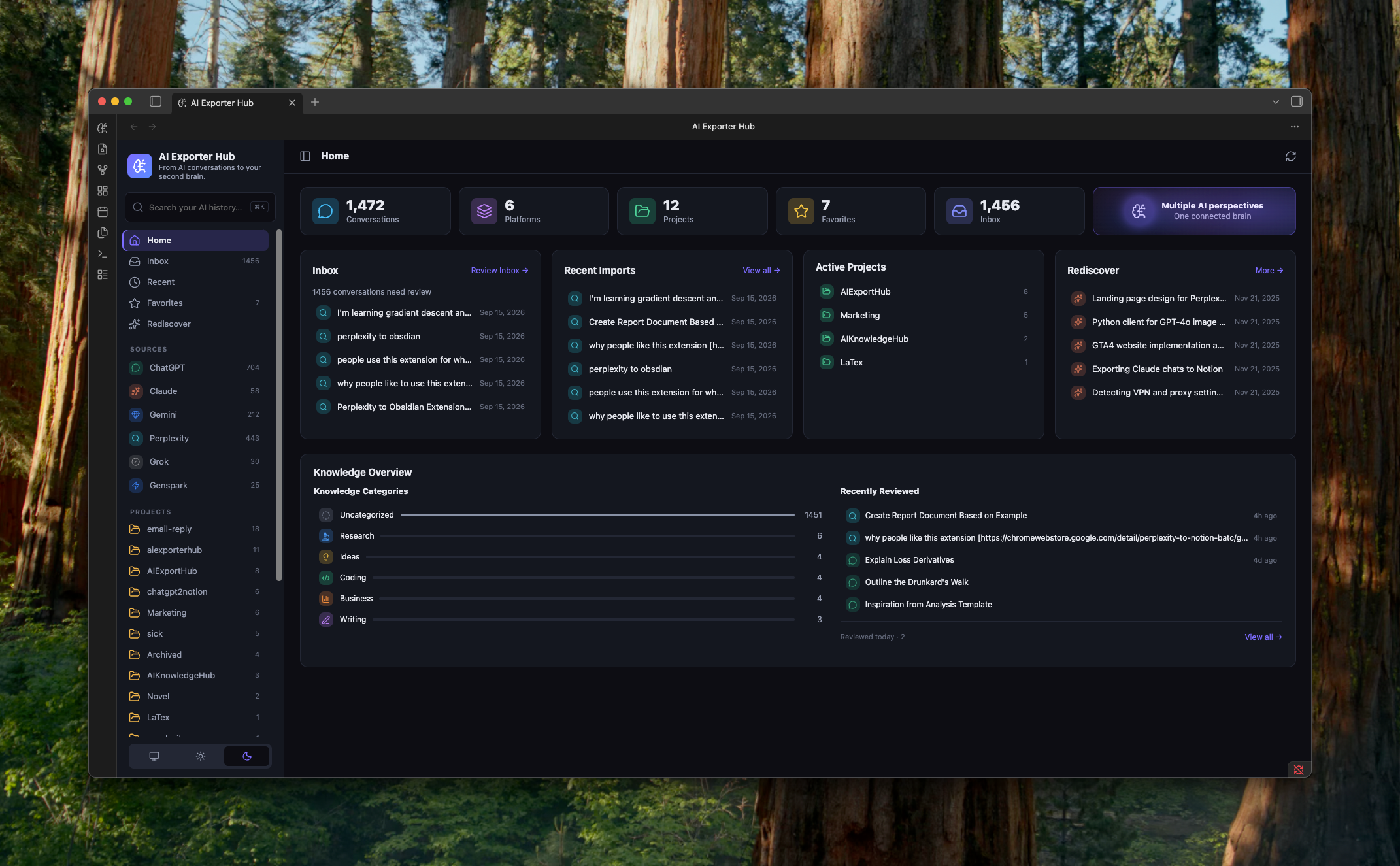
Home dashboard
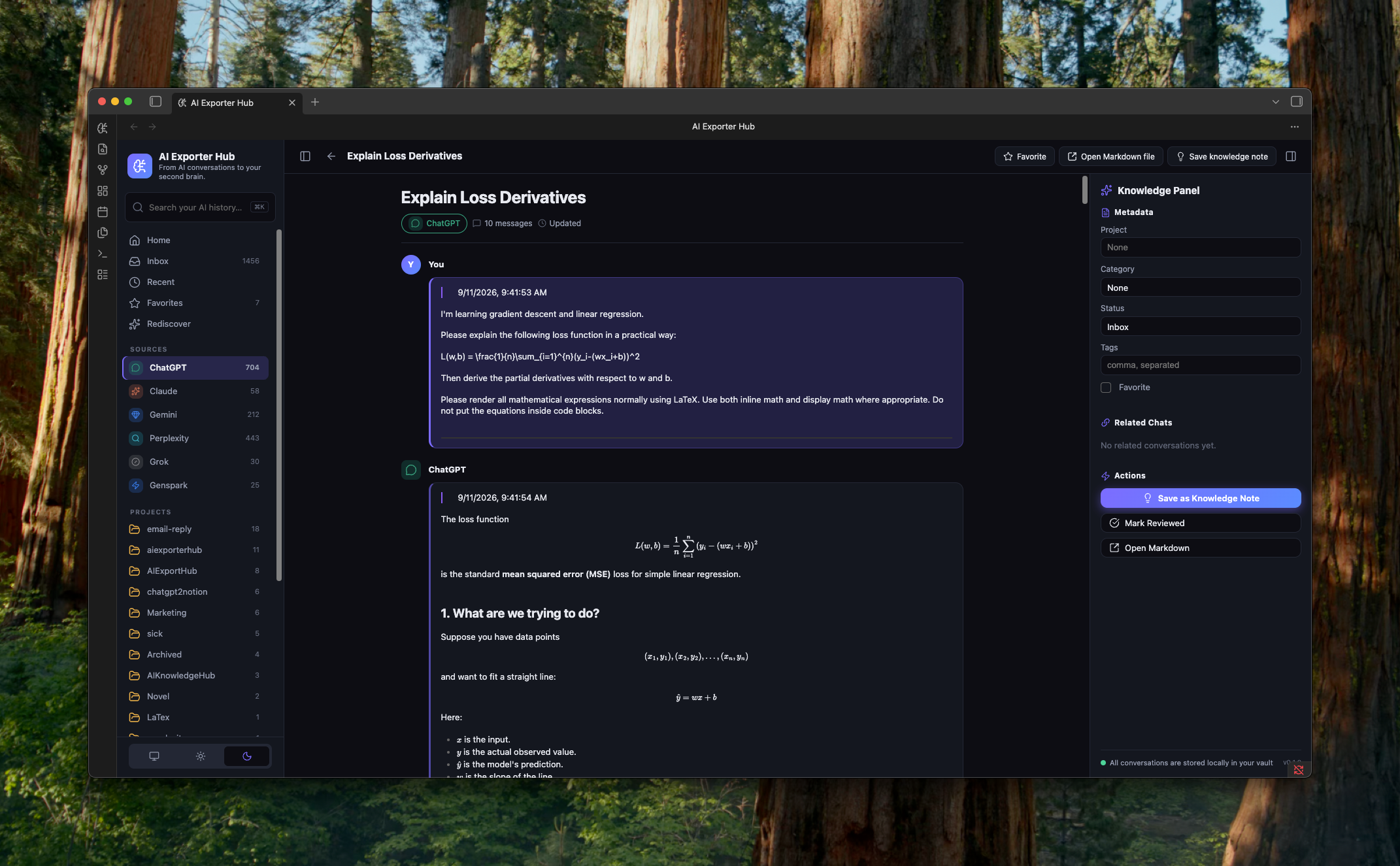
Conversation reader and knowledge panel
Features
- Browse conversations from multiple AI platforms in one dashboard.
- Organize conversations by source, project, category, tags, favorite status, and review status.
- Review new conversations in an inbox and revisit recent imports.
- Search titles, metadata, tags, and optionally full conversation content.
- Read long conversations in a dedicated reader powered by Obsidian's Markdown renderer.
- Update project, category, status, tags, and favorites through YAML frontmatter.
- Create normal Markdown knowledge notes linked to source conversations.
- Find related conversations using shared projects, categories, and tags.
- Rediscover older favorites and reviewed conversations using local metadata.
- Rebuild the in-memory index from Markdown at any time.
No AI service is required for any current feature.
Local-first by design
AI Exporter Hub treats your vault as the database:
- No account is required.
- No telemetry or analytics are collected.
- No conversation content is uploaded.
- No background network service is used.
- No proprietary storage format is introduced.
- Uninstalling the plugin does not remove or alter your notes.
- The clipboard is never read. Message text is written only when you click Copy.
The plugin keeps only a disposable in-memory search index. When you edit organizational fields, it writes them to the note's YAML frontmatter through Obsidian's file APIs.
The optional Open original action opens the source_url from a note only after you click it. Only HTTP and HTTPS links are accepted. As with Obsidian's normal reading view, remote resources referenced inside Markdown may be loaded when the note is rendered.
Supported conversations
The recommended format uses type: ai-conversation in YAML frontmatter:
---
type: ai-conversation
schema_version: 1
title: "Product research notes"
platform: ChatGPT
conversation_id: abc123
source_url: https://chatgpt.com/c/abc123
created_at: 2026-09-01T10:00:00Z
updated_at: 2026-09-01T11:00:00Z
exported_at: 2026-09-01T11:05:00Z
project: Product Development
category: Research
tags:
  - product
  - ai-research
favorite: false
status: inbox
message_count: 24
word_count: 6200
---
A minimal file can be as simple as:
---
type: ai-conversation
title: Example conversation
platform: Claude
---
The rest of the file remains standard Markdown. Headings such as ## User and ## Assistant provide the best reader experience, but they are not required.
AI Exporter Hub also recognizes legacy exports when their frontmatter contains both a supported platform signal and conversation metadata such as a source URL, date, conversation ID, or message count.
Recognized platforms
- ChatGPT
- Claude
- Gemini
- Perplexity
- Grok
- Genspark
- Other compatible Markdown exports
The plugin does not scrape or download conversations from AI websites. You can create compatible files yourself, import them from another tool, or use an optional conversation exporter.
Installation
Obsidian Community plugins
AI Exporter Hub is available in the Obsidian Community directory:
- Open Settings → Community plugins in Obsidian.
- Select Browse.
- Search for AI Exporter Hub.
- Install and enable the plugin.
BRAT
For beta testing before the official listing:
- Install BRAT.
- In BRAT settings, select Add beta plugin.
- Enter
https://github.com/joysey/ai-exporter-hub-obsidian. - Enable AI Exporter Hub in Obsidian.
BRAT installation requires a published GitHub release containing the plugin assets.
Manual installation
Download main.js, manifest.json, and styles.css from the latest GitHub release. Place them in:
<vault>/.obsidian/plugins/ai-exporter-hub/
Restart Obsidian, then enable AI Exporter Hub under Settings → Community plugins.
Build from source
git clone https://github.com/joysey/ai-exporter-hub-obsidian.git
cd ai-exporter-hub-obsidian
npm install
npm run build
Copy the generated main.js together with manifest.json and styles.css into the plugin folder shown above.
Getting started
- Open AI Exporter Hub from the ribbon or Command Palette.
- Choose the vault folder containing your conversation Markdown files.
- Select Scan folder.
- Use the dashboard, inbox, source, project, and category views to browse your library.
- Open a conversation to read it, edit its metadata, or save a linked knowledge note.
The default folders are:
AI Knowledge/             # conversation library
AI Knowledge/Knowledge/   # generated knowledge notes
Both folders can be changed in the plugin settings.
Commands
Open hubOpen inboxSearch AI conversationsRebuild conversation indexMark current conversation as reviewedSave current conversation as favorite
Compatibility
- Requires Obsidian 1.7.2 or later.
- Uses standard Obsidian and browser APIs; no Node.js or Electron API is used at runtime.
- Desktop only. Mobile layouts are not supported in this release.
- Does not require Dataview, a specific theme, or an external account.
Performance
Startup indexing uses the configured conversation folder when it exists. If that folder is missing, the plugin falls back to scanning the vault root for compatible conversation notes. Indexing reads frontmatter from Obsidian's metadata cache rather than loading every conversation body. Full-text body indexing is optional, runs lazily in batches, and has a configurable file limit.
If you report a performance issue, include the approximate conversation count, Obsidian version, operating system, and plugin version. Do not attach private conversation content unless it is necessary and safe to share.
Optional companion exporters
AI Exporter Hub works with any compatible Markdown file. Companion browser tools may make it easier to export conversations from supported AI services, but they are optional and are not required to use this plugin.
The plugin itself does not sell or require access to another product.
Development
Node.js 20 or later is required for development.
npm install
npm run dev       # watch mode
npm run check     # lint, type-check, test, and production build
The production build creates main.js. Automated tests cover date and metadata normalization, conversation parsing, filtering, related items, and search helpers.
Contributing
Bug reports and pull requests are welcome. Please read CONTRIBUTING.md before proposing a larger change.
When opening an issue, remove private conversation content and other sensitive vault data from screenshots, logs, and example files.
Roadmap
Potential future work includes bulk metadata editing, stronger rediscovery signals, optional summaries and insights, semantic search, and cross-conversation workflows. Features that send content to an external service, if introduced, will be opt-in and documented before release.
License
MIT © 2026 AIExportHub
Disclaimer
AI Exporter Hub is an independent community project. It is not affiliated with or endorsed by Obsidian, OpenAI, Anthropic, Google, Perplexity, xAI, or Genspark.