Search...Search plugins and themes...
⌘K
Sign in
  • Get started
  • Download
  • Pricing
  • Enterprise
  • Account
  • Obsidian
  • Overview
  • Sync
  • Publish
  • Canvas
  • Mobile
  • Web Clipper
  • CLI
  • Learn
  • Help
  • Developers
  • Changelog
  • About
  • Roadmap
  • Blog
  • Resources
  • System status
  • License overview
  • Terms of service
  • Privacy policy
  • Security
  • Community
  • Plugins
  • Themes
  • Discord
  • Forum / 中文论坛
  • Merch store
  • Brand guidelines
Follow us
DiscordTwitterBlueskyThreadsMastodonYouTubeGitHub
© 2026 Obsidian

A-Diary-Habits

evinvinevinvin53 downloads

Track habits, journals, tags, daily reviews, tasks, and progress in one Obsidian workspace.

Add to Obsidian
A-Diary-Habits screenshot
  • Overview
  • Scorecard
  • Updates3

把习惯打卡、日记记录、话题标签与每日复盘集中在一个 Obsidian 主页中的个人记录插件。

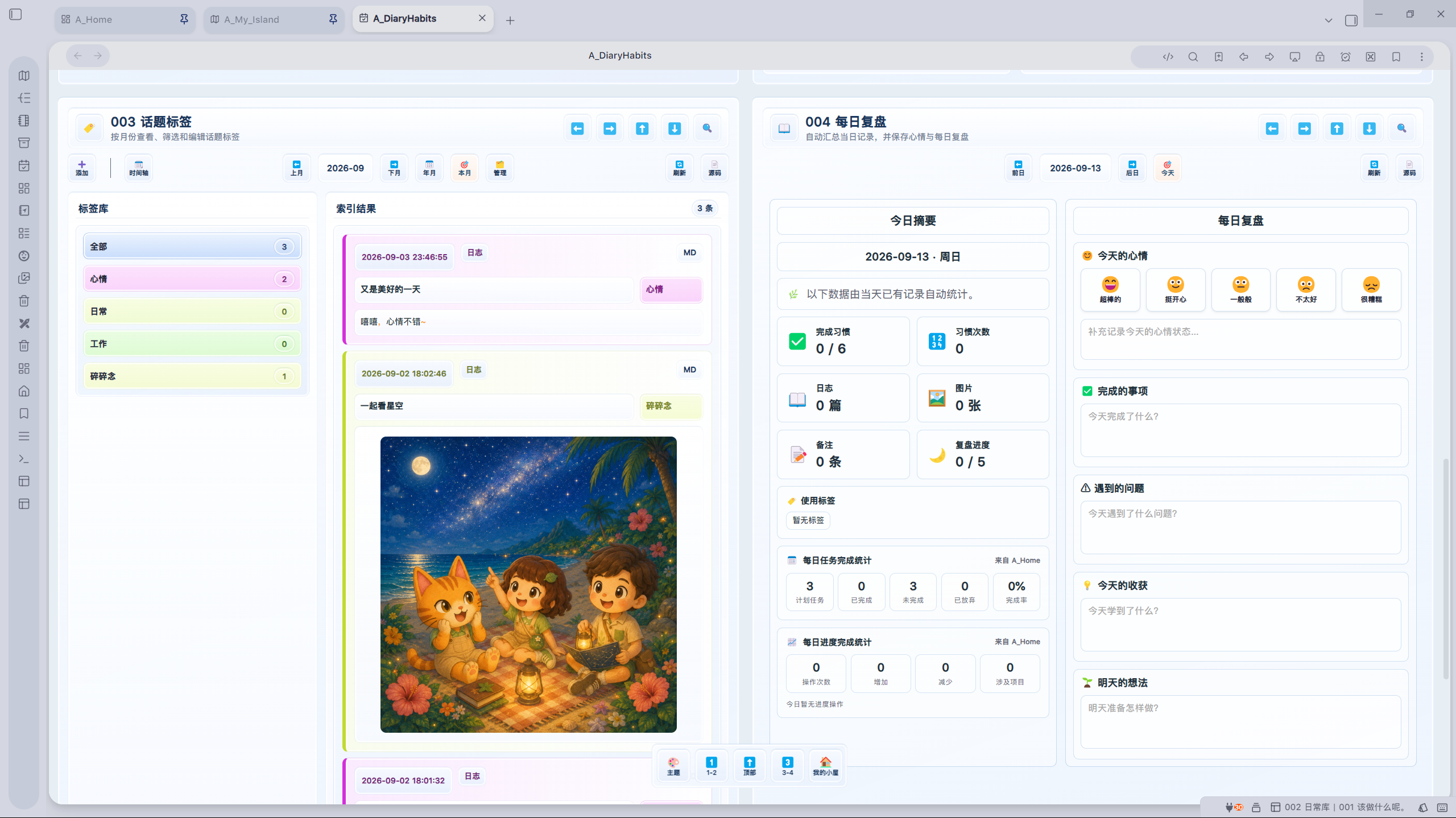
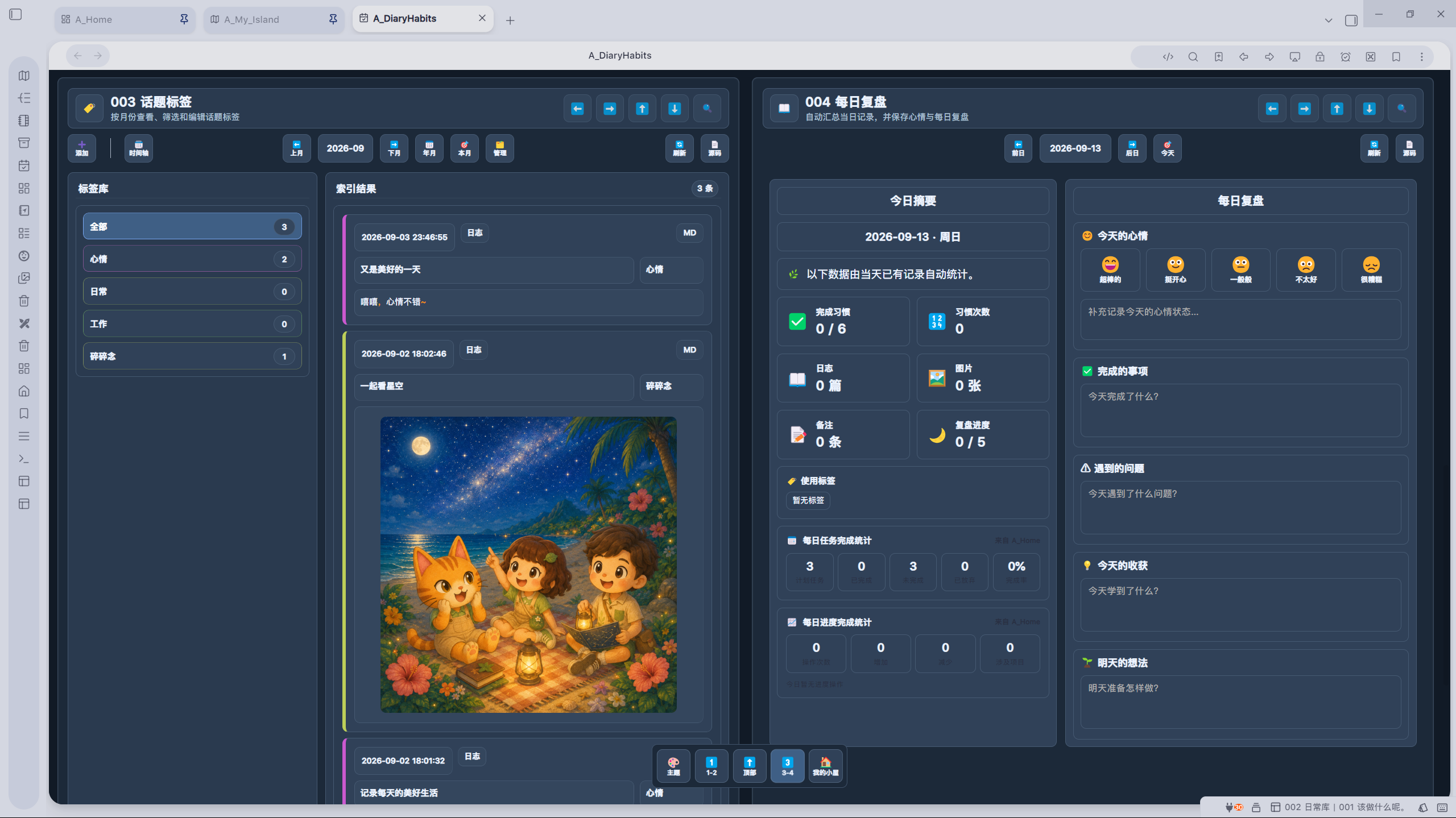
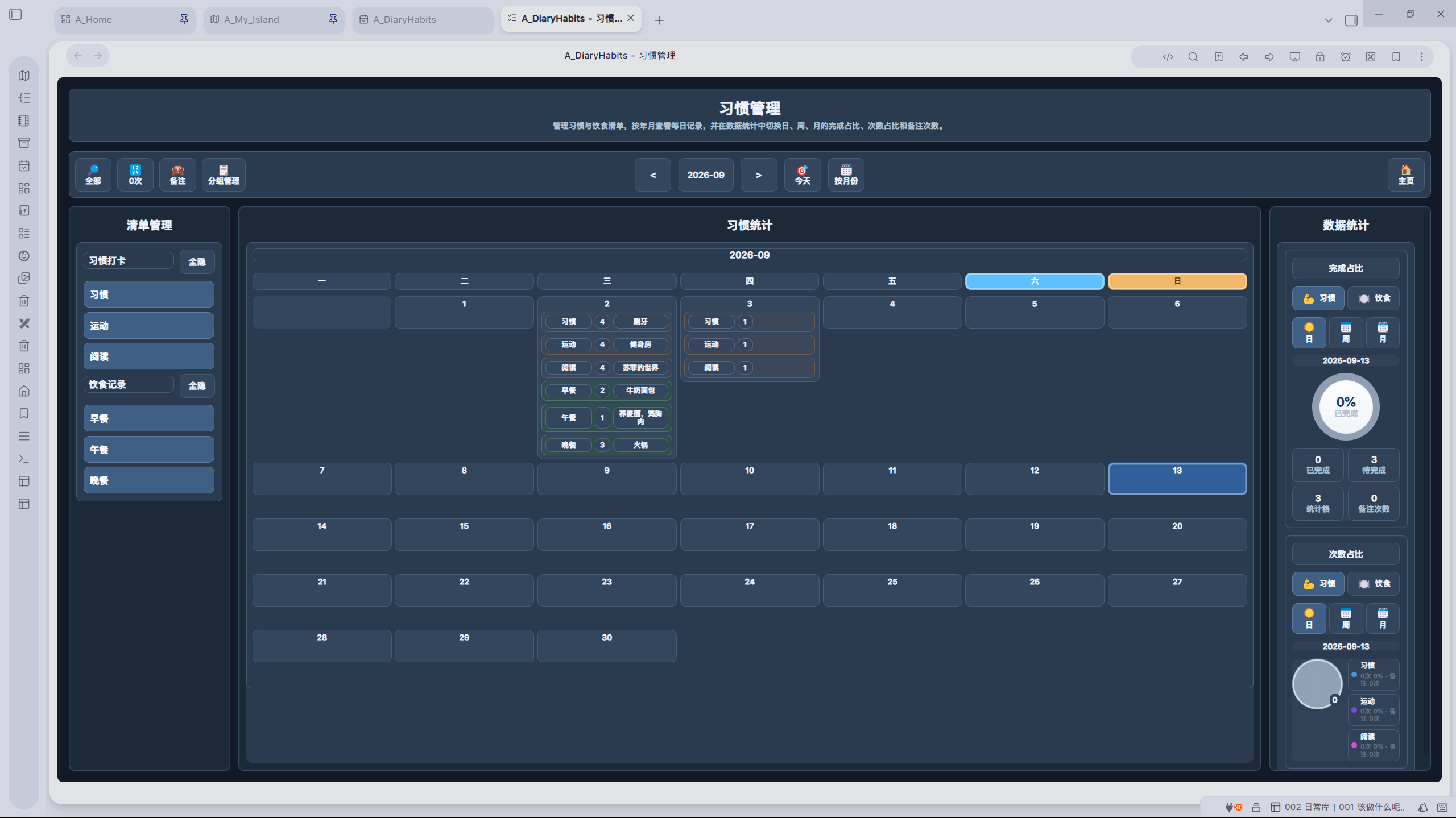
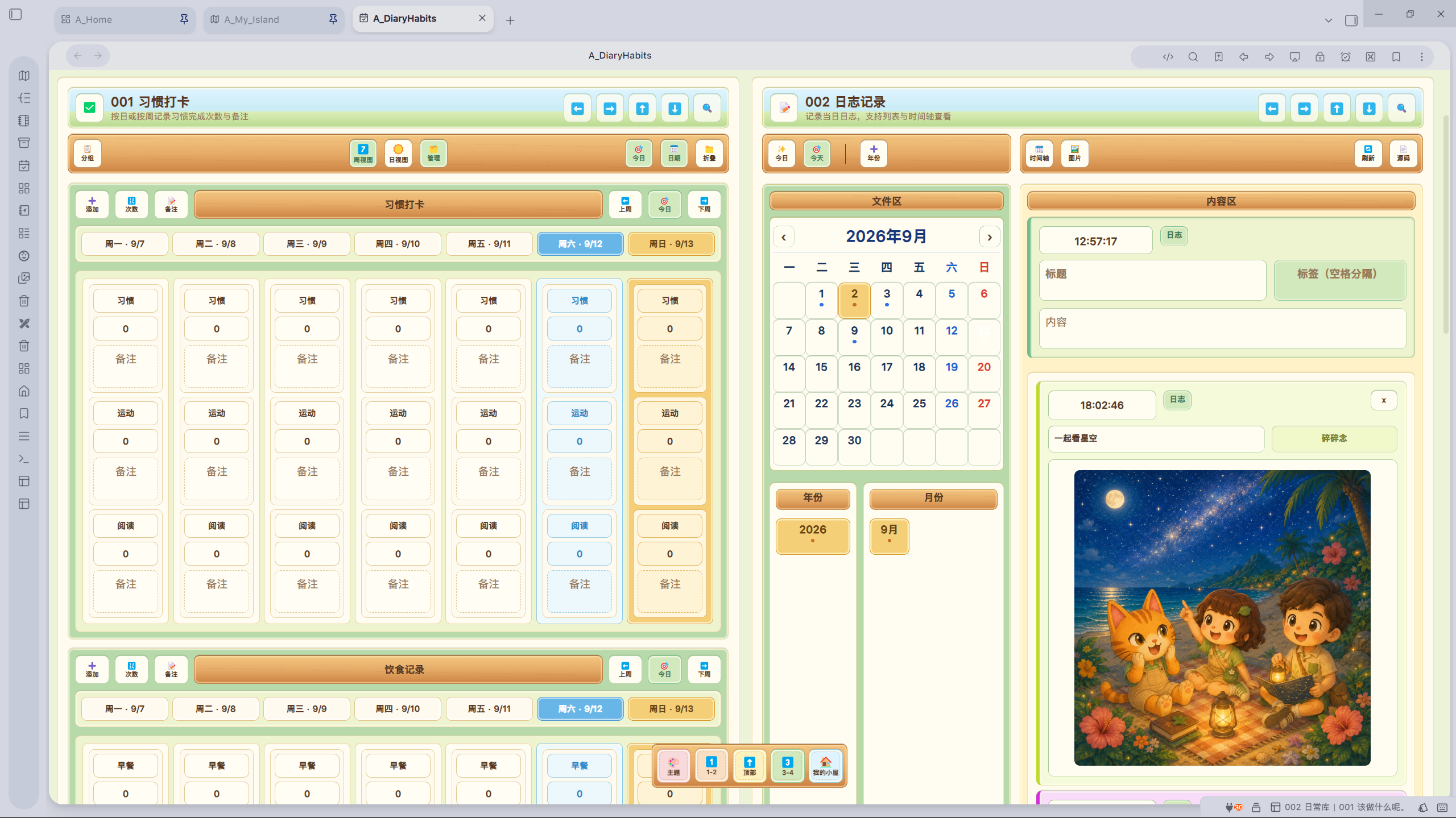
界面预览

亮色主题

A-Diary-Habits 亮色主题界面一 A-Diary-Habits 亮色主题界面二

暗色主题

A-Diary-Habits 暗色主题界面一 A-Diary-Habits 暗色主题界面二

小岛主题

A-Diary-Habits 小岛主题界面

主要功能

  • 按日视图或周视图记录习惯次数与备注,并提供习惯管理和统计。
  • 创建、查看和编辑日记,支持多标签、时间轴、图片粘贴与图片查看。
  • 按月份、年份和标签检索历史记录,并管理话题标签。
  • 自动汇总当日习惯、日志、标签、图片、任务和进度数据,完成每日复盘。
  • 支持亮色、深色和小岛主题,并适配桌面端与移动端布局。
  • 使用 Vault 内的 Markdown 文件保存主要业务数据,便于备份和多设备同步。

付费与激活

A-Diary-Habits 是需要购买许可证并激活后使用完整功能的付费插件。未激活时可在插件主页的激活区完成激活。

激活码请通过作者的正式销售或联系渠道获取:

  • 购买 A-Diary-Habits 激活码
  • QQ群:603045364
  • 微信:VinVinVin444
  • Bilibili
  • 小红书
  • 抖音

网络访问

A-Diary-Habits 仅在许可证激活、验证、续签或恢复等必要场景连接授权服务。授权服务可能接收完成验证所必需的许可及匿名设备信息。插件不包含客户端遥测、使用行为分析或广告跟踪。

数据与备份

习惯配置、标签和每日日记等主要数据保存在当前 Vault 的 A_DiaryHabits_Data 目录;插件设置和离线许可证保存在当前 Vault 的插件配置数据中。

建议备份整个 Vault,或至少备份 A_DiaryHabits_Data 与插件配置目录。卸载插件不会主动删除已保存的 Markdown 日记和附件。

安装与更新

正式上架后,请通过 Obsidian Community Plugin Directory 安装和更新。不要从非官方来源下载修改过的构建文件。

手动安装时,请从本仓库对应版本的 GitHub Release 下载以下文件,并放入 .obsidian/plugins/a-diary-habits/:

  • main.js
  • manifest.json
  • styles.css

Source and review

A-Diary-Habits is a paid, license-activated plugin. Its complete source code is maintained in the private repository VinVinVin444/A_DiaryHabits. This public repository contains release files only and does not publish the plugin source code.

Release builds may be submitted to the Obsidian Community Plugin Directory review and scanning process. The plugin contains no client telemetry, usage analytics, or advertising trackers.

Support

作者:全平台:岛民Vin。问题反馈与购买咨询可通过上述作者渠道联系。

License

A-Diary-Habits is proprietary commercial software. Redistribution, modification, reverse engineering, or resale is not permitted without the copyright holder's authorization. Third-party components remain governed by their respective licenses.

HealthExcellent
ReviewRisks
About
Track habits and record daily or weekly journal entries on one Obsidian homepage, with counts, notes, multi-tag diaries, images and a timeline. Aggregate habits, logs, tags, images, tasks and progress into an automatic daily review, search history by month/year/tag, and save data as Markdown in your vault; requires license activation for full features.
ReviewDatesWriting
Details
Payments
Paid
Current version
1.5.2
Last updated
Last week
Created
Last week
Updates
3 releases
Downloads
53
Compatible with
Obsidian 1.13.0+
Platforms
Desktop, Mobile
Report bugRequest featureReport plugin
Payments
A valid paid license is required to activate and use A-Diary-Habits. The plugin does not offer a permanently free tier.
Author
evinvinevinvinvinvinvin444
GitHubvinvinvin444
  1. Community
  2. Plugins
  3. Review
  4. A-Diary-Habits

Related plugins

Calendarium

Craft mind-bending fantasy and sci-fi calendars.

Journal Review

Review your daily notes on their anniversaries, like "what happened today last year".

Yesterday

Transform your notes into a visually stunning diary, integrating dialogs, chat logs, and media content blocks for a seamless journaling experience.

File Info Panel

Create a File Info view that displays the active file's date created, date modified, file size, and links to open the file in its native application and to open the file's folder.

Annotation Marker

Add colored highlights, inline comments and ruby (phonetic) annotations to notes while keeping original Markdown untouched

LanguageTool Integration

Advanced grammar and spell checking, powered by LanguageTool.

Thino

Quickly capture memos and display them in the sidebar with a heatmap. (Closed source)

ChatGPT MD

A seamless integration of ChatGPT, OpenRouter.ai and local LLMs via Ollama into your notes.

Tasks

Track tasks across your vault. Supports due dates, recurring tasks, done dates, sub-set of checklist items, and filtering. Maintained by Clare Macrae and Ilyas Landikov, created by Martin Schenck.

Day Planner

Turn tasks from daily notes, the Tasks plugin, and calendars into time blocks on an editable timeline, with built-in time tracker.