Sync Settings for Windows
 loah830 downloads
Share settings across vaults using profiles.
- Overview
- Scorecard
- Updates3
An Obsidian plugin that shares settings (plugins, themes, snippets, hotkeys, etc.) across multiple vaults using profiles.
Migrating from
profile-settings? This plugin was previously published under the idprofile-settings. It has been re-registered assync-settings-for-windows. If you installed the older version, please follow the migration steps below before upgrading.
Features
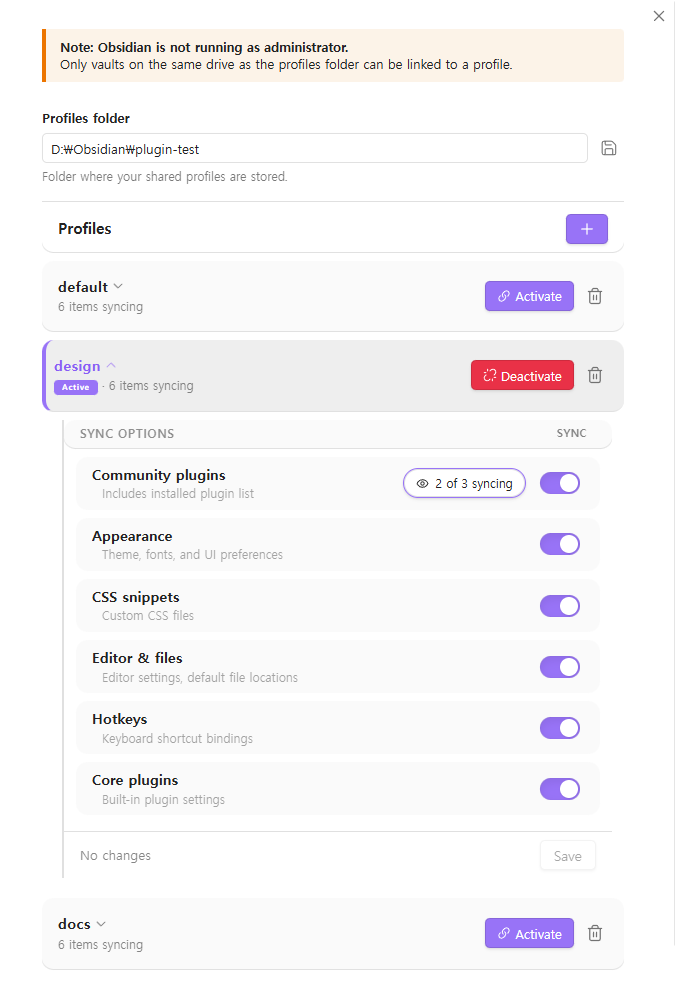
- Profile management — Create named profiles (e.g.
default,work,mobile) in a central folder - One-click apply — Apply a profile to any vault with a single click
- Selective sync — Choose which settings to share per profile. Keeps workspace and graph settings local per vault
- Windows native — Built for Windows
How it works
- Set a profiles folder (e.g.
D:\Obsidian\settings\) - Create or select a profile — each profile is a subfolder containing shared settings
- Apply the profile to your vault — the plugin links your vault's settings to the profile
Multiple vaults pointing to the same profile will always stay in sync.
Shared items
| Item | Type |
|---|---|
plugins/ |
Folder |
themes/ |
Folder |
snippets/ |
Folder |
appearance.json |
File |
app.json |
File |
hotkeys.json |
File |
community-plugins.json |
File |
core-plugins.json |
File |
Local-only items (not shared)
workspace.jsonworkspace-mobile.jsongraph.json
Important notes
- Run Obsidian as Administrator for best results. This removes all drive restrictions.
- Without Administrator, only vaults on the same drive as the profiles folder can be linked.
- After applying or changing a profile, Obsidian may not pick up the new settings immediately due to caching.
- The settings tab may also show stale values until you restart.
- Restarting Obsidian will always load the latest settings.
How file access works
This plugin uses Node.js filesystem APIs to read, write, and link files outside the Obsidian vault directory. This is required for its core purpose — sharing settings between vaults cannot be done through Obsidian's vault adapter API, which only accesses files inside a single vault.
The plugin touches only the paths you explicitly configure:
- The profiles folder you set (e.g.
D:\Obsidian\settings\) - Each vault's
.obsidian/directory that you choose to link - Symlinks / junctions / hardlinks created between the two
No other location on the filesystem is read or written.
Installation
From within Obsidian
- Open Settings → Community plugins → Browse
- Search for "Sync Settings for Windows"
- Click Install, then Enable
Manually
- Download
main.js,manifest.json, andstyles.cssfrom the latest release - Create a folder
<vault>/.obsidian/plugins/sync-settings-for-windows/ - Copy the three files into that folder
- Restart Obsidian and enable the plugin under Settings → Community plugins
Migration from profile-settings
If you previously installed the plugin under its old id, your settings will not be picked up automatically. Migrate once:
- In Obsidian, open Settings → Community Plugins and disable the old "Profile Settings" entry (if still listed).
- Close Obsidian.
- In your vault, open
<vault>/.obsidian/plugins/and delete theprofile-settings/folder. - (Optional) Back up
<vault>/.obsidian/plugins/profile-settings/data.jsonfirst if you want to copy custom settings over manually. - Install Sync Settings for Windows (see Installation above) and re-enable it.
- Re-select your profiles folder in the plugin settings — your existing profile folders on disk are reused as-is, no data loss.
Requirements
- Windows 10 or later
- Obsidian 1.5.0+