
- Overview
- Scorecard
- Updates3
Replay your writing process
A plugin to record your writing, so you can re-watch and share your writing process. Recordings are separate .replay file that can be share and reconstruct the entire document. You can import .replay file and play them in Obsidian, with this plugin.
Also supports a Doomed mode to highlight text that differs from the final recorded version.
Inspired by an old YCombinator project called Stypi. See Paul Graham writing process for inspiration.
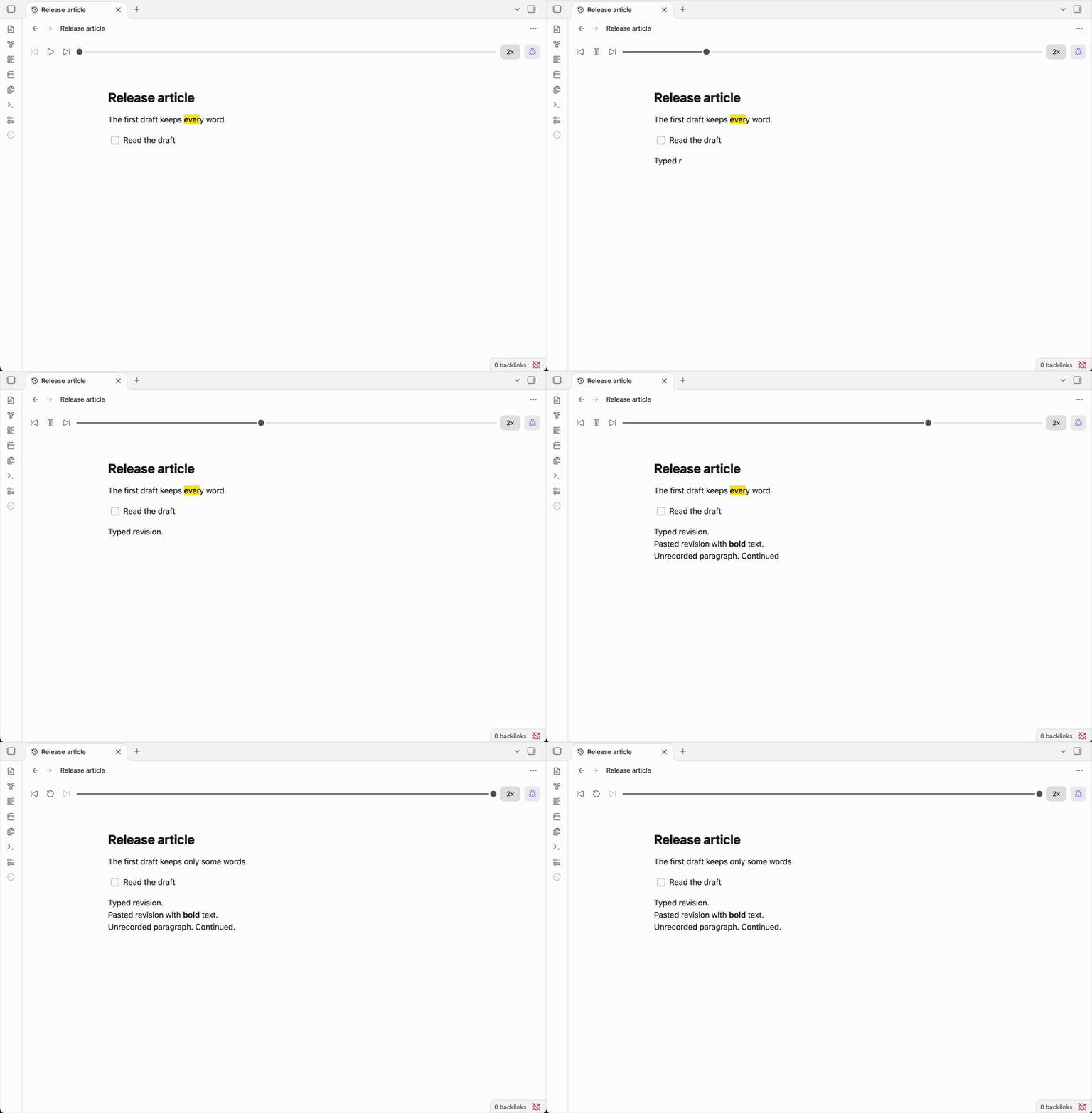
Explore the features
- Start and stop recording for each note, and continue the same recording across sessions.
- Open the
.replayfile beside a recorded note to play, pause, step through changes, and adjust playback speed. - Read formatted Markdown with native headings, lists, tables, and callouts.
- Enable Doomed to highlight text that differs from the final recorded version.
- Share a recording by copying its
.replayfile to another vault with Replay enabled. - Work locally without accounts, uploads, telemetry, or external services.
Build and install Replay
Requires Obsidian 1.7.2 or newer. To install manually, build with Node.js 18+ and npm:
npm install
npm run build
Copy main.js, manifest.json, and styles.css into <Vault>/.obsidian/plugins/replay/. Reload Obsidian, then enable Replay in Settings → Community plugins.
For mobile, build on a desktop computer and copy the same files into your mobile vault's plugin folder. Mobile behavior has not yet been verified on a device.
Record and replay
- Open a note in editing view and run Replay: Toggle recording from the command palette. On desktop, you can also use the ribbon button.
- Write, then use the same command to stop. Wait for Recording stopped before sharing.
- Open the
.replayfile beside your note to play, pause, step through edits, or adjust playback speed.
Starting again continues the same recording. Edits made while recording is stopped appear as one step when you resume. Recording never starts automatically when you reopen Obsidian. If saving fails, resolve the reported problem and use the toggle command to retry.
Assign a keyboard shortcut in Settings → Hotkeys by searching for Replay: Toggle recording. Replay does not assign a default shortcut.
Share a recording
After stopping, copy or share the .replay file. The recipient needs Replay enabled in Obsidian, but does not need the original note. Attachments and linked notes are not included.
Recordings include deleted and replaced text. Review them before sharing. Playback never changes the original note.
Doomed highlights
Enable Doomed in the player to highlight text that differs from the final recorded version. Change the color in Settings → Replay → Doomed highlight color.
Storage and privacy
Replay stores recording history locally in the plugin's recordings/ folder and saves a companion .replay file beside each recorded note. It makes no network requests and collects no telemetry.
For technical details, see local storage and the recording format.