Open Connections


Chat with your notes & see links to related content with Local or Remote models.
- Overview
- Scorecard
- Updates109
Chat with your notes & see links to related content with Local or Remote models.
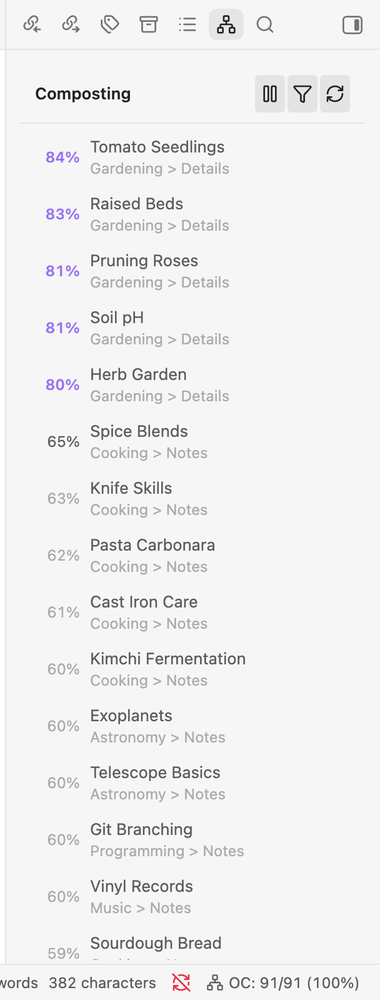
Features
- Connections view lists notes related in meaning to the note you have open, and updates as you navigate.
- Lookup view searches the vault by meaning instead of keywords.
- Local embeddings by default (Transformers.js with WebGPU, WASM fallback), or OpenAI, Gemini, Ollama, LM Studio, Upstage, or OpenRouter.
- Embeddings are cached locally and re-created automatically when you change model.
- An MCP server exposes your vault's connections to MCP clients.
Usage
- Open Settings, Open Connections, and choose an embedding provider and model. The default is local and needs no API key; API providers need a key.
- Open the Connections view from the ribbon and wait for the status bar to finish embedding.
- Open any note to see related notes, or run Open smart lookup and type a query in plain language.
- Optional: turn on MCP in settings and run Start local server, or run
node dist/mcp.js <vault path>from a build. The plugin must have run once in that vault.
Installation
Desktop only, Obsidian 1.13.0 or later.
Community plugins: open Settings, Community plugins, Browse, search for "Open Connections", then Install and Enable.
Manual: download main.js, manifest.json and styles.css from the latest release into <vault>/<configDir>/plugins/open-connections/, then enable the plugin. <configDir> is your vault's configuration folder (.obsidian by default).
Disclosures
- Network use: with the default local provider, the Transformers.js library is loaded from
cdn.jsdelivr.netand the default model is downloaded (tens of megabytes) fromhuggingface.coon first use and stored in<configDir>/plugins/open-connections/models/; your notes are not sent anywhere. With an API provider (OpenAI, Gemini, Upstage, OpenRouter), the text of your notes is sent to that provider to create embeddings. Ollama and LM Studio are contacted at the local address you configure. - Account or payment: API providers need your own account and API key. Keys are stored in the plugin's settings file.
- Local database: embeddings are stored in the plugin folder through Node's built-in
node:sqlite, which needs the vault's absolute path. The plugin reads notes through the Vault API and never lists the whole vault. - Local server: the optional MCP server listens only on
127.0.0.1and is off until you start it. - Files outside the vault: only the optional standalone MCP command (
node dist/mcp.js <vault>), a separate process that reads the vault's files from disk. - Telemetry: none.
Development
See the dev contract: bun run dev, bun run build, bun run ci.
License
GPL-3.0. A fork of Smart Connections by Brian Petro.
HealthExcellent
ReviewPassed
About
Discover semantically related notes and search your vault by meaning, not just keywords. Run local embeddings on-device with zero API keys or connect to OpenAI, Gemini, Ollama and others, view live Connections, and keep embeddings cached locally for speed and privacy.Details
Current version
3.10.4
Last updated
3 weeks ago
Created
9 months ago
Updates
109 releases
Downloads
4k
Compatible with
Obsidian 1.13.0+
Platforms
Desktop only
License
GPL-3.0