Search...Search plugins and themes...
⌘K
Sign in
  • Get started
  • Download
  • Pricing
  • Enterprise
  • Account
  • Obsidian
  • Overview
  • Sync
  • Publish
  • Canvas
  • Mobile
  • Web Clipper
  • CLI
  • Learn
  • Help
  • Developers
  • Changelog
  • About
  • Roadmap
  • Blog
  • Resources
  • System status
  • License overview
  • Terms of service
  • Privacy policy
  • Security
  • Community
  • Plugins
  • Join the community
  • Discord
  • Forum / 中文论坛
  • Merch store
  • Brand guidelines
Follow us
DiscordTwitterBlueskyThreadsMastodonYouTubeGitHub
© 2026 Obsidian

Link Converter

ozntelozntel30k downloads

Scan all your links in the vault and convert them to your desired format.

Add to Obsidian
  • Overview
  • Scorecard
  • Updates17

This plugin helps you to scan all your links in the vault and convert them to WikiLinks or Markdown format. The plugin also helps you to convert final path to relative, absolute or shortest possible. You can do link and path conversion at the same time or separately. Adjust the plugin settings and enjoy converting your links in your Obsidian vault!

📕 Commands

Once the plugin is loaded, 4 different commands are added to the available commands:
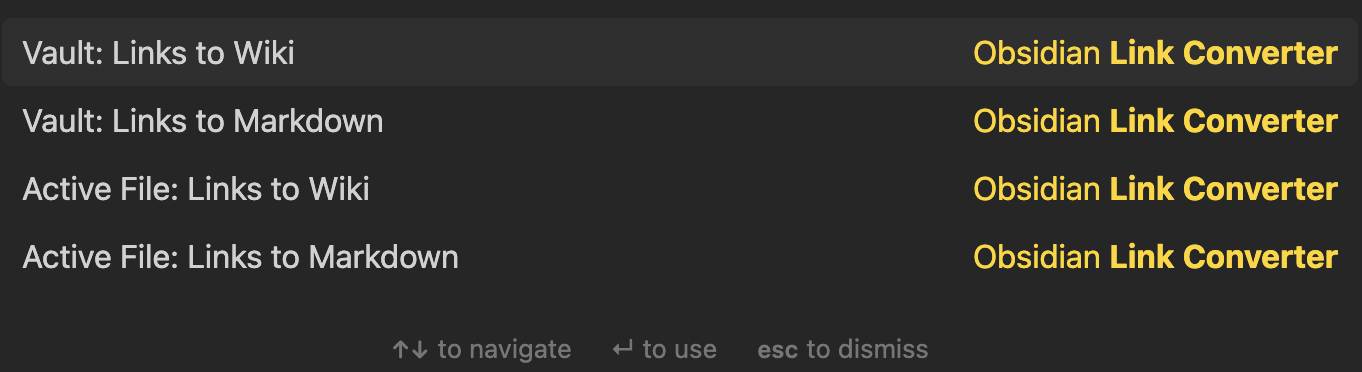
These commands will help you to convert all links in your "Active File" or in all files in your "Vault" to the desired format.

📕 Context Menu

Additionally, the plugin adds Link convert options to the Context Menu of Markdown Files:

In case you don't want Context Menu items, you can simply turn them off from the plugin settings.

The Context Menu item to convert all links to Shortest, Relative or Absolute path appears depending on plugin settings. Make sure that you adjust the settings depending on your preferences.

📕 Final Link Format

You can also select the final format of the conversions as "Relative", "Absolute" or "Shortest Possible". Or you can simply select "Do not Change" to not make any changes to the final link formats.

📕 Contact

If you have any issue or you have any suggestion, please feel free to reach me out directly using contact page of my website ozan.pl/contact/ or directly to [email protected].

📕 Support

If you are enjoying the plugin then you can support my work and enthusiasm by buying me a coffee:

65%
HealthFair
ReviewCaution
About
Scan all links in your vault or active file and convert between WikiLinks and Markdown formats. Convert link targets to relative, absolute, or shortest possible paths and run conversions via commands or the file context menu.
LinksFormattingCommands
Details
Current version
0.1.6
Last updated
2 years ago
Created
5 years ago
Updates
17 releases
Downloads
30k
Compatible with
Obsidian 0.9.12+
Report bugRequest featureReport plugin
Sponsor
Ko-fi
Author
ozntelozntel
ozan.pl/aboutme/
GitHubozntel
  1. Community
  2. Plugins
  3. Links
  4. Link Converter

Related plugins

Paste URL into selection

Paste URL "into" selected text.

Find orphaned files and broken links

Find files that are not linked anywhere and would otherwise be lost in your vault. In other words: files with no backlinks.

Smart Connections

AI link discovery copilot. See related notes as you write. Lookup using semantic (vector) search across your vault. Zero-setup local model for embeddings, no API keys, private.

Commander

Customize your workspace by adding commands everywhere, create macros and supercharge your mobile toolbar.

Linter

Format and style your notes. Linter can be used to format YAML tags, aliases, arrays, and metadata; footnotes; headings; spacing; math blocks; regular Markdown contents like list, italics, and bold styles; and more with the use of custom rule options.

Advanced URI

Control everything with URI.

Admonition

Admonition block-styled content.

Waypoint

Easily generate dynamic MOCs in your folder notes using waypoints. Enables folders to show up in the graph view and removes the need for messy tags!

Auto Link Title

Automatically fetches the titles of links from the web.

Strange New Worlds

Reveal networked thought and the strange new worlds created by your vault.