Search...Search plugins and themes...
⌘K
Sign in
  • Get started
  • Download
  • Pricing
  • Enterprise
  • Account
  • Obsidian
  • Overview
  • Sync
  • Publish
  • Canvas
  • Mobile
  • Web Clipper
  • CLI
  • Learn
  • Help
  • Developers
  • Changelog
  • About
  • Roadmap
  • Blog
  • Resources
  • System status
  • License overview
  • Terms of service
  • Privacy policy
  • Security
  • Community
  • Plugins
  • Themes
  • Discord
  • Forum / 中文论坛
  • Merch store
  • Brand guidelines
Follow us
DiscordTwitterBlueskyThreadsMastodonYouTubeGitHub
© 2026 Obsidian

Link Formatter

dilanthadilantha416 downloads

Formats a block of links into a clean markdown list

Add to Obsidian
  • Overview
  • Scorecard
  • Updates3

Formats a block of links into a clean markdown list in Obsidian.

Here I'm pasting links from Firefox bookmarks and formatting them.
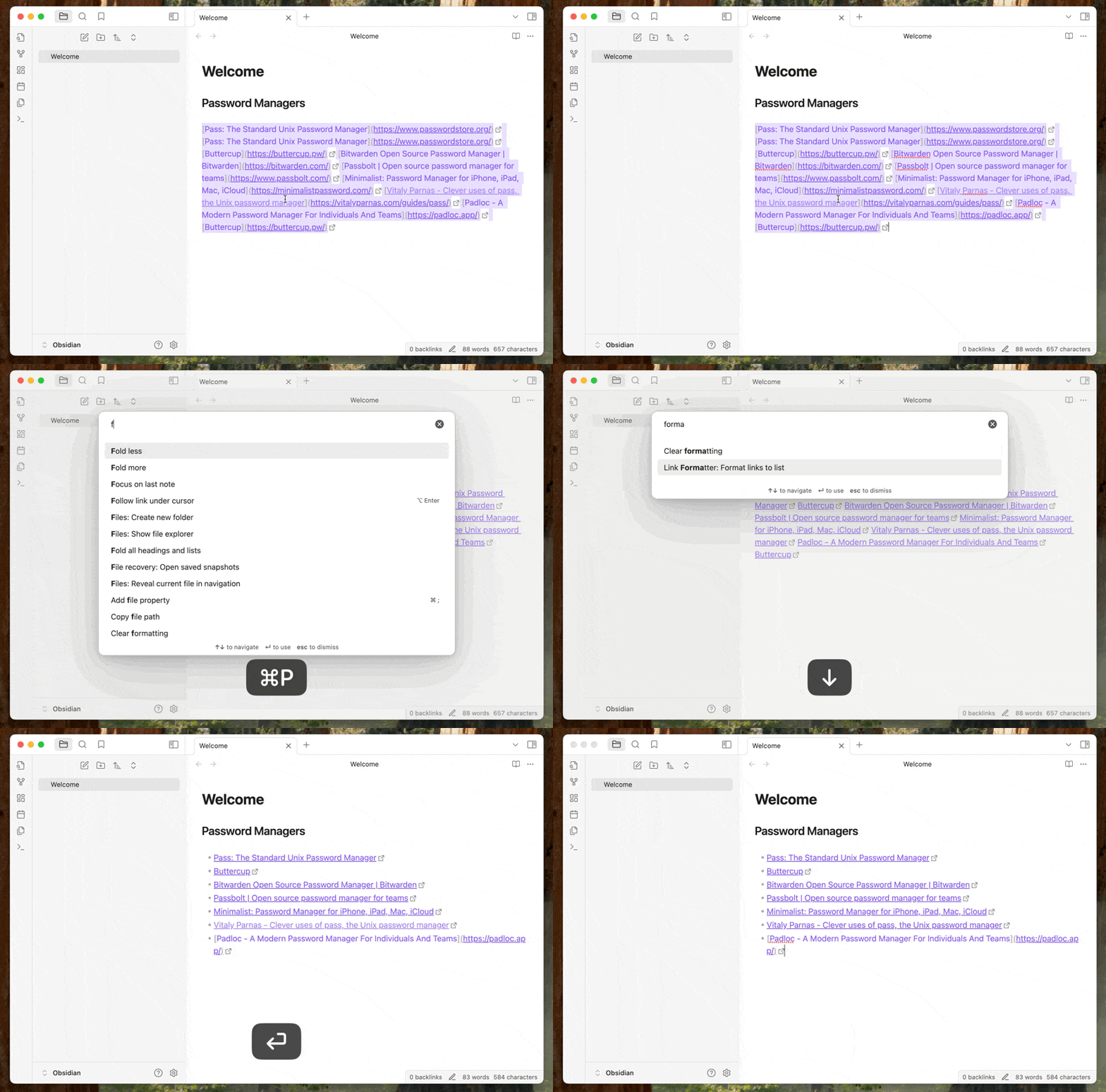
Pasting and formatting

Installing from Obsidian

  1. Enable Community Plugins in Obsidian settings.
  2. Click the Link Formatter plugin link.
  3. Or browse the Community Plugins list and search for "Link Formatter".
  4. Click "Install" to install the plugin.
  5. Enable the plugin in the Plugins settings.

Installing from BRAT

First install the BRAT plugin.

Then either from the BRAT settings page, or from the command palette, select "Add beta plugin". Paste the plugin URL https://github.com/dilantha/obsidian-link-formatter and then install.

How to use

Once installed select the links you want to format and search for Link Formatter: Format links to unordered list in the command pallet.

Once you select that the links will be formatted. You can also setup a hotkey for this command.

Development

This plugin uses a Makefile to streamline development tasks. Here are the available commands:

  • make install - Install dependencies using pnpm
  • make build - Build the project
  • make test - Run tests
  • make dev - Run in development mode with auto-rebuilding
  • make clean - Clean build artifacts
  • make all - Run install, build, and test in sequence

For version management and releases:

  • make bump-major - Bump major version number
  • make bump-minor - Bump minor version number
  • make bump-patch - Bump patch version number
  • make release - Release the current version (create git tag and push)

If you find this plugin useful, please consider donating to support me. Cheers!

75%
HealthGood
ReviewSatisfactory
About
Format a block of links into a clean Markdown unordered list. Convert pasted bookmarks or raw URLs into tidy bullet entries that preserve link text and targets for easy note organization.
LinksFormatting
Details
Current version
1.0.3
Last updated
Last year
Created
Last year
Updates
3 releases
Downloads
416
Compatible with
Obsidian 0.15.0+
Platforms
Desktop only
License
MIT
Report bugRequest featureReport plugin
Sponsor
Buy Me a Coffee
Author
dilanthadilantha
github.com/dilantha
GitHubdilantha
  1. Community
  2. Plugins
  3. Links
  4. Link Formatter

Related plugins

Smart Connections

AI link discovery copilot. See related notes as you write. Lookup using semantic (vector) search across your vault. Zero-setup local model for embeddings, no API keys, private.

Excalidraw

Visual PKM powerhouse. Create and edit Excalidraw drawings.

Linter

Format and style your notes. Linter can be used to format YAML tags, aliases, arrays, and metadata; footnotes; headings; spacing; math blocks; regular Markdown contents like list, italics, and bold styles; and more with the use of custom rule options.

Link Favicons

See the favicon for a linked website.

Easy Typing

Auto format when typing.

Advanced URI

Control everything with URI.

Admonition

Admonition block-styled content.

Waypoint

Easily generate dynamic MOCs in your folder notes using waypoints. Enables folders to show up in the graph view and removes the need for messy tags!

Auto Link Title

Automatically fetches the titles of links from the web.

Strange New Worlds

Reveal networked thought and the strange new worlds created by your vault.