Search...Search plugins and themes...
⌘K
Sign in
  • Get started
  • Download
  • Pricing
  • Enterprise
  • Account
  • Obsidian
  • Overview
  • Sync
  • Publish
  • Canvas
  • Mobile
  • Web Clipper
  • CLI
  • Learn
  • Help
  • Developers
  • Changelog
  • About
  • Roadmap
  • Blog
  • Resources
  • System status
  • License overview
  • Terms of service
  • Privacy policy
  • Security
  • Community
  • Plugins
  • Themes
  • Discord
  • Forum / 中文论坛
  • Merch store
  • Brand guidelines
Follow us
DiscordTwitterBlueskyThreadsMastodonYouTubeGitHub
© 2026 Obsidian

Browser Interface

jason-liebjason-lieb797 downloads

Allows you to interact with the browser.

Add to Obsidian
  • Overview
  • Scorecard
  • Updates7

An obsidian plugin that pairs with a chrome extension to manage your tabs in obsidian.

This plugin displays the tabs saved from the chrome extension and creates buttons to reopen and delete tabs.

The Obsidian Browser Interface Plugin is dependent on the Meta Bind plugin. Also it is highly recommended to pair this plugin with the Advanced Tables plugin.

If there is interest in a firefox-supported extension, one might be created in the future.

Installation

  1. Install from community plugins in Obsidian settings.

  2. Install the chrome extension from the chrome web store.

  3. If you are using chromium or brave, enable these 3 flags at chrome://flags or brave://flags, respectively.

  • #file-system-access-api

  • #file-system-access-persistant-permission

  • #file-system-observer

  1. Set the directory in obsidian plugin settings and in the extension.

Limitations

This plugin currently only has the essential functions. The Open Tab and Delete Tab work by clicking on the row of the desired tab and then clicking the associated button. Also, the buttons don't work in reading mode from a limitation from obsidian.

Screenshot
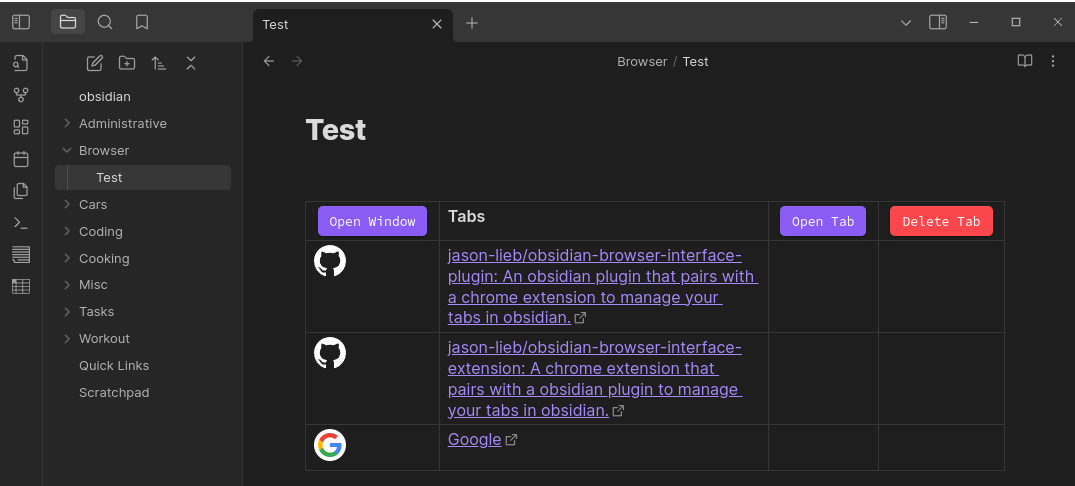
obsidian browser interface plugin screenshot

74%
HealthGood
ReviewSatisfactory
About
Manage Chrome tabs saved by the companion Chrome extension directly inside Obsidian. Display saved tabs in a list and open or delete them with built-in buttons. Require the Meta Bind plugin.
IntegrationsLinksNavigation
Details
Current version
1.0.6
Last updated
2 years ago
Created
2 years ago
Updates
7 releases
Downloads
797
Compatible with
Obsidian 1.5.12+
Platforms
Desktop only
License
GPL-3.0
Report bugRequest featureReport plugin
Author
jason-liebjason-lieb
github.com/jason-lieb/
GitHubjason-lieb
  1. Community
  2. Plugins
  3. Integrations
  4. Browser Interface

Related plugins

Strange New Worlds

Reveal networked thought and the strange new worlds created by your vault.

Notebook Navigator

A better file browser and calendar inspired by Apple Notes, Bear, Evernote and Day One.

Local REST API & MCP Server

Unlock your automation needs by interacting with your notes over a secure REST API.

Homepage

Open a note, base, or workspace on startup, or set it for quick access later.

Recent Files

Display a list of recently opened files.

Smart Connections

AI link discovery copilot. See related notes as you write. Lookup using semantic (vector) search across your vault. Zero-setup local model for embeddings, no API keys, private.

Vertical Tabs

Offer an alternative view that displays open tabs vertically, allowing users to group and organize tabs for a better navigation experience.

Quick Switcher++

Enhanced Quick Switcher, search open panels, and symbols.

Excalidraw

Visual PKM powerhouse. Create and edit Excalidraw drawings.

BRAT

Easily install a beta version of a plugin for testing.